
phhmllhhondgbkaifcompghkadamdanc

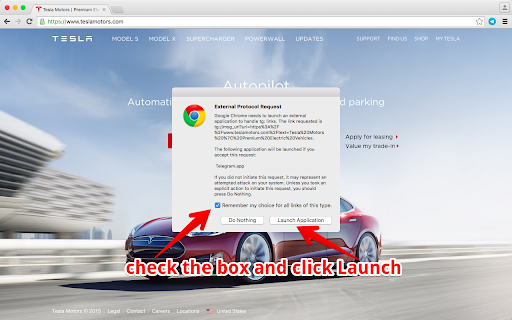


Allows to share current page via Telegram messenger in just one click This extension allows you to share URL of the current page or selected text/link/image to the Telegram app. 'Reading your browsing history' permission is required to get the url of the page you're currently on. Works with Telegram Desktop apps for Windows, MacOS and Linux.

Telegram desktop online
Send unlimited Telegram messages, photos, videos, and voice notes, and conduct efficient group chats. Telegram Desktop Online is an extension for smooth communication and collaboration with friends, family, and colleagues. Offering all the functionalities of the renowned messaging app Telegram, this desktop online version ensures you stay connected and productive wherever you go. This extension then provides most of the Telegram key features: • Secure Messaging: Telegram prioritizes user privacy and security by providing end-to-end encryption for all messages, ensuring that only intended recipients can access the content. • Secret Chats: Engage in private conversations with end-to-end encryption, self-destructing messages, and the ability to prevent screenshots, catering to personal and professional needs. • Group Conversations: Create groups with up to 200,000 members, ideal for large communities or professional teams. Group admins can assign roles, conduct polls, and manage settings. • Channels: Broadcast messages to a vast number of subscribers for announcements, news, or content sharing, with no limit on subscribers. • Voice and Video Calls: Enjoy high-quality voice and video calls, providing a real-time communication alternative with less tracking compared to other platforms. • File Sharing: Share various file types, including documents, photos, videos, and audio files, with a file size limit of 2GB. Telegram offers a cloud-based storage system for easy access across devices. • GIFs and Stickers: Express emotions creatively with a wide range of stickers and GIFs. • Bot Interaction: Interact with automated services through Telegram's robust bot platform, including news, weather, and productivity bots. • Customizations: Personalize your Telegram experience with themes, chat backgrounds, and notification settings. Experience the convenience of accessing messages, files, and contacts in one place, with a larger screen and keyboard for easier typing and navigation. Send unlimited messages, photos, videos, and voice notes, and conduct efficient group chats. Stay organized by creating channels to broadcast messages to a large audience, ideal for sharing updates or announcements. Protect your conversations with end-to-end encryption, ensuring privacy and security. With Telegram Desktop Online, seamlessly switch between mobile and desktop devices, syncing messages and files across all platforms. Stay connected, productive, and in control with the Telegram Desktop Online extension. This extension has used the Telegram GPL license that allows its online distribution. • File Manager Integration for files This extension allows users to automatically detect files while browsing the web and open them directly in the Telegram online file manager to be used by the application.

Messenger for Telegram™
Access to Telegram's web application in a separate window or tab and get notified when new messages received This extension opens the official Telegram's web client in a sandboxed window or a browser tab. If an existing window is found, the extension activates the window without opening a new instance. Also, when the interface is open, the extension updates its badge number based on the total unread conversions that the user has. This number ignores muted conversions. Also, automatically updates when a conversion is read. After installation, if you haven't used Telegram on this browser yet, you will need to login into your Telegram account. Simply, press the newly added icon on the toolbar area (the icon might be inside the extensions panel; if so pin the icon to the toolbar area). Now enter your Telegram's phone number and check another device that has a Telegram client on it. Enter the PIN code into the web client and wait for Telegram to sync your data. If you already have open Telegram tabs, make sure to refresh them for the extension to inject the badge monitoring script into these pages. To protect user privacy, this extension does not send any data to any server whatsoever. It is only a shortcut to access your beloved messenger. What is Telegram? Telegram is a freeware, cross-platform, cloud-based instant messaging software and application service similar to WhatsApp and Signal messengers. The service also provides end-to-end encrypted video calling, VoIP, file sharing, and several other features. -- Legal This extension is an open-source project to open the official Telegram's web client. It has nothing to do with Telegram development and is an independent project.

Web for Telegram
Easy access to Telegram for Chrome. Notifications for incoming messages. Share and Save Telegram. Messenger ★★★★★ Text with your friends just like you where in your smartphone 📱 Very Low CPU/RAM/Bandwidth consumption 📌 All Telegram features available (Chats 💬, Friends, Notifications, Options) 🥊 Provides an easy access to Telegram, and notifies you of all incoming posts 🔥 Clicking on the toolbar icon, renders Telegram Web in a small UI attached to the toolbar popup 📢 Moreover, you will get badge notification for all incoming messages 📻 FEATURES ★ Type much faster 🚴 on Telegram. ★ Share photos and videos stored in your computer 💻 ★ Telegram for Chrome extension allows you to have access to the official Telegram (web version) in a stand-alone window 🌋 ★ Cross-platform (Windows, Linux, MacOS X) 🍎 ★ Telegram is a cloud-based messenger with seamless sync 🦊 ★ Share an unlimited number of photos, videos and files (doc, zip, mp3, etc.) of up to 1,5 GB each 🚁 ★ Multi-data center infrastructure and encryption, Telegram is faster and way more secure 👮 ★ Telegram is free and will stay free 💎 ★ Posts, groups and channels are available for free to join 🎩 ✔ Small window well positioned 📰 ✔ Auto-Start when Google Chrome™ starts 📱 ✔ Configurations in a Options 🔧 section. ✔ See your friends news and edit your profile 🔊 ✔ HTTPS and over Telegram™ platform for maximum security 🔑 No share of credentials to third party 🔓 💎 Building Apps and Extensions for Google Chrome and Android 🔥📣 📔 Available on the product page: https://jitt.wwevents.fun/project/web-for-telegram/#changelog Telegram™ is a trademark of Telegram Inc., registered in the U.S. and other countries. This is an independent project developed by WWEvents and has no relationship to Telegram or Telegram Inc. By installing this product you agree to our privacy policy & terms of service: https://jitt.wwevents.fun/privacy-policy/ You may consult the list of permissions and the reason why they are required on the product page: https://jitt.wwevents.fun/project/web-for-telegram/#permissions “notifications” – Used to send desktop notification. For example when a new message arrive or App is updated. “contextMenus” – Allow to add more settings when right click in the App icon in the browser toolbar and browser context menu. “storage” – Used to save settings on your local computer. “scripting” – Used to be able to insert JS or CSS on the required host/domains. “system.display” – Used to detect the display size and position the Extension window. “unlimitedStorage” – Storage is limited to 5MB of data that may not be enough to store all configs. “host_permissions” – Permission to access to some hosts/domains that we must modify in order to provide the desired functionality detailed in the functionality. It also allows that you can share content (links or text) from other pages directly to inside the App and send it as a Chat to a friend for example. Also used to allow intercommunication with other WWEvents Apps (i.e. Emojis). “activeTab” – Permission to access the window that the extension is running and is show to the user. “all_urls” – Permission required for users be able to take screenshots of the current window – captureVisibleTab. This information is also available inside the App: Options -> About

Telegram Blur - Advanced Telegram Web Privacy
Blur and Hides your messages on Telegram until you hover over them. Blur and Hides your messages on Telegram until you hover over them. To increase privacy in public spaces the Telegram Blur Extension For Telegram Web blurs your messages as well as other content. And only reveals one when you hover over it with your mouse cursor. Additionally, you can quickly toggle all effects by using a keyboard shortcut (Alt+X) or by clicking the toggle button in the extension menu. It adapts to your needs by letting you decide which elements you want to blur. Your options: - Blurs all messages in the current chat. - Blurs all message previews on the left. - Blurs all images, videos, stickers, ... in separation from the text. - Blurs all small icons of images, videos, ... while viewing an image, video, ... - Makes the color in your input field lighter to make it hard to read. - Blurs all profile pictures. - Blurs all groups and users names. - Allows you to turn off the delay before revealing an item on hover. - Unblurs all elements when you hover over the Telegram Web app. --- This extension does not collect information about you or your messages. Disclaimer: Telegram is a trademark of Telegram Inc., registered in the U.S. and other countries. This extension is an independent and has no relationship to Telegram or Telegram Inc. We display a banner ads and affiliate link redirection as a sort of monetization, thank you for your support.
