
kjnmdomccekpkjomjhapnilfmeiglkid

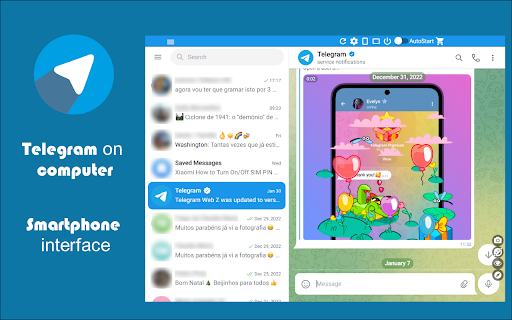

Easy access to Telegram for Chrome. Notifications for incoming messages. Share and Save Telegram. Messenger ★★★★★ Text with your friends just like you where in your smartphone 📱 Very Low CPU/RAM/Bandwidth consumption 📌 All Telegram features available (Chats 💬, Friends, Notifications, Options) 🥊 Provides an easy access to Telegram, and notifies you of all incoming posts 🔥 Clicking on the toolbar icon, renders Telegram Web in a small UI attached to the toolbar popup 📢 Moreover, you will get badge notification for all incoming messages 📻 FEATURES ★ Type much faster 🚴 on Telegram. ★ Share photos and videos stored in your computer 💻 ★ Telegram for Chrome extension allows you to have access to the official Telegram (web version) in a stand-alone window 🌋 ★ Cross-platform (Windows, Linux, MacOS X) 🍎 ★ Telegram is a cloud-based messenger with seamless sync 🦊 ★ Share an unlimited number of photos, videos and files (doc, zip, mp3, etc.) of up to 1,5 GB each 🚁 ★ Multi-data center infrastructure and encryption, Telegram is faster and way more secure 👮 ★ Telegram is free and will stay free 💎 ★ Posts, groups and channels are available for free to join 🎩 ✔ Small window well positioned 📰 ✔ Auto-Start when Google Chrome™ starts 📱 ✔ Configurations in a Options 🔧 section. ✔ See your friends news and edit your profile 🔊 ✔ HTTPS and over Telegram™ platform for maximum security 🔑 No share of credentials to third party 🔓 💎 Building Apps and Extensions for Google Chrome and Android 🔥📣 📔 Available on the product page: https://jitt.wwevents.fun/project/web-for-telegram/#changelog Telegram™ is a trademark of Telegram Inc., registered in the U.S. and other countries. This is an independent project developed by WWEvents and has no relationship to Telegram or Telegram Inc. By installing this product you agree to our privacy policy & terms of service: https://jitt.wwevents.fun/privacy-policy/ You may consult the list of permissions and the reason why they are required on the product page: https://jitt.wwevents.fun/project/web-for-telegram/#permissions “notifications” – Used to send desktop notification. For example when a new message arrive or App is updated. “contextMenus” – Allow to add more settings when right click in the App icon in the browser toolbar and browser context menu. “storage” – Used to save settings on your local computer. “scripting” – Used to be able to insert JS or CSS on the required host/domains. “system.display” – Used to detect the display size and position the Extension window. “unlimitedStorage” – Storage is limited to 5MB of data that may not be enough to store all configs. “host_permissions” – Permission to access to some hosts/domains that we must modify in order to provide the desired functionality detailed in the functionality. It also allows that you can share content (links or text) from other pages directly to inside the App and send it as a Chat to a friend for example. Also used to allow intercommunication with other WWEvents Apps (i.e. Emojis). “activeTab” – Permission to access the window that the extension is running and is show to the user. “all_urls” – Permission required for users be able to take screenshots of the current window – captureVisibleTab. This information is also available inside the App: Options -> About

Telegram Blur - Advanced Telegram Web Privacy
Blur and Hides your messages on Telegram until you hover over them. Blur and Hides your messages on Telegram until you hover over them. To increase privacy in public spaces the Telegram Blur Extension For Telegram Web blurs your messages as well as other content. And only reveals one when you hover over it with your mouse cursor. Additionally, you can quickly toggle all effects by using a keyboard shortcut (Alt+X) or by clicking the toggle button in the extension menu. It adapts to your needs by letting you decide which elements you want to blur. Your options: - Blurs all messages in the current chat. - Blurs all message previews on the left. - Blurs all images, videos, stickers, ... in separation from the text. - Blurs all small icons of images, videos, ... while viewing an image, video, ... - Makes the color in your input field lighter to make it hard to read. - Blurs all profile pictures. - Blurs all groups and users names. - Allows you to turn off the delay before revealing an item on hover. - Unblurs all elements when you hover over the Telegram Web app. --- This extension does not collect information about you or your messages. Disclaimer: Telegram is a trademark of Telegram Inc., registered in the U.S. and other countries. This extension is an independent and has no relationship to Telegram or Telegram Inc. We display a banner ads and affiliate link redirection as a sort of monetization, thank you for your support.

Прокси для телеграм
Прокси для телеграм — бесплатные прокси для телеграм Прокси для телеграм — безопасный и быстрый VPN для Chrome, открывающий интернет без границ и защищающий вашу конфиденциальность. Прокси для телеграм – быстрый и бесплатный VPN для Chrome Получайте безопасный доступ к заблокированным сайтам и сервисам, включая YouTube, Instagram, Facebook и другие, без регистрации и оплаты. С Прокси для телеграм вы получаете: • Смену IP для анонимного серфинга. • Выбор бесплатных виртуальных стран для подключения. • Неограниченный доступ к видео, музыке и играм, недоступным в вашем регионе. • VPN для YouTube — обход любых блокировок и замедлений. ⸻ ☆ Безопасное соединение Прокси для телеграм шифрует ваш интернет-трафик, защищая данные от слежки и утечек. Даже при работе через публичный Wi-Fi ваши личные данные остаются приватными. ☆ Обход блокировок YouTube Если YouTube ограничен или работает медленно, Прокси для телеграм позволяет смотреть видео без прерываний. Простая установка и мгновенное подключение обеспечивают удобный просмотр. ☆ Интернет без границ Прокси для телеграм снимает региональные ограничения и открывает доступ к популярным ресурсам: YouTube, Facebook, Instagram, Twitter, LinkedIn и другим. Смените виртуальную страну и пользуйтесь интернетом свободно. ☆ Большой выбор серверов Подключайтесь к серверам в США, Великобритании, Нидерландах, Сингапуре и других странах для стабильного соединения и высокой скорости. ☆ Конфиденциальность и анонимность Мы не храним личные данные и применяем современные технологии защиты, чтобы ваши действия в интернете оставались приватными. ☆ Премиум-функции С премиум-версией скорость достигает 1 Гбит/с, доступны выделенные серверы, выбор стран и автоматическая смена часового пояса для отдельных сайтов. ⸻ Установка и использование 1. Установите Прокси для телеграм из интернет-магазина Chrome. 2. Откройте расширение и следуйте инструкциям. 3. Перейдите на нужный сайт, например youtube.com, и наслаждайтесь свободным доступом. Прокси для телеграм – простой, безопасный и быстрый VPN для любого пользователя.

Teneo Community Node
This is a Chrome extension for the Teneo Community Node The Teneo Community Node is your key to be at the forefront of the decentralized data revolution. As a node operator, you will initially be rewarded with Teneo Points. The more you contribute, the more you earn – so get involved and watch your rewards grow! Please note that we are currently still in the BETA phase. Some functions will be rolled out in the coming weeks and allocation/reward numbers are subject to change.

Web Client for Telegram™ - Teleside
Run web client for Telegram™ just like your favorite mobile app. Run web client for Telegram™ just like your favorite mobile app. Download videos and images, upload your own content, and send DM. Teleside | Web Client for Telegram™ is a useful Chrome extension that allows users to experience the popular social media platform. This is a simple and powerful tool with many features to make your social user experience even better. With one click in your browser, you will be taken to the popular social network - Telegram, where you can share photos and videos, view the news feed and chat with friends.
