
jlkmjnjncpcplnajcbibddpkmbficecj

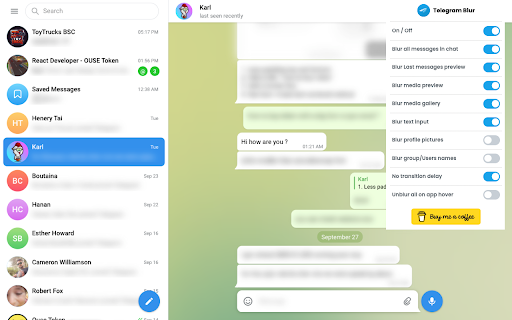
Blur and Hides your messages on Telegram until you hover over them. Blur and Hides your messages on Telegram until you hover over them. To increase privacy in public spaces the Telegram Blur Extension For Telegram Web blurs your messages as well as other content. And only reveals one when you hover over it with your mouse cursor. Additionally, you can quickly toggle all effects by using a keyboard shortcut (Alt+X) or by clicking the toggle button in the extension menu. It adapts to your needs by letting you decide which elements you want to blur. Your options: - Blurs all messages in the current chat. - Blurs all message previews on the left. - Blurs all images, videos, stickers, ... in separation from the text. - Blurs all small icons of images, videos, ... while viewing an image, video, ... - Makes the color in your input field lighter to make it hard to read. - Blurs all profile pictures. - Blurs all groups and users names. - Allows you to turn off the delay before revealing an item on hover. - Unblurs all elements when you hover over the Telegram Web app. --- This extension does not collect information about you or your messages. Disclaimer: Telegram is a trademark of Telegram Inc., registered in the U.S. and other countries. This extension is an independent and has no relationship to Telegram or Telegram Inc. We display a banner ads and affiliate link redirection as a sort of monetization, thank you for your support.

Web Client for Telegram™ - Teleside
Run web client for Telegram™ just like your favorite mobile app. Run web client for Telegram™ just like your favorite mobile app. Download videos and images, upload your own content, and send DM. Teleside | Web Client for Telegram™ is a useful Chrome extension that allows users to experience the popular social media platform. This is a simple and powerful tool with many features to make your social user experience even better. With one click in your browser, you will be taken to the popular social network - Telegram, where you can share photos and videos, view the news feed and chat with friends.

Discord Blur
Blur and Hides your messages on Discord until you hover over them. Blur and Hides your messages on Discord until you hover over them. To increase privacy in public spaces the Discord Blur Extension For Discord Web blurs your messages as well as other content. And only reveals one when you hover over it with your mouse cursor. Additionally, you can quickly toggle all effects by using a keyboard shortcut (Alt+X) or by clicking the toggle button in the extension menu. It adapts to your needs by letting you decide which elements you want to blur. Your options: - Blurs all messages in the current chat. - Blurs all message previews on the left. - Blurs all images, videos, stickers, ... in separation from the text. - Blurs all small icons of images, videos, ... while viewing an image, video, ... - Makes the color in your input field lighter to make it hard to read. - Blurs all profile pictures. - Blurs all groups and users names. - Allows you to turn off the delay before revealing an item on hover. - Unblurs all elements when you hover over the Discord Web app

Messenger for Telegram™
Access to Telegram's web application in a separate window or tab and get notified when new messages received This extension opens the official Telegram's web client in a sandboxed window or a browser tab. If an existing window is found, the extension activates the window without opening a new instance. Also, when the interface is open, the extension updates its badge number based on the total unread conversions that the user has. This number ignores muted conversions. Also, automatically updates when a conversion is read. After installation, if you haven't used Telegram on this browser yet, you will need to login into your Telegram account. Simply, press the newly added icon on the toolbar area (the icon might be inside the extensions panel; if so pin the icon to the toolbar area). Now enter your Telegram's phone number and check another device that has a Telegram client on it. Enter the PIN code into the web client and wait for Telegram to sync your data. If you already have open Telegram tabs, make sure to refresh them for the extension to inject the badge monitoring script into these pages. To protect user privacy, this extension does not send any data to any server whatsoever. It is only a shortcut to access your beloved messenger. What is Telegram? Telegram is a freeware, cross-platform, cloud-based instant messaging software and application service similar to WhatsApp and Signal messengers. The service also provides end-to-end encrypted video calling, VoIP, file sharing, and several other features. -- Legal This extension is an open-source project to open the official Telegram's web client. It has nothing to do with Telegram development and is an independent project.

Telegram Multi-account
Telegram Multi-account - Use more than one telegram account in the browser. !!! Extension working on https://web.telegram.org/k/ Quite often, telegram users are faced with the fact that when working, it is necessary to work with two or more accounts, but this problem could only be solved with portable versions. We have solved this problem and give the opportunity to use more than 2 accounts in active access. There is a PRO version for active users.
