

Chrome extension · Eyedropper precision
Pick Any Color from Any Website Instantly
A simple Chrome extension to capture colors directly from your screen with precision.
- No account required
- Works alongside your tabs
- Lightweight footprint
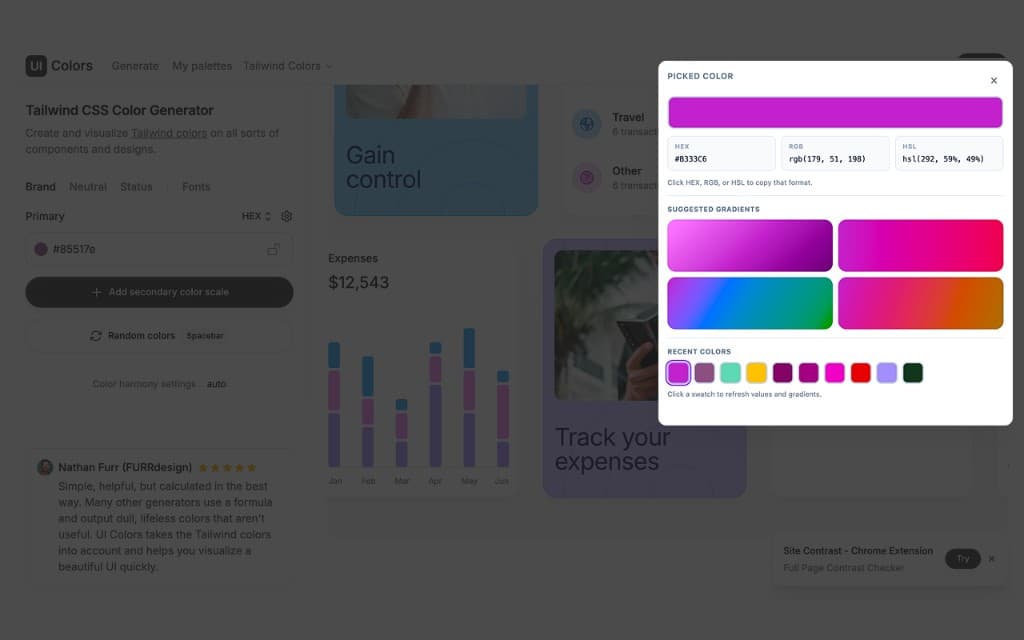
Product UI preview — Picked color, formats, gradients, and history
Features
Everything you need to lock a color fast
Built for designers and developers who want accurate values without leaving the site they're browsing.
Pick from any webpage
Point and capture real pixels on the page—no guessing from devtools swatches.
HEX, RGB, and HSL
Switch formats in one tap so values drop straight into your design stack.
Gradient suggestions
Go beyond flat fills with tasteful gradient pairs built from your picked tone.
Recent color history
Revisit swatches from your last session without redoing the eyedropper dance.
One-click copy
Copy the active format instantly—no more selecting tiny text in a modal.
Clean, focused UI
A floating panel that stays out of the way until you need precise values.
How it works
Three steps to a perfect swatch
No export hoops. Stay on the page you're auditing and pull values the moment you see them.
- 1
Install the extension
Add Color Picker from the Chrome Web Store—permissions stay minimal and transparent.
- 2
Click the toolbar icon
Open the floating panel from the puzzle piece menu or pin it for one-click access.
- 3
Pick any color on the screen
Hover, click, and capture. Values update live in HEX, RGB, and HSL as you move.
Demo & preview
See the panel in context
Placeholder frames below—swap with real marketing shots when your build is ready.
HEX #6366F1
RGB 99, 102, 241
HSL 239°, 84%, 67%
Color preview
Gradient samples inspired by your last pick—tap to copy.
Sunset drift
Berry soda
Ocean mist
Live value card
- HEX
- #8B5CF6
- RGB
- 139, 92, 246
- HSL
- 258°, 89%, 66%
Why teams choose it
Benefits that feel invisible—until you need them
Color Picker is tuned for speed and trust: capture what you see, copy what you need, and get back to building.
“We stopped screenshotting swatches into Figma just to read HEX codes.”
— Placeholder social proof for your launch
Fast and lightweight
Tiny footprint so your browser stays snappy—even with dozens of tabs.
No external tools needed
Skip juggling desktop apps or pasting into converters. Grab values in place.
Works on most websites
From marketing pages to dense dashboards, if you can view it, you can sample it.
Privacy-friendly
No accounts, no telemetry by default—your picks stay on your machine.
Start Picking Colors Now
Install in seconds and sample your next hero gradient without leaving the page.