
Every new tab steals your focus. Stay on the page—translate instantly.
Highlight any phrase and read the meaning beside your content. No copy-paste circus, no hunting for the right dictionary tab—just clarity and momentum.
No signup required · Works instantly


Trusted by 50,000+ users · developers, students, and researchers
Features
Built for deep work—not another noisy toolbar
Each capability answers one question: does this help you read faster, safer, and with less mental drag?
Zero tab-hopping
Why it matters: you keep context. Meanings appear next to what you’re reading so you don’t re-scan paragraphs after every lookup.
Zero guesswork on language
Why it matters: you waste less time config-tweaking. Auto-detection routes to the right pair so you translate once and move on.
Stays fast on heavy sites
Why it matters: slow tools kill focus. A lean footprint keeps news apps, docs, and dashboards snappy—no fan-spinning bloat.
Your highlights stay yours
Why it matters: less uneasy than piping every selection to the cloud. We prioritize on-device paths when we can—privacy as default.
How it works
Three steps. No learning curve.
A calm, repeatable flow you’ll memorize after the first try.
Highlight any text
A word, a sentence, or a whole paragraph—if you can select it, you can translate it without leaving the page.
Open Simple Translate
Use the toolbar icon or your keyboard shortcut. No right-click maze, no hunting for another tab.
Read, copy, move on
Skim the translation inline, tweak languages if you want, and copy the result in one click.
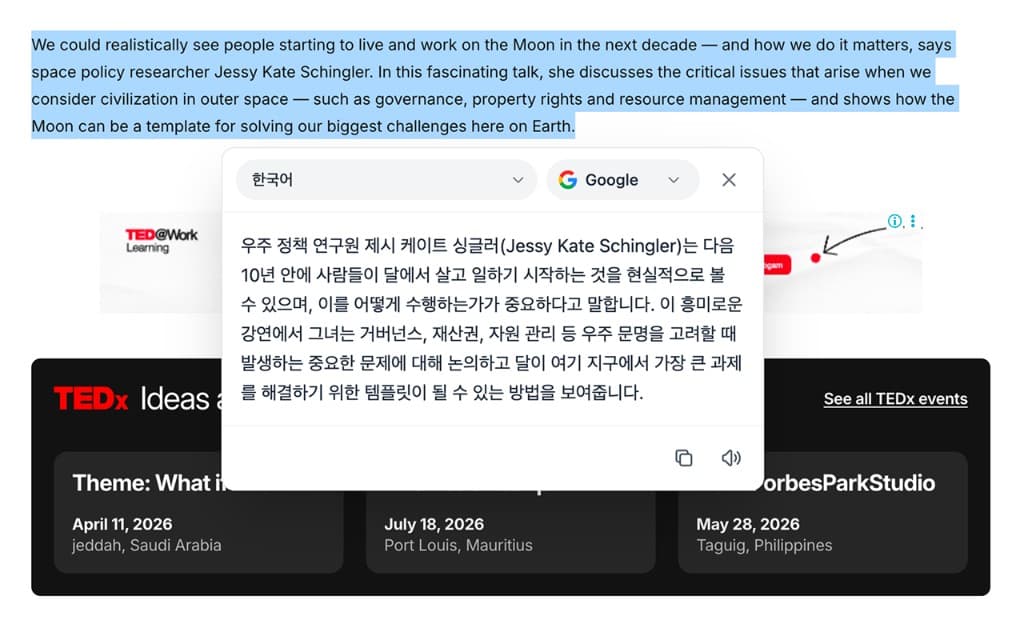
Product preview
The same page. A calmer way to read.
Highlight text, open the popup, and pick your language and engine—copy or listen without breaking your flow.
See it in action
TED@Work
If we're serious about a long-term presence beyond Earth, space policy has to evolve — fast. Living on the Moon isn't a photo op; it's logistics, radiation budgets, supply chains, and the quiet work of keeping people alive when help is three days away.
지구를 넘어선 장기 체류를 진지하게 고려한다면 우주 정책은 빠르게 진화해야 합니다. 달에서의 생활은 포즈를 취하는 일이 아니라 물류, 방사선 예산, 공급망, 그리고 도움이 사흘 거리에 있을 때 사람들을 살려내는 조용한 일의 연속입니다.
April 11, 2026
Lunar ops 101
July 18, 2026
Radiation budgets
Nov 2, 2026
Supply rhythm
Testimonials
Readers who protect their focus
Real workflows—research, design, writing—without the tab shuffle.
“I stopped bouncing between tabs for every unknown phrase. Simple Translate feels like part of the page—not a detour.”

Mai Nguyen
Product designer · HCMC
“Fast, unobtrusive, and the UI actually looks like our internal tools. That’s rare for a browser extension.”

Jordan Lee
Engineering lead · Remote
“Auto-detect saves me on multilingual docs. Highlight, copy, move on—exactly the rhythm I wanted.”

Elena Rossi
Content strategist · Milan
FAQ
Quick answers
Everything you need to feel confident before you click install.
- Does Simple Translate work on PDFs and locked readers?
- It works wherever you can select text in Chrome. Some PDF viewers and DRM-protected sites may block selection.
- Do you store what I translate?
- We prioritize on-device processing when available. When a network lookup is required, requests are minimized and not used to train models.
- Can I use keyboard shortcuts?
- Yes—open the popup, pin your favorite shortcut, and translate without touching the mouse.
Stop switching tabs.Start understanding instantly.
Add Simple Translate in one click—free, with no signup wall. Your next article, spec, or paper stays in focus.
No credit card · No trial gimmicks
 Add to Chrome — Free forever