
omiaekblhgfopjkjnenhahfgcgnbohlk
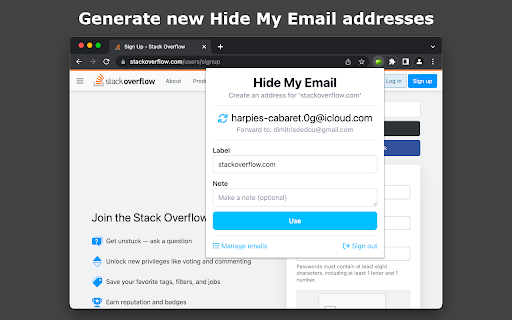
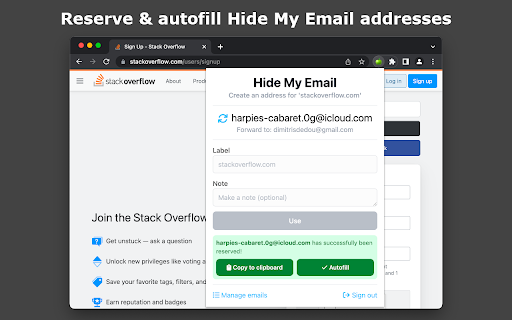
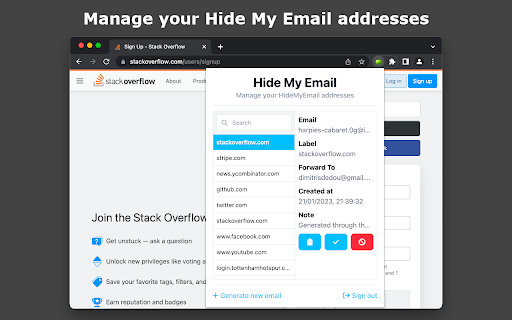
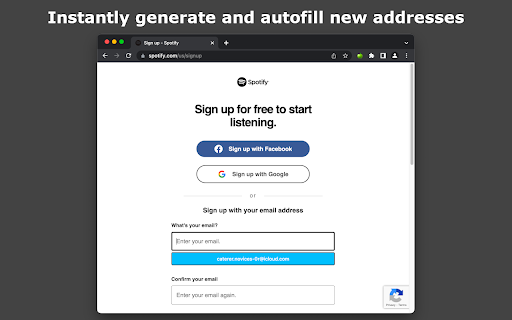
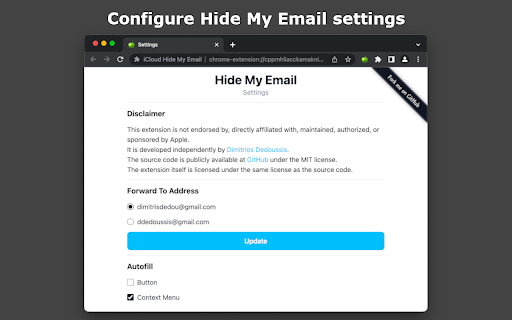
This extension enables the use of iCloud's Hide My Email service on any Chromium based browser such as Google Chrome, Brave, Opera, and Microsoft Edge. Hide My Email is natively supported in Safari. This extension aims to bring a similar UX to the Chromium ecosystem. - Simple pop-up UI for generating and reserving new Hide My Email addresses - Ability to manage existing Hide My Email addresses (including deactivation, reactivation, and deletion) - Instant autofilling on any HTML input element that is relevant to email - Quick configuration of Hide My Email settings, such as the Forward-To address, through the Options page of the extension. Disclaimer: This extension is not endorsed by, directly affiliated with, maintained, authorized, or sponsored by Apple. Source code: https://github.com/dedoussis/icloud-hide-my-email-browser-extension Found an issue or bug? Please submit it here: https://github.com/dedoussis/icloud-hide-my-email-browser-extension/issues/new

Matter
Save articles to your Matter account Finally, a better reading app. The internet is full of things you want to read – articles, newsletters, Twitter threads, PDFs. Matter brings them together in one place. “Matter improves vastly on earlier read-later apps like Pocket and Instapaper, letting you easily access news and other stories whenever you get the time” –The Wall Street Journal (2022) Save in 1-click: - Save full articles if you’re within the paywall (eg. Bloomberg, NYT, WSJ) - Rollup Twitter threads into a single article page - Save PDFs and YouTube 3 ways to save: - Click the Matter button in the toolbar - Or right-click a link and “Save to Matter” - Or use the keyboard shortcut ‘Control + M’ Unified inbox for your subscriptions: - Sync your newsletters by connecting Gmail - Follow individual writers for their latest - Add any RSS feed The most elegant reading experience: - Best-in-class article parsing - Gorgeous night mode - Human-like text-to-speech - Fluid highlighting Export your knowledge: - Sync your highlights to Notion, Obsidian, Roam, Readwise, and others

iCloud Mail Notifier - Email Alerts
Keep Tabs on your iCloud Emails Introducing "iCloud Mail Notifier - Email Alerts," the ultimate Chrome extension for busy professionals, students, and anyone who relies on email communication. Designed with simplicity and efficiency in mind, this extension is a must-have tool for managing your iCloud emails directly from your browser. Regular Email Updates: Stay informed with your iCloud Mail without constant manual checking. Our extension displays a badge icon on your browser, showing the unread email count, updated every 5 minutes for timely awareness of your inbox. Automatic Refresh Mechanism: The extension automatically refreshes your iCloud Mail inbox at 5-minute intervals, ensuring you're regularly updated on your latest emails. Subtle Notification Chime: A gentle chime alerts you of new emails, striking the perfect balance between being noticeable and not disruptive. This feature allows you to be alert to new messages without interrupting your workflow. Manual Refresh Option: For those moments when you need immediate updates, the extension offers a manual refresh option. A simple click on the popup allows you to check for new emails instantly. Privacy-Focused: Your privacy is our top priority. The extension operates seamlessly in the background without storing any login information. Enjoy a secure experience knowing your credentials are safe. User-Friendly Interface: Experience a clean, intuitive interface that integrates seamlessly with your Chrome browser. No complicated settings or configurations - just a straightforward solution to email notifications. Benefits: Enhanced Productivity: By staying informed about your emails in real-time, you can manage your time more effectively and respond to important messages promptly. Convenience: Access your email notifications directly from your browser, eliminating the need to constantly log in to your iCloud account. Peace of Mind: With automatic and manual refresh options, you have complete control over how and when you receive email alerts. Secure and Private: Enjoy a worry-free experience with an extension that respects your privacy and security. Who is it for? Whether you're a software engineer managing multiple projects, a student coordinating assignments, or a professional juggling various tasks, "iCloud Mail Notifier - Email Alerts" is your perfect companion for staying on top of your emails without hassle. Download Now: Get "iCloud Mail Notifier - Email Alerts" today and transform the way you manage your iCloud emails. It's fast, efficient, and free! Add it to your Chrome browser and experience the convenience of smarter email alerts. Note: iCloud is a trademark of Apple Inc., not affiliated with this extension. This extension is an independent project designed to enhance your email experience.

Hide My Email for Gmail™
Hide your emails in Gmail™ to focus and get in the flow. Unhide them whenever you're ready. Now you can hide your emails in Gmail™ whenever you want so you can get in the flow and do more deep work. ## Overview After you open Gmail™, click the "Hide emails" button to hide your messages. You'll still be able to search Gmail™ and use it as a reference, just without all your emails appearing and distracting you. When you're ready to view your the emails in your inbox again, just click "Show emails". This extension only works if you use the Gmail™ website on chrome. It doesn't work if you're using the Gmail™ desktop app. ## View the code https://github.com/mthurmond/hide-my-email-for-gmail ## More helpful extensions Try my other two extensions to remove distractions. Both are free & open source: - Distraction free for Linkedin™: https://chrome.google.com/webstore/detail/distraction-free-for-link/kigfnbfbpfpgphbocdkmeablbgdbpfke

Consent-O-Matic
Cookie pop-ups are designed to be confusing and make you 'agree' to be tracked. This add-on automatically answers consent pop-ups for you, so you can't be manipulated. Set your preferences once, and let the technology do the rest! This add-on is built and maintained by workers at Aarhus University in Denmark. We are privacy researchers that got tired of seeing how companies violate the EU's General Data Protection Regulation (GDPR). Because the organisations that enforce the GDPR do not have enough resources, we built this add-on to help them out. We looked at 680 pop-ups and combined their data processing purposes into 5 categories that you can toggle on or off. Sometimes our categories don't perfectly match those on the website, so then we will choose the more privacy preserving option. The first version of this add-on works with 4 popular pop-ups: Cookiebot, OneTrust, QuantCast, and TrustArc. The add-on is open source, so anyone can add additional pop-ups through our template system: https://github.com/cavi-au/Consent-O-Matic. Most recent changes: * Fixed issues related to manifest v3 * Fixed a bug causing some rules to not complete properly, leaving the popup open
