
mdjildafknihdffpkfmmpnpoiajfjnjd

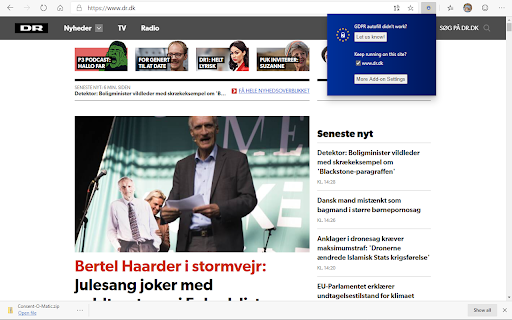
Cookie pop-ups are designed to be confusing and make you 'agree' to be tracked. This add-on automatically answers consent pop-ups for you, so you can't be manipulated. Set your preferences once, and let the technology do the rest! This add-on is built and maintained by workers at Aarhus University in Denmark. We are privacy researchers that got tired of seeing how companies violate the EU's General Data Protection Regulation (GDPR). Because the organisations that enforce the GDPR do not have enough resources, we built this add-on to help them out. We looked at 680 pop-ups and combined their data processing purposes into 5 categories that you can toggle on or off. Sometimes our categories don't perfectly match those on the website, so then we will choose the more privacy preserving option. The first version of this add-on works with 4 popular pop-ups: Cookiebot, OneTrust, QuantCast, and TrustArc. The add-on is open source, so anyone can add additional pop-ups through our template system: https://github.com/cavi-au/Consent-O-Matic. Most recent changes: * Fixed issues related to manifest v3 * Fixed a bug causing some rules to not complete properly, leaving the popup open

Reddit Untranslate
Automatically redirects Reddit URLs by removing ?tl=xx from the query string + optional toggle for Google query modification redditUntranslate automatically cleans up Reddit URLs by removing the ?tl=xx query string parameter, effectively disabling the auto-translation feature. This ensures you view content in its original language without unwanted translations. Whether you frequently browse international subreddits or just want to streamline your Reddit experience, redditUntranslate keeps your browsing free from automatic language adjustments, allowing you to enjoy Reddit exactly as intended. Automatically removes the ?tl=xx parameter from Reddit URLs. Disables auto translation, showing content in its original language. Lightweight and runs quietly in the background, with no setup required. How It Works: Simply install redditUntranslate, and it will automatically modify Reddit URLs as you browse, ensuring that you see the original, untranslated content every time. V2.1 : Added an optional Google filtering toggle, it will ad a string that ignores translated Reddit pages when you do a Google search, it will however add an ugly string of text at the end of your query. V2.2 : Added a sub-toggle to the Google filtering option that restricts the appender to queries containing the word "reddit", so the ugly string of text only ends up on searches where it's actually useful. It will however only catch searches where you explicitly typed "reddit", so a query that's clearly about a Reddit thread but doesn't include the word won't be filtered. The popup is also a bit wider now for readability. Thanks to the contributors : @NotaInutilis, @lucasfernog and @tairi Tags: Reddit extension, language settings, Non-English Reddit users, Reddit language fix, Disable automatic translation

Google Search Maps Button
Adds back the Maps button to Google search pages and makes the search result map images clickable again for seamless navigation. The "Google Search Maps Button" Chrome extension brings the Google Maps button back to the Google Search navigation bar for users in Europe. If you've found the Google Maps button gone or missing from your search experience, this extension is designed to address exactly that. What it Does: This extension ensures you can access Google Maps with just one click from the Google Search page. It also makes map images clickable within search results, significantly improving your navigation experience. Why it's Needed: In response to the Digital Markets Act (DMA), which is aimed at fostering fair competition and innovation, the Google Maps shortcut was removed for European users. This tool effectively restores that lost convenience. Privacy and Security: Operating without saving any user data, the extension ensures your privacy and security are protected. For anyone who's noticed the Google Maps button gone from the Google Search navigation bar in Europe, this extension provides a straightforward and effective solution, seamlessly reintegrating this essential feature into your browsing routine. Troubleshooting steps if the extension is not working: 1. Check Plugin Status: Make sure that the plugin is enabled in your Chrome browser. 2. Verify Site Access: Open the details for this plugin under "My Extensions" and ensure that "Site Access" is enabled. NB! For Opera users: Go to the Manage Extension section and tick the „Allow access to search page results” option. Otherwise the plugin wont work. If you'd like to say thanks, you can do so via PayPal at henripp94@gmail.com. I'm truly grateful for any support, though it's absolutely not necessary or expected.

Clickbait Remover for Youtube
Replaces thumbnails and modifies titles of videos on youtube.com This extension replaces thumbnails with a frame from the video, effectively removing any clickbait while still showing a high quality thumbnail so you can still get a good idea of what the video is about. It can also modify titles to stop partial or all caps titles. It works everywhere on Youtube including the homepage, trending page, subscription page and channel pages. All functionality of the extension is customizable by clicking the extension icon on the top right, you can see the effect that different options have right away if you have a youtube tab open, no need to reload the page. And also on mobile. This extension might help people who have a Youtube addiction or anyone who just doesn't want to be distracted by flashy thumbnails and all caps titles while trying to find some quality content. Source code: https://github.com/pietervanheijningen/clickbait-remover-for-youtube Firefox version: https://addons.mozilla.org/firefox/addon/clickbait-remover-for-youtube

I don't care about cookies
The EU regulations require that any website using tracking cookies must get… The EU regulations require that any website using tracking cookies must get user's permission before installing them. Imagine how irritating that becomes when you surf anonymously or if you delete cookies automatically every time you close the browser. In most cases, it just blocks or hides cookie related pop-ups. When it's needed for the website to work properly, it will automatically accept the cookie policy for you (sometimes it will accept all and sometimes only necessary cookie categories, depending on what's easier to do). It doesn't delete cookies.
