
omoinegiohhgbikclijaniebjpkeopip
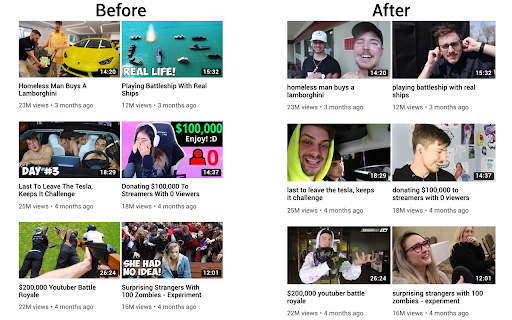


Replaces thumbnails and modifies titles of videos on youtube.com This extension replaces thumbnails with a frame from the video, effectively removing any clickbait while still showing a high quality thumbnail so you can still get a good idea of what the video is about. It can also modify titles to stop partial or all caps titles. It works everywhere on Youtube including the homepage, trending page, subscription page and channel pages. All functionality of the extension is customizable by clicking the extension icon on the top right, you can see the effect that different options have right away if you have a youtube tab open, no need to reload the page. And also on mobile. This extension might help people who have a Youtube addiction or anyone who just doesn't want to be distracted by flashy thumbnails and all caps titles while trying to find some quality content. Source code: https://github.com/pietervanheijningen/clickbait-remover-for-youtube Firefox version: https://addons.mozilla.org/firefox/addon/clickbait-remover-for-youtube

Youtube-shorts block
Play the Youtube shorts video as if it were a normal video. A extension allows youtube shorts videos to play on a regular page. Features - Redirect shorts - Hide "shorts" tab - Hide shorts - Extended GUI for shorts player *** "Hide shorts video" is now enabled by default!!!! If you don't want to do that, please disable in option page! *** The UI of Youtube-shorts is not very well optimized for PCs and has poor functionality. This extension aims to improve the user experience by displaying short videos in the regular video player. ...utube.com/shorts/"video-id" ↓↓ ...utube.com/watch?v="video-id" Change the URL to something like. v1.5.5 features - Fix: Extension Breaks YouTube's New Replies UI #64 v1.5.2 features # Changed - Fix block the entire News(and other) page v1.5.1 features # Changed - Fix where opening in a new tab redirected to the wrong video v1.5.0 features # Changed - refactoring codebase - Fixed an issue where the hide shorts feature might not work depending on the environment (specifications). - Fixed the "open in new tab" feature on the shorts screen. - Updated to comply with YouTube's latest specifications (blocking ytd-rich-shelf-renderer). v1.4.2 features # Added - Russian translation from @jooblex # Changed - Support for Youtube specification changes v1.4.1 features # Added - German translation from @golgorath # Changed - Support new subscription page(Hide shorts video) v1.3.1 features # Changed - Fixed a bug that redirected links that were not short videos containing the string "shorts" v1.3.0 features # Added - Added "Open in regular player" button in the Shorts player - Block Shorts-related feeds (if Hide shorts video is enabled) - Add a Release notes # Changed - Fixed the problem that the load spinner does not disappear when "Hide Shorts video" is selected - Optimize "hide shorts video" v1.5.4 features - Additional selector for Shorts shelf elements by @HardyHeron2008 in #62 - Fix timing issue for richShelfFilter by @seporterfield in #63

Highlights for YouTube
View highlights on the video player, that are generated from timestamps found in the description and top comments. ✨ UPDATE: Added controls for navigating between highlights. 🎬 See chapters or interesting moments without the need to scroll to the comment/description section. You can toggle the highlights directly from the video player options. ⚠️ Not all videos will have highlights on them since they are generated from timestamps. 🔗 Open Source: View code and report issues on GitHub: https://github.com/Ermag/yt-highlights-chrome 💭 Feedback is greatly appreciated!

YouTube Full Title For Videos
This extension shows the headlines of the video entirely without hiding them partially, as by default. This extension shows the headlines of the video entirely without hiding them partially, as by default. It add a CSS that change height of title, so it is easier to use YouTube.com, because you can see all title and don't need to hover on a title to see it all. The plugin doesn't have any JS, just simple CSS.

Karamel: View Reddit comments on YouTube™
Step up your viewing experience by embedding relevant Reddit comments under YouTube videos. Karamel is an open-source extension that adds Reddit comments to any YouTube videos you watch. - View the comments for all posts on Reddit of the video you're watching - Switch between YouTube and Reddit comments with a conveniently placed button - Upvote, reply to, and save comments on the same page! - Supports dark and light theme - Change the default comment mode and sort methods in the options - Open-Source on GitHub: https://github.com/odensc/karamel NOTE: This extension is in no way affiliated with YouTube, LLC; Google LLC; Reddit Inc.; or any company mentioned on this page.
