
halllmdjninjohpckldgkaolbhgkfnpe
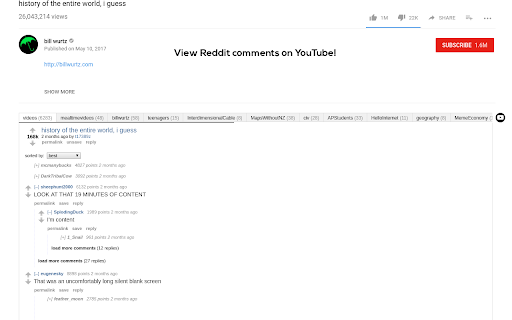

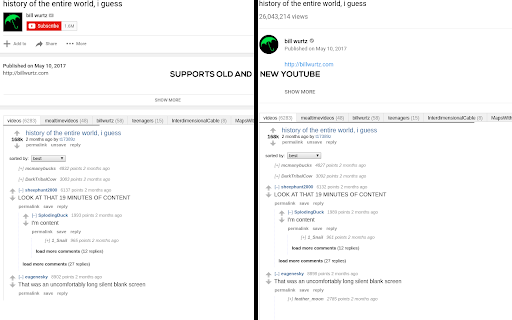

Step up your viewing experience by embedding relevant Reddit comments under YouTube videos. Karamel is an open-source extension that adds Reddit comments to any YouTube videos you watch. - View the comments for all posts on Reddit of the video you're watching - Switch between YouTube and Reddit comments with a conveniently placed button - Upvote, reply to, and save comments on the same page! - Supports dark and light theme - Change the default comment mode and sort methods in the options - Open-Source on GitHub: https://github.com/odensc/karamel NOTE: This extension is in no way affiliated with YouTube, LLC; Google LLC; Reddit Inc.; or any company mentioned on this page.

Reddit Enhancement Suite
A suite of modules that enhance your Reddit browsing experience Reddit Enhancement Suite is a community-driven unofficial browser extension for Reddit. Please note that RES is specifically designed to work on OLD reddit. Most functionality will not work on the redesign. NOTE: Reddit Enhancement Suite is developed independently, and is not officially endorsed by or affiliated with Reddit.

Reddit Promoted Ad Blocker
Reddit Promoted Ad Blocker is used to automatically remove promoted posts on the new (and old!) Reddit layout. Save your brain the effort of having to distinguish real posts from promoted posts. This extension was made for free. Donations are welcomed and appreciated: https://buymeacoffee.com/mockerydev PATCH NOTES (DEC. 2020): - Updated extension name. PATCH NOTES (SEPT. 2019): - Updated to allow support for old.reddit.com. Current users will need to allow permissions again to access this new domain. - Improved code based on a user's feedback. Thank you kind stranger! ✓ About Permissions & Privacy As with all ad blocker extensions, this extension needs permissions to remove ads on reddit pages you view. All ad blocker detection takes place on your computer and does not see nor track any of your browsing history or any personally identifiable information. ✓ Terms of Use Only works on reddit.com. No guarantee or warranty is given with the use of this software. The author shall not be held liable for any consequences by its use. Usage of this extension means that you agree to these terms.

Highlights for YouTube
View highlights on the video player, that are generated from timestamps found in the description and top comments. ✨ UPDATE: Added controls for navigating between highlights. 🎬 See chapters or interesting moments without the need to scroll to the comment/description section. You can toggle the highlights directly from the video player options. ⚠️ Not all videos will have highlights on them since they are generated from timestamps. 🔗 Open Source: View code and report issues on GitHub: https://github.com/Ermag/yt-highlights-chrome 💭 Feedback is greatly appreciated!

YouTube Timestamps
The extension shows timestamps that YouTube users leave in comments. It shows timestamps from the top 100 comments. If YouTube video doesn't have comments with timestamps or the timestamps are not in the top 100 comments the extension doesn't show anything. Timestamps are placed right on YouTube's video timeline. Hover a timestamp on the timeline to preview the corresponding comment. Key features: - Shows timestamps from YouTube comments on timeline. - Works in Fullscreen and Theater modes. - Works for embedded videos. - Dark theme support. - Open Source https://github.com/ris58h/youtube-timestamps NOTE: To scroll a long comment preview scroll on the timestamp you are hovering over. LIMITATIONS: Only timestamps from the first 100 comments are shown.
