
fjchmkcdmgeimkholkgodkejnikeklmh
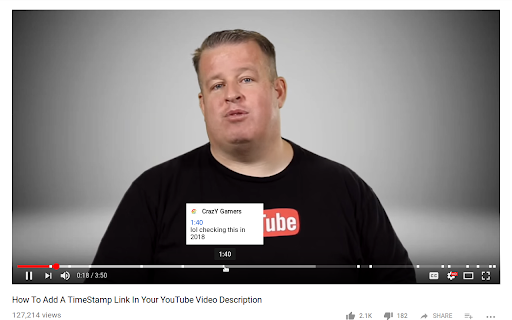
The extension shows timestamps that YouTube users leave in comments. It shows timestamps from the top 100 comments. If YouTube video doesn't have comments with timestamps or the timestamps are not in the top 100 comments the extension doesn't show anything. Timestamps are placed right on YouTube's video timeline. Hover a timestamp on the timeline to preview the corresponding comment. Key features: - Shows timestamps from YouTube comments on timeline. - Works in Fullscreen and Theater modes. - Works for embedded videos. - Dark theme support. - Open Source https://github.com/ris58h/youtube-timestamps NOTE: To scroll a long comment preview scroll on the timestamp you are hovering over. LIMITATIONS: Only timestamps from the first 100 comments are shown.

Jumpcut
Navigate YouTube videos through description timestamps and comment chapters. Make YouTube more fun and productive! • New! Navigate YouTube Creator Timestamps by using the Jumpcut Next (shorcut: 'x') and Back (shortcut: 'z') buttons • Jumpcut loads author and comment timestamps to easily navigate the video • Watch only the parts people are talking about in the comments section! • An easy to use "Table of Contents" to quickly see if the video interests you • Play shorter Jumpcuts of videos that skip over the boring parts • Easily navigate by pressing 'x' to jump to the next clip and 'z' to jump back • Skip annoying sponsor segments and introductions • Skip non-music parts in music videos So why are you wasting time? Skip the boring parts, make time for more content! Edit: This will likely be the last release of Jumpcut. Jumpcut will only use local data to show the cuts, either Channel description cut, or comments. It was fun while it lasted, I hope you enjoyed it too!

TimeComments
Finds Youtube comments with timestamps and teleports them above timeline, so you can jump to the moment people are talking about When you start watching a video, the extension loads the most relevant comments, finds the ones that mention timestamps, and creates markers above the timeline near those moments. Hover a marker to read the comment. If the comment has replies, you can open them too. . Why this matters? ✔ Save time. ✔ Notice details, corrections, and clarifications you might otherwise miss. ✔ See what other viewers noticed at the same moment. ✔ Use community comments as a lightweight guide through the video. . The main point is simple: timestamped comments are useful only if you see them on time. . New Features: ● Private notes / bookmarks. ● Mini Timeline for precise bookmarks. ● Custom captions panel for saving subtitle text. ● Shadow Ghosts for returning to moments you visited. ● Spike markers for moments where many comments point to the same time. ● Saved Items and Collections for organizing comments and bookmarks. . Privacy Note. Email permission is used to check whether extra functionality, such as loading all comments, is enabled for your account.

Tempus
A tool that allows you to manage and view YouTube comments with timestamps efficiently. Features: 1. View the concentration of comments using opacity of displayed markers. 2. View comments containing a particular timestamp. 3. While playing the video, view comments with timestamps like a live chat replay. 4. Customize the primary colour, block size of the markers. To use Tempus, just make sure the extension has been installed and enabled in your browser. Then, you can head to any YouTube video, where the extension will collect timestamps from the comments and display them under the video progress bar. The settings, which are accessible through the Tempus icon on the top-right of your browser, allow you to: 1. Configure the block size of the marker (value can range between 1 and 20 seconds, default: 1) 2. Toggle HeatMap markers (default: enabled) 3. Toggle the comment live replay (default: disabled) 4. Toggle the marker on-click commment view (default: enabled) 5. Configure the primary colour for markers (default: #ffb347) Check out the source code here: https://github.com/knightron0/tempus

YouTube Time Labels
A Chrome Extension for saving labelled timestamps of YouTube videos Take notes on YouTube easily with YouTube Time Labels. Add labels to different times of a video, and skip a video to that time by simply clicking the recorded timestamp on the extension. Very helpful for long videos where you want to save particular sections (e.g. lecture material, a song from a compilation), or to simply keep track of your favorite videos. For easy access to the extension, make sure to pin the extension. Major Features: - Add and remove videos to the extension, and give videos a custom name. - Record and delete video timestamps to the extension - Add custom labels / notes to timestamps. - Open a video at a particular timestamp from the extension. - Filter videos by title or timestamp label - Export / Import data of your saved videos and timestamps. This is a personal project I made for fun and learning. If you are interested in the source code, please visit the GitHub page: https://github.com/brianlinUM/youtube-timestamps All YouTube browsing data (e.g. saved videos and timestamps) are handled by this extension solely for the functioning of this extension - it can not save notes about timestamps without saving the timestamp after all. This data is only stored locally on your device, and never transmitted elsewhere; I do not collect your data.
