
djcmgmddnajefejhjhfhlfljoofplmlo
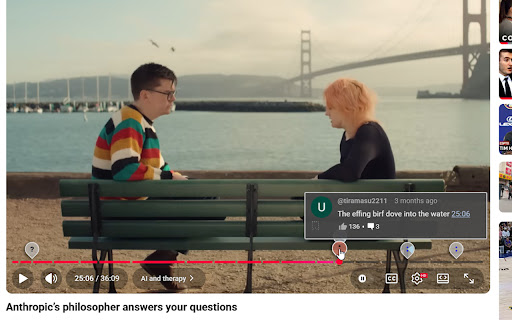
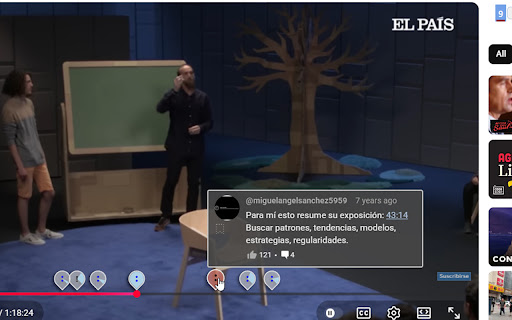


Finds Youtube comments with timestamps and ''teleports'' them above video timeline. When you start watching Youtube video, it loads one hundred most relevant comments. Among them finds ones with timestamps in them and for each makes a marker above the timeline near the time those timestamps refer to. Hover over the marker to see the actual comment. You can also see replies, if there are any, by clicking on the replies icon. . And that's about it. Simple as it gets. ..... NEW Features! . 👉 When timestamps refer to similar times in video, the markers may appear stacked up. You can now view all comments in that stack in one window. 👉 But, when people comment on almost exactly the same moment in video, that's special. I call it "The Spike". You can now view all comments in that spike in one window. 👉 You can also "bookmark" (save) any comment, and then view all of them in one place. . . How does it work? Free and "automáticamente", No actions and clicking required on your part. All you do is reap the benefits those comments have. And they do have value, (in my opinion and experience) I mean, have, if you see them on time. And that's the main purpose and point of this extension: for you to see them on time . Ideally, that would be when video starts or when video playback reaches the timestamps time. . As for privacy concerns, email permission is needed because there is a set of extra functionality beyond above mentioned (it's possible to load all comments), and via your email, extension knows that this extra functionality is turned on or is not.

CommentSync - Real-time YouTube Comments
Sync YouTube comments with video playback. See reactions and timestamps appear automatically as you watch. Bring your YouTube comments to life! Have you ever found yourself scrolling down while watching a video just to understand what a timestamped comment was referring to? With CommentSync, you no longer have to choose between the video and the community. CommentSync automatically detects comments with timestamps and displays them as elegant, non-intrusive overlays at the exact moment they are mentioned. Experience the energy of a live premiere or a Twitch chat on any YouTube video! Key Features: 🚀 Lightning Fast Experience: No more waiting for comments to load. Enjoy instant access to community reactions the moment you start watching. ✨ Elegant Design: Experience a modern, distraction-free interface. Our sleek overlays blend perfectly with the YouTube player for a premium, native feel. 🧠 Curated Highlights: Don't get overwhelmed during popular moments. The extension automatically highlights the most relevant and high-quality reactions, keeping your screen clean. 🛡️ Distraction-Free Viewing: Your viewing experience is sacred. The overlay automatically tucks itself away during advertisements and when you're interacting with player controls. How it works: Install the extension. Watch as community insights, jokes, and reactions "pop up" on your screen at the perfect time. Stop scrolling and start watching. Upgrade your YouTube experience with CommentSync today!

Youtube Popup Comments
Ever wanted to read the comments on a YouTube video, without scrolling down to the comments section and missing any of the action? With this extension, you can. Simply click on the button added to the top of the YouTube UI (next to the watch later button), and scroll through the comments using the newly created pop-up window that appears on top of your video. Click on the button again to close the pop-up when you want to focus on your video.

YouTube Timestamps
The extension shows timestamps that YouTube users leave in comments. It shows timestamps from the top 100 comments. If YouTube video doesn't have comments with timestamps or the timestamps are not in the top 100 comments the extension doesn't show anything. Timestamps are placed right on YouTube's video timeline. Hover a timestamp on the timeline to preview the corresponding comment. Key features: - Shows timestamps from YouTube comments on timeline. - Works in Fullscreen and Theater modes. - Works for embedded videos. - Dark theme support. - Open Source https://github.com/ris58h/youtube-timestamps NOTE: To scroll a long comment preview scroll on the timestamp you are hovering over. LIMITATIONS: Only timestamps from the first 100 comments are shown.

Tempus
A tool that allows you to manage and view YouTube comments with timestamps efficiently. Features: 1. View the concentration of comments using opacity of displayed markers. 2. View comments containing a particular timestamp. 3. While playing the video, view comments with timestamps like a live chat replay. 4. Customize the primary colour, block size of the markers. To use Tempus, just make sure the extension has been installed and enabled in your browser. Then, you can head to any YouTube video, where the extension will collect timestamps from the comments and display them under the video progress bar. The settings, which are accessible through the Tempus icon on the top-right of your browser, allow you to: 1. Configure the block size of the marker (value can range between 1 and 20 seconds, default: 1) 2. Toggle HeatMap markers (default: enabled) 3. Toggle the comment live replay (default: disabled) 4. Toggle the marker on-click commment view (default: enabled) 5. Configure the primary colour for markers (default: #ffb347) Check out the source code here: https://github.com/knightron0/tempus
