
ohlbkadomdbneipiieamlnlkniahjnnh
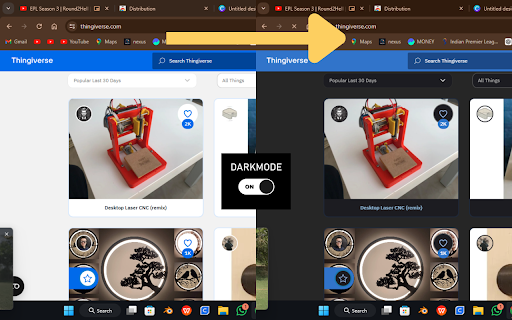

CLICK ME for Enable dark mode for all websites Short Description: Transform every website into dark mode with a single click. Experience the web in a whole new way with Universal Dark Mode. This extension transforms every website into dark mode, ensuring a pure black background and comfortable, eye-friendly colors. Pure Black Background: Ensures a pure black background on every website for an optimal dark mode experience. Eye-Friendly Colors: Adjusts text and link colors to provide high contrast and readability. Easy to Use: Toggle dark mode on and off with a simple click. Customizable: Easily enable or disable dark mode from the extension popup. Why Choose Universal Dark Mode? Reduce eye strain during nighttime browsing. Save battery life on devices with OLED screens. Enjoy a sleek, modern look on every website you visit. How to Use: Install the Universal Dark Mode extension. Click the extension icon in your browser toolbar. Click "Enable Dark Mode" to transform the current website. Click "Disable Dark Mode" to revert to the original theme. Enhance your browsing experience with Universal Dark Mode. Download now and see the web in a new light!

Dark Reader
Dark mode for every website. Take care of your eyes, use dark theme for night and daily browsing. This eye-care extension enables night mode by creating dark themes for websites on the fly. Dark Reader inverts bright colors to make web pages high contrast and easier to read. Adjust brightness, contrast, the sepia filter, font preferences. Enable dark mode on every web page or give websites a sepia tone. Enable or disable Dark Reader for specific websites, automatically sync with system dark mode, or detect already dark websites and leave them unchanged. This is the original Dark Reader extension. Since 2014, we continuously evolve alongside modern web technologies to deliver fast and reliable dark mode support for people sensitive to bright light. By installing the extension you agree to these terms of use https://darkreader.org/terms/

Tisy Dark Mode
Apply dark mode for any website • Apply dark mode for any website (except pages protected by the browser of course). • Super simple and easy to use with one click. • Instantly apply for all other tabs having the same domain. • Day and Night styles (Day style has more contrast). • An option page that allows manually input and backup whitelisted domains.

Shade Dark Mode
Shade Dark Mode: Seamlessly embrace dark mode on all websites with personalized controls 🖥️ Tired of being blinded by the bright light of websites? It's time to embrace the sleek elegance of the dark side with Shade Dark Mode! 🌑 🌐 Say goodbye to eye strain and hello to a seamless browsing experience on every website. Shade Dark Mode effortlessly transforms all websites into a soothing dark theme, creating a visually comfortable environment for your online adventures. 🌚 ✨ With Shade Dark Mode, you get: ➡️ Enabled dark mode for ALL websites, giving your browsing experience a sleek and modern touch. 🖤 ➡️ Personalized controls that let you customize the dark mode settings according to your preferences, so you can truly make it your own. ✏️ 🚫 But what if a website doesn't play nicely with dark mode or if you simply prefer a lighter look? No worries! Shade Dark Mode allows you to blacklist specific websites, ensuring they stay in the light while the rest of the web stays in the dark. ⛔ ⚡️ Say hello to effortless dark mode browsing with Shade Dark Mode! Upgrade your web experience today and join the dark side, where comfort and style meet. Get the extension now and start browsing with flair. 💻🌙

Picture-in-Picture for ALL Sites
Enables picture-in-picture mode, even for sites that have disabled it This extension functions similarly to the official Google extension, except it does not include Google Analytics and it ignores the `disablepictureinpicture` attribute on HTML videos. This means that sites like Netflix, Disney Plus, and Hulu will work!
