
mkeimkkbcndbdlfkbfhhlfgkilcfniic
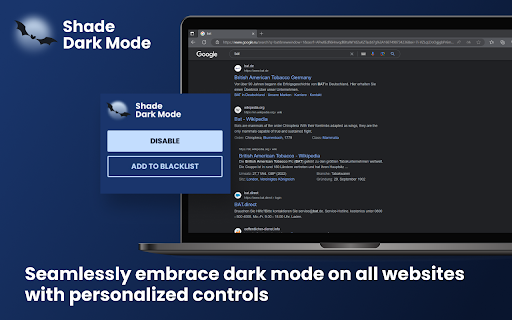
Shade Dark Mode: Seamlessly embrace dark mode on all websites with personalized controls 🖥️ Tired of being blinded by the bright light of websites? It's time to embrace the sleek elegance of the dark side with Shade Dark Mode! 🌑 🌐 Say goodbye to eye strain and hello to a seamless browsing experience on every website. Shade Dark Mode effortlessly transforms all websites into a soothing dark theme, creating a visually comfortable environment for your online adventures. 🌚 ✨ With Shade Dark Mode, you get: ➡️ Enabled dark mode for ALL websites, giving your browsing experience a sleek and modern touch. 🖤 ➡️ Personalized controls that let you customize the dark mode settings according to your preferences, so you can truly make it your own. ✏️ 🚫 But what if a website doesn't play nicely with dark mode or if you simply prefer a lighter look? No worries! Shade Dark Mode allows you to blacklist specific websites, ensuring they stay in the light while the rest of the web stays in the dark. ⛔ ⚡️ Say hello to effortless dark mode browsing with Shade Dark Mode! Upgrade your web experience today and join the dark side, where comfort and style meet. Get the extension now and start browsing with flair. 💻🌙

Dark Theme - Dark mode for Chrome
Dark mode switch any websites to dark theme. Take care of your eyes day using a classic dark reader or change screen brightness. Dark Theme - Dark Reader for Chrome enables night mode on nearly all websites and gives you the ability to control the built-in dark themes on those that have it. If the website has built-in night theme, you can control it directly from extension and if it doesn't (like Gmail, Google Docs, Office Online, Github and millions others), we will convert the colors to provide you with smooth transition on dark mode. There is also a white-list feature which enables you to exclude a desired domain from mode. Simply add a domain(s) to the designated area (comma separated) in the options page and the websites will be excluded. Night Shift Activate Night Shift mode to invert the usual light from the screen to a warmer tone, thus, preventing your eyes from harm. You can turn the tool on and off in a single click when you need it. Night shift automatically shifts the colors of your browser content to warmer end of the color spectrum after dark. Screen Shader Mode is a pleasure for your eyes! Dark Reader This eye-care extension enables night mode by creating dark themes for websites on the fly. Dark Reader inverts bright colors, making them high contrast and easy to read at night. Extension will put dark theme on all websites, suitable for those work at night and dark reader for online news or book reading. This extension changes the style of Google Docs to a dark theme that is easier on the eyes and looks cooler :) You need to refresh all the tabs, which were opened BEFORE the Dark mode and Night Shift was installed. You can also restart the Chrome to refresh all the tabs at once. Otherwise, Night Shift will work only with the newly opened tabs. Dark Theme for YouTube extension converts YouTube theme to a highly customizable dark charcoal/blue theme. This extension is built on top of the default YouTube theme, so it is very light-weighted compare to using themes injected by stylish or stylus extensions. Feel free to ask any questions and leave comments. Your feedback is very important for our product!

Dark Mode Enabler
Enables dark mode and filters on all websites that do not support it natively. Dark Mode Enabler is an open-source Chrome extension designed to help you enable Dark Mode or at least, invert colors to release your eyes from the white light of the screen. 🌓 Switch Modes Instantly: Seamlessly toggle between dark, sepia, grayscale, or standard modes. Enjoy effortless reading, reduced eye strain, and a browsing experience that aligns with your personal style or ambient lighting. 🖥️ Customized for Every Site: From your favorite news portal to the most frequented social media platform, our extension tailors every website according to your chosen theme. Say goodbye to the one-size-fits-all approach! 💾 Remember Your Preferences: Your chosen settings are saved automatically, providing a consistent experience across all websites. Revisit your favorite sites and find them just as you left them, visually customized to your preference. 👁️ Simple, User-Friendly Interface: With just a few clicks, Dark Mode Enabler allows you to switch modes and adjust settings. No technical expertise required – it’s all about enhancing your browsing experience with simplicity and elegance. 🛡️ Privacy-Focused: We value your privacy. The extension operates without collecting or sharing any personal data, ensuring your browsing habits remain private.

Dark Mode - Dark Reader for Сhrome
Dark Mode a classic dark theme for every website. Switch website to dark reader and for night and daily browsing. Dark Mode - Dark Reader for Chrome will put dark theme on all websites, suitable for those work at night and dark reader for online news or book reading. Apply all websites in browser into dark mode and exclude any domain from black theme for better experience. It's possible to create your own custom theme with any color you like. What will you get from Dark Mode extension: - Turn on/off the dark mode manually - Click on the extension icon to turn on/off. - Exclude/Include a site from the dark mode - Choose "Dark Mode" > "Disable/Enable for this site" - Customize colors for websites - Change all colors you want. - Automatic schedule - Enable "Auto ON/OFF" in the section. No more needs to open settings one by one for different websites - just one app brings black theme across the whole net. Option page is now available! Useful features: - Site exclusion. Enter a correct web address to exclude the page from black theme applying. - Page exclusion. Optionally add domains that you don't want to apply into black theme. - Theme changer. Create your own custom theme! Save it, rename and apply at any time. This eye-care extension enables night mode by creating dark themes for websites on the fly. Dark Reader inverts bright colors, making them high contrast and easy to read at night. Extension will put dark theme on all websites, suitable for those work at night and dark reader for online news or book reading. Feel free to ask any questions and leave comments for extension. Your feedback is very important for us!

Dark Mode for Chrome
Dark mode for all websites. Use dark theme for night and daily browsing with dark reader. Night shift mode. Dark Mode and Dark Reader makes all the websites you browse into dark/night mode so that you can browse the internet without straining your eyes. It is an extremely useful chrome extension for those who use internet especially at night. The Dark theme extension. Works with all websites! You need to refresh all the tabs, which were opened BEFORE the dark reader was installed. You can also restart the Chrome to refresh all the tabs at once. Otherwise, dark mode and night shift mode will work only with the newly opened tabs. If the website has built-in night theme, you can control it directly from extension and if it doesn't like Gmail, Google Docs, Office Online, GitHub and millions others, we will convert the colors to provide you with smooth transition on dark mode. What will you get from Dark Reader extension: 1. An easy way to create dark mode on every website. In addition, you can customize your black theme visual from Brightness, Contrast, to Saturation. 2. A Night Shift mode which changes the website's color to warmer, making it much more pleasing to watch. You can choose to use either dark theme or night shift mode, or both. You can also quickly activate these modes with simple keyboard shortcuts. 3. You can set up schedule for each dark theme and night shift mode, and decide when you want to auto-activate dark theme. Also Dark for YouTube extension converts YouTube theme to a highly customizable dark charcoal/blue theme. This extension is built on top of the default YouTube theme, so it is very light-weighted compare to using themes injected by stylish or stylus extensions Note: Remember to disable any similar Night Theme extension to prevent compatibility issues! We hope you enjoy it.
