
pjbgfifennfhnbkhoidkdchbflppjncb


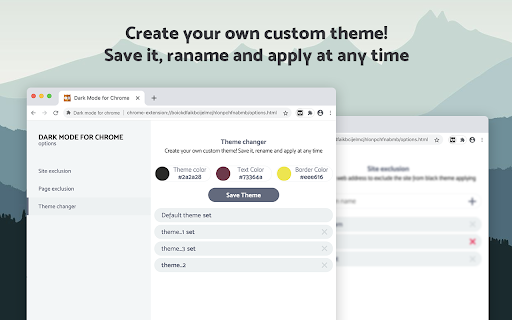
Dark Mode a classic dark theme for every website. Switch website to dark reader and for night and daily browsing. Dark Mode - Dark Reader for Chrome will put dark theme on all websites, suitable for those work at night and dark reader for online news or book reading. Apply all websites in browser into dark mode and exclude any domain from black theme for better experience. It's possible to create your own custom theme with any color you like. What will you get from Dark Mode extension: - Turn on/off the dark mode manually - Click on the extension icon to turn on/off. - Exclude/Include a site from the dark mode - Choose "Dark Mode" > "Disable/Enable for this site" - Customize colors for websites - Change all colors you want. - Automatic schedule - Enable "Auto ON/OFF" in the section. No more needs to open settings one by one for different websites - just one app brings black theme across the whole net. Option page is now available! Useful features: - Site exclusion. Enter a correct web address to exclude the page from black theme applying. - Page exclusion. Optionally add domains that you don't want to apply into black theme. - Theme changer. Create your own custom theme! Save it, rename and apply at any time. This eye-care extension enables night mode by creating dark themes for websites on the fly. Dark Reader inverts bright colors, making them high contrast and easy to read at night. Extension will put dark theme on all websites, suitable for those work at night and dark reader for online news or book reading. Feel free to ask any questions and leave comments for extension. Your feedback is very important for us!

Dark Mode - Night Eye
Dark Mode: Switch to dark reading for night & day browsing. More than dark theme style, it ensures optimal eye protection. The best dark mode extension for Chrome. Enable dark theme on any website and protect your eyes. With Night Eye, you can effortlessly enable dark mode on any website, ensuring optimal readability and reducing eye strain, especially in low light environments. Offering a range of customization options, including brightness, contrast, and saturation adjustments, as well as a blue light filter for added eye protection, Night Eye empowers you to personalize your browsing experience. Moreover, with the ability to control built-in dark themes on supported websites, Night Eye grants you complete control over your online journey. Trusted by over 1,000,000 users across all major browsers, Night Eye stands as the preferred choice for those seeking unparalleled eye comfort. Rest assured, Night Eye is dedicated to providing a seamless experience, with no ads or data mining, and a responsive support team. With regular updates for the past five years and ongoing commitment to future enhancements, Night Eye is the definitive solution for achieving a smooth and consistent dark mode on any website. YOUR PRIVACY, OUR PRIORITY: A Transparent Look at How Our Extension Works When you install our extension, Chrome will warn you that it can read and change your data on the websites you visit. But let's break it down: Our extension works like a pair of sunglasses for your browser. It looks at the colors on a webpage and tweaks them to create a smooth, eye-friendly dark mode. Just like sunglasses need to 'see' the light to filter it, our extension needs to 'see' the webpage colors to adjust them. But here's the key point: we don't collect or store any of your data. Think of us like a paid TV service. You subscribe, enjoy the service (in our case, a great dark mode experience), and that's it. We don't sell your data - your privacy stays intact. Follow us on Twitter to keep up with the latest news around Night Eye and what we are planning ahead - https://twitter.com/nighteye_ext Meet Night Eye Lite, our forever-free version of Night Eye. It offers dark mode for up to 5 websites of your choice, such as Google.com or Gmail.com, with no ads or hidden charges. For more details, visit: [https://nighteye.app/lite-free-dark-mode-extension/](https://nighteye.app/lite-free-dark-mode-extension/) We also offer a free 3-month trial of Night Eye Pro. No credit card or payment required - just install and explore. After the trial, you can opt for Night Eye Pro at $9/year, Pro Max at $14/year for power users, or stick with the free Night Eye Lite. For those seeking a one-time purchase, we have the Ultimate plan at $40. For a comprehensive overview of our pricing, visit: [https://nighteye.app/how-to-start/](https://nighteye.app/how-to-start/) SOME FEATURES ➤ OS/Browser Color scheme integration - sync Night Eye with your macOS/Windows dark themes ➤ Deep integration with websites that have their own built-in dark themes. ➤ Schedule dark mode to turn on and off ➤ Custom dark mode for PDFs ➤ Export/Import data between your browsers AVAILABLE MODES The extension allows you to quickly switch the three available modes ➤ Dark - Go into complete dark mode. All colors, small images and icons will be converted to give you the smoothest dark experience possible. ➤ Filtered - The websites’ colors will not be changed, but you can still adjust brightness, contrast, warmth and more. ➤ Normal - Get back to the normal browsing experience. Any modifications you make such as contrast level adjustment, blue light filter and etc. can be applied to a single website or globally. ➤ Images - Night Eye analyses and converts only the small images and icons in a website to give you even smoother experience. Facebook posts and other significant media is not converted. ➤ Brightness / Saturation / Contrast - Adjust the brightness, the contrast and the saturation to match the recommended healthy levels and protect your eyes. The default setting for each is 50%, but you can customize each to the preferred levels ➤ Blue Light - Take care of your eyes by eliminating the blue light coming from your screen. Highly recommended especially during late night browsing. Simply slide to the preferred level of warmth. ➤ Dim - Extremely useful if you are working in dark space/room and the screen is the only source of light in the room. The default setting is set to 50%, but you can customize it as you please. Built-in support system - we take pride into being available to provide reliable support and help you with any problems or issues you might experience with the extension. CHANGELOG We strive to bring you the best possible dark mode experience. In this update we’ve made several improvements and added one major feature - OS/Browser color scheme integration. You can monitor all our updates and what we do at https://nighteye.app/changelog PRIVACY MATTERS: Here's How We Handle Your Data We believe in transparency and want to explain our approach to privacy in the simplest terms. We don't use third-party analytics like Google Analytics to collect anonymous usage data when you're using our extension. What we do store are your personalized settings for each website you visit using Night Eye. These settings are saved locally on your computer (localStorage), not on our servers. These settings include any adjustments you've made to enhance your browsing experience with Night Eye, such as changes to Colors, Images, Brightness, Contrast, Saturation, Cold/Warm, and Dim. In essence, we only keep track of your visual preferences while you surf the web. These preferences are stored on your computer, ensuring that your data remains in your control. Facebook - https://facebook.com/night.eye.extension/ Twitter - https://twitter.com/nighteye_ext Pinterest -https://pinterest.com/nighteyeextension/

Dark Theme - Dark mode for Chrome
Dark mode switch any websites to dark theme. Take care of your eyes day using a classic dark reader or change screen brightness. Dark Theme - Dark Reader for Chrome enables night mode on nearly all websites and gives you the ability to control the built-in dark themes on those that have it. If the website has built-in night theme, you can control it directly from extension and if it doesn't (like Gmail, Google Docs, Office Online, Github and millions others), we will convert the colors to provide you with smooth transition on dark mode. There is also a white-list feature which enables you to exclude a desired domain from mode. Simply add a domain(s) to the designated area (comma separated) in the options page and the websites will be excluded. Night Shift Activate Night Shift mode to invert the usual light from the screen to a warmer tone, thus, preventing your eyes from harm. You can turn the tool on and off in a single click when you need it. Night shift automatically shifts the colors of your browser content to warmer end of the color spectrum after dark. Screen Shader Mode is a pleasure for your eyes! Dark Reader This eye-care extension enables night mode by creating dark themes for websites on the fly. Dark Reader inverts bright colors, making them high contrast and easy to read at night. Extension will put dark theme on all websites, suitable for those work at night and dark reader for online news or book reading. This extension changes the style of Google Docs to a dark theme that is easier on the eyes and looks cooler :) You need to refresh all the tabs, which were opened BEFORE the Dark mode and Night Shift was installed. You can also restart the Chrome to refresh all the tabs at once. Otherwise, Night Shift will work only with the newly opened tabs. Dark Theme for YouTube extension converts YouTube theme to a highly customizable dark charcoal/blue theme. This extension is built on top of the default YouTube theme, so it is very light-weighted compare to using themes injected by stylish or stylus extensions. Feel free to ask any questions and leave comments. Your feedback is very important for our product!

Dark Mode for Google Chrome™
It is a dark mode for all the browse. It darkens all the websites you visit so you can browse without straining your eyes. Want to rest your eyes from the glare of a computer screen? The best way to protect your eyes when you are using the computer at night is to have white font and a black background color for the website. If you want to continue using the computer for a long period of time and not have strained eyes, simply install our software Dark Mode for Google Chrome™ Our software allows you to turn the website into dark mode status where it uses white font and a black background. Simply press the software icon to turn dark mode on/off for the web page you are on. Disclaimer: Please note this extension is NOT made by Google and is made by an independent development team. All copyrights belong to their respective owners. Google doesn’t endorse or sponsor this Chrome extension. Dark Mode for Google Chrome™ is not owned by, is not licensed by and is not a subsidiary of Google Inc.

Dark Mode for Chrome
Dark mode for all websites. Use dark theme for night and daily browsing with dark reader. Night shift mode. Dark Mode and Dark Reader makes all the websites you browse into dark/night mode so that you can browse the internet without straining your eyes. It is an extremely useful chrome extension for those who use internet especially at night. The Dark theme extension. Works with all websites! You need to refresh all the tabs, which were opened BEFORE the dark reader was installed. You can also restart the Chrome to refresh all the tabs at once. Otherwise, dark mode and night shift mode will work only with the newly opened tabs. If the website has built-in night theme, you can control it directly from extension and if it doesn't like Gmail, Google Docs, Office Online, GitHub and millions others, we will convert the colors to provide you with smooth transition on dark mode. What will you get from Dark Reader extension: 1. An easy way to create dark mode on every website. In addition, you can customize your black theme visual from Brightness, Contrast, to Saturation. 2. A Night Shift mode which changes the website's color to warmer, making it much more pleasing to watch. You can choose to use either dark theme or night shift mode, or both. You can also quickly activate these modes with simple keyboard shortcuts. 3. You can set up schedule for each dark theme and night shift mode, and decide when you want to auto-activate dark theme. Also Dark for YouTube extension converts YouTube theme to a highly customizable dark charcoal/blue theme. This extension is built on top of the default YouTube theme, so it is very light-weighted compare to using themes injected by stylish or stylus extensions Note: Remember to disable any similar Night Theme extension to prevent compatibility issues! We hope you enjoy it.
