
jpgjmidladomebfdpanhbeodbmkibdcp
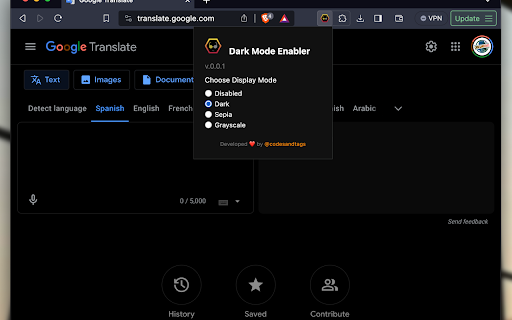


Enables dark mode and filters on all websites that do not support it natively. Dark Mode Enabler is an open-source Chrome extension designed to help you enable Dark Mode or at least, invert colors to release your eyes from the white light of the screen. 🌓 Switch Modes Instantly: Seamlessly toggle between dark, sepia, grayscale, or standard modes. Enjoy effortless reading, reduced eye strain, and a browsing experience that aligns with your personal style or ambient lighting. 🖥️ Customized for Every Site: From your favorite news portal to the most frequented social media platform, our extension tailors every website according to your chosen theme. Say goodbye to the one-size-fits-all approach! 💾 Remember Your Preferences: Your chosen settings are saved automatically, providing a consistent experience across all websites. Revisit your favorite sites and find them just as you left them, visually customized to your preference. 👁️ Simple, User-Friendly Interface: With just a few clicks, Dark Mode Enabler allows you to switch modes and adjust settings. No technical expertise required – it’s all about enhancing your browsing experience with simplicity and elegance. 🛡️ Privacy-Focused: We value your privacy. The extension operates without collecting or sharing any personal data, ensuring your browsing habits remain private.

Tisy Dark Mode
Apply dark mode for any website • Apply dark mode for any website (except pages protected by the browser of course). • Super simple and easy to use with one click. • Instantly apply for all other tabs having the same domain. • Day and Night styles (Day style has more contrast). • An option page that allows manually input and backup whitelisted domains.

Dark Mode Switcher
Switch between light and dark themes instantly on any website. Transform any website into a dark-themed (dark mode) experience instantly, while keeping images, videos and dynamic content looking natural. Perfect for night browsing or reducing eye strain! ===🔑FEATURES THAT STAND OUT=== 🌓 Global Theme Toggle Apply a dark theme to all websites and tabs with a single click or keyboard shortcut. The extension intelligently inverts colors while preserving readability and usability. 📋 Exclusion List Maintain a list of websites that should be excluded from theme changes. Perfect for sites that already have their own dark mode or where color accuracy is important. 🖼️ Smart Media Handling The extension preserves the original appearance of: ✔️ Images ✔️ Videos ✔️ Canvas elements ✔️ Background images and gradients This ensures media content remains visually accurate while the rest of the page is in dark mode. ⚡ Dynamic Content Support Using MutationObserver, the extension automatically processes new content as it loads on the page, ensuring a consistent experience even with dynamically loaded elements. 💾 Persistent Settings All your preferences are saved across browser sessions, so you only need to configure the extension once. 🎨 UI Theme Toggle Switch the extension's own user interface between light and dark themes to match your browser theme. ✅ Works Everywhere Auto-adapts to blogs, dashboards, news sites and even legacy web apps 🎯 Precision Control ✔️Domain exclusion list ✔️Manual override for stubborn elements ✔️Smart exclusion of logos/media/canvas/data visualizations 🚀 Zero Lag CSS-powered inversion ensures smooth scrolling and animations. Works on 99% of websites – including Gmail, GitHub and YouTube! ===🧑🏻💻USAGE=== 1. Basic Controls ✔️ Click the extension icon to toggle dark mode ✔️ Use keyboard shortcut Alt+Shift+D to toggle dark mode on any page 2. Settings Access the extension settings by right-clicking the icon and selecting "Options": ✔️ Exclusion List: Add or remove domains that should never have dark mode applied ✔️ Preservation Options: • Choose which media types to preserve (images, videos, canvas) • Enable/disable smart inversion for auto-detection of elements that should remain unchanged ✔️ UI Theme: Select light or dark theme for the extension's settings panel 3. Customization The extension offers several options to fine-tune the dark mode experience: ✔️ Smart Inversion: Automatically detects dark UI elements that shouldn't be inverted ✔️ Element Preservation: Customize which types of elements should keep their original colors ✔️ Keyboard Shortcut: Customize the keyboard shortcut in Chrome's extension settings ===🛠️TROUBLESHOOTING=== If you encounter any issues: ✔️ Dark mode not applying: Check if the current site is in your exclusion list ✔️ Media looks inverted: Ensure media preservation is enabled in settings ✔️ Performance issues: Try disabling smart inversion on complex websites ✔️ Extension icon not changing: Refresh the page or restart the browser ===🛡️PRIVACY=== This extension: ✔️ Does not collect any user data ✔️ Does not communicate with external servers ✔️ Works entirely within your browser ✔️ Requires only necessary permissions to function

Dark Mode Everywhere
A simple dark mode extension for effortless nighttime browsing. 🌜 ✨ Key Features: ⭐️ Website-Specific Dark Mode - toggle dark mode on and off for each website individually. ⭐️ Three Modes: On, Auto, Off - “On” forces dark mode on all websites, “Auto” tries to apply dark mode based on the background color of the website (avoiding dark mode if the site is already dark), and “Off” disables dark mode completely. ⭐️ Real-Time Dark Mode Application - the extension dynamically adjusts a site’s appearance without requiring a page reload. ⭐️ Easy-to-Use Popup Interface - simple, intuitive popup interface where users can easily toggle dark mode settings and view the current website's status. ⭐️ Resource-friendly design with minimal impact on browsing speed. Completely free and with no ads.

Midnight Dark mode - Dark theme Chrome
Turn on dark mode across all websites. Customize dark theme and brightness. Dark reader - dark skin for Chrome. Dark Mode - Midnight Chrome: A Night-Time Companion for Your Browsing Experience Transform your browsing experience with Dark Mode - Midnight Chrome, the ultimate Chrome extension designed for comfortable and eye-friendly internet usage at any hour.* Key Features and Benefits: 1. Universal Dark Mode: Instantly apply a sleek, dark theme across all your favorite platforms, including YouTube, Facebook, and more, ensuring a consistent and strain-free viewing experience. 2. Reading Night Shift Mode: Automatically adjusts your screen to warmer tones during night-time, reducing blue light exposure and aiding in better sleep quality. 3. Collaborative Browsing Support: Enhance group work or shared screen experiences with an interface that's easy on everyone's eyes, ideal for late-night study sessions or team projects. 4. Customizable Viewing: Tailor your browsing experience with adjustable brightness, contrast, grayscale, and color temperature settings, providing personalized comfort and accessibility. 5. Enhanced Contrast for Accessibility: Specialized contrast settings to aid users with visual impairments, ensuring the web is accessible and enjoyable for everyone. 6. Free to Use: Enjoy all these premium features at no cost, making it an ideal choice for students, professionals, and casual users alike. 7. Multi-Language Support: Catering to a global audience, ensuring a user-friendly experience for diverse users. 1. Install with a Click: Simply add the "Dark Mode - Midnight Chrome" extension to your Chrome browser from the Chrome Web Store. 2. One-Touch Activation: Enable dark mode across all sites with just one click. 3. Customize Your Experience: Access the extension's menu to adjust brightness, contrast, and more to fit your viewing preferences. 4. Enjoy Collaborative and Individual Browsing: Whether it's for personal use or while collaborating, the extension adapts to your needs. - Eye Comfort: Reduces eye strain, particularly during night-time browsing. - Enhanced Readability: Improves text clarity and reduces glare. - Energy Efficient: Can lead to reduced screen power consumption. - User-Friendly: Intuitive design for ease of use and customization. With "Dark Mode - Midnight Chrome," night-time browsing is no longer a strain on your eyes. Whether you're a night owl, a professional working late, or someone who enjoys a customizable browsing experience, this extension is your go-to solution for a more comfortable and personalized internet experience.
