
pidmkmoocippkppbgebgjhnmgkhephlb

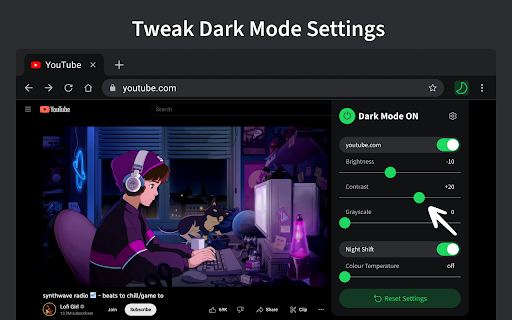


Turn on dark mode across all websites. Customize dark theme and brightness. Dark reader - dark skin for Chrome. Dark Mode - Midnight Chrome: A Night-Time Companion for Your Browsing Experience Transform your browsing experience with Dark Mode - Midnight Chrome, the ultimate Chrome extension designed for comfortable and eye-friendly internet usage at any hour.* Key Features and Benefits: 1. Universal Dark Mode: Instantly apply a sleek, dark theme across all your favorite platforms, including YouTube, Facebook, and more, ensuring a consistent and strain-free viewing experience. 2. Reading Night Shift Mode: Automatically adjusts your screen to warmer tones during night-time, reducing blue light exposure and aiding in better sleep quality. 3. Collaborative Browsing Support: Enhance group work or shared screen experiences with an interface that's easy on everyone's eyes, ideal for late-night study sessions or team projects. 4. Customizable Viewing: Tailor your browsing experience with adjustable brightness, contrast, grayscale, and color temperature settings, providing personalized comfort and accessibility. 5. Enhanced Contrast for Accessibility: Specialized contrast settings to aid users with visual impairments, ensuring the web is accessible and enjoyable for everyone. 6. Free to Use: Enjoy all these premium features at no cost, making it an ideal choice for students, professionals, and casual users alike. 7. Multi-Language Support: Catering to a global audience, ensuring a user-friendly experience for diverse users. 1. Install with a Click: Simply add the "Dark Mode - Midnight Chrome" extension to your Chrome browser from the Chrome Web Store. 2. One-Touch Activation: Enable dark mode across all sites with just one click. 3. Customize Your Experience: Access the extension's menu to adjust brightness, contrast, and more to fit your viewing preferences. 4. Enjoy Collaborative and Individual Browsing: Whether it's for personal use or while collaborating, the extension adapts to your needs. - Eye Comfort: Reduces eye strain, particularly during night-time browsing. - Enhanced Readability: Improves text clarity and reduces glare. - Energy Efficient: Can lead to reduced screen power consumption. - User-Friendly: Intuitive design for ease of use and customization. With "Dark Mode - Midnight Chrome," night-time browsing is no longer a strain on your eyes. Whether you're a night owl, a professional working late, or someone who enjoys a customizable browsing experience, this extension is your go-to solution for a more comfortable and personalized internet experience.

Dark Mode — Night Reader & Blue Light Filter
Automatic dark mode for all websites + blue-light filter. Customize themes, reduce eye strain — fast, private Chrome extension. Dark Mode — Night Reader & Blue Light Filter Enjoy automatic dark mode for all websites and protect your eyes with an advanced blue light filter. Fast, lightweight and privacy-friendly — built for comfortable night reading in Chrome. ✨ Key features: ➖Automatic dark theme: Instantly applies a dark theme to every website — no manual toggles. ➖Blue light filter: Reduce blue light to ease eye strain during night reading and long browsing sessions. ➖Full color customization: Pick or create your own dark palette with a simple color picker and presets. ➖Reading mode: Cleaner layout and adjustable brightness for distraction-free reading. ➖Privacy first: No ads, no tracking, no data collection — 100% local settings. ➖Lightweight & fast: Optimized to use minimal CPU and memory. ✅ Why choose Dark Mode — Night Reader: ➖Reduce eye strain and improve night-time reading comfort. ➖Make any website easier on the eyes with customizable dark themes. ➖Keep your browsing private — all settings are stored locally. 📌 How to use: 1.Install the extension and open the popup. 2.Toggle Dark Mode or Reading mode to enable. 3.Adjust the Blue Light Filter slider and choose custom colors. 4.Use per-site exceptions to disable dark mode if needed. 📎 Tips: ➖Use the color presets for quick theme changes. ➖Turn on Reading mode for articles to remove clutter and focus on text. 🛡️ Privacy & performance: We do not collect personal data. All processing is done locally in your browser for speed and security. ❓FAQ ➖Does it work on all sites? — Yes, it automatically applies to most websites; some complex web apps may need per-site tweaks. ➖Can I exclude a site? — Yes — add exceptions from the popup. ➖Is it resource heavy? — No — optimized for minimal CPU and memory usage. ➡️ Install Dark Mode — Night Reader now and make browsing at night comfortable and safe. If you like it, please leave a 5-star review — it helps us improve.

Dark Theme - Dark Reader for Web
Dark Theme switch any web pages to dark mode. Take care of your eyes day using a dark reader or change screen brightness. Dark Theme - Dark Reader for Web offers a dark theme for all websites, making it ideal for individuals working at night or those who prefer a dark background for online news or book reading. Additionally, the extension allows you to design your own custom theme using any color of your choice. This way, you can personalize the dark mode according to your preferences. What benefits does the Dark Mode extension offer? - You can manually switch the dark mode on or off by clicking on the extension icon. - You have the option to exclude or include specific sites from the dark mode by accessing "Dark Mode" and selecting "Disable/Enable Dark Mode for this site." - The extension allows you to customize the colors for websites according to your preferences. - You can set an automatic schedule for the dark mode to turn on or off by enabling "Auto ON/OFF" in the settings section. With Dark Theme, social networks, mainstream sites, and all other websites will be seamlessly transformed with dark colors for a unified dark mode experience. Introducing the new Option page with several useful features: 1. Site exclusion: Enter a correct web address to exclude specific pages from applying the black theme. 2. Page exclusion: Optionally add domains that you don't want the black theme to be applied to. 3. Theme changer: You can now create your own custom theme, save it, rename it, and apply it whenever you like. Night Shift: Activate Night Shift mode to change the screen's usual light to a warmer tone, safeguarding your eyes. You can easily toggle the tool on and off with a single click as needed. We welcome your questions and comments for our extension. Your feedback is highly valued!

Smart Dark Mode
Does not use heavy codes. It doesn't break the web design. Detects only bright sites and invert them to dark sites. - All elements are displayed normally. - The script is light. - Dark pages do not convert. - Easy to add/remove filters.

Dark Mode for Chrome
Dark mode for all websites. Use dark theme for night and daily browsing with dark reader. Night shift mode. Dark Mode and Dark Reader makes all the websites you browse into dark/night mode so that you can browse the internet without straining your eyes. It is an extremely useful chrome extension for those who use internet especially at night. The Dark theme extension. Works with all websites! You need to refresh all the tabs, which were opened BEFORE the dark reader was installed. You can also restart the Chrome to refresh all the tabs at once. Otherwise, dark mode and night shift mode will work only with the newly opened tabs. If the website has built-in night theme, you can control it directly from extension and if it doesn't like Gmail, Google Docs, Office Online, GitHub and millions others, we will convert the colors to provide you with smooth transition on dark mode. What will you get from Dark Reader extension: 1. An easy way to create dark mode on every website. In addition, you can customize your black theme visual from Brightness, Contrast, to Saturation. 2. A Night Shift mode which changes the website's color to warmer, making it much more pleasing to watch. You can choose to use either dark theme or night shift mode, or both. You can also quickly activate these modes with simple keyboard shortcuts. 3. You can set up schedule for each dark theme and night shift mode, and decide when you want to auto-activate dark theme. Also Dark for YouTube extension converts YouTube theme to a highly customizable dark charcoal/blue theme. This extension is built on top of the default YouTube theme, so it is very light-weighted compare to using themes injected by stylish or stylus extensions Note: Remember to disable any similar Night Theme extension to prevent compatibility issues! We hope you enjoy it.
