
pdpfhanekfkeijhemmfbnnjffiblgefi

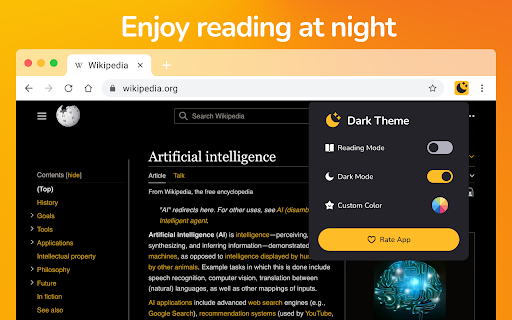

Automatic dark mode for all websites + blue-light filter. Customize themes, reduce eye strain — fast, private Chrome extension. Dark Mode — Night Reader & Blue Light Filter Enjoy automatic dark mode for all websites and protect your eyes with an advanced blue light filter. Fast, lightweight and privacy-friendly — built for comfortable night reading in Chrome. ✨ Key features: ➖Automatic dark theme: Instantly applies a dark theme to every website — no manual toggles. ➖Blue light filter: Reduce blue light to ease eye strain during night reading and long browsing sessions. ➖Full color customization: Pick or create your own dark palette with a simple color picker and presets. ➖Reading mode: Cleaner layout and adjustable brightness for distraction-free reading. ➖Privacy first: No ads, no tracking, no data collection — 100% local settings. ➖Lightweight & fast: Optimized to use minimal CPU and memory. ✅ Why choose Dark Mode — Night Reader: ➖Reduce eye strain and improve night-time reading comfort. ➖Make any website easier on the eyes with customizable dark themes. ➖Keep your browsing private — all settings are stored locally. 📌 How to use: 1.Install the extension and open the popup. 2.Toggle Dark Mode or Reading mode to enable. 3.Adjust the Blue Light Filter slider and choose custom colors. 4.Use per-site exceptions to disable dark mode if needed. 📎 Tips: ➖Use the color presets for quick theme changes. ➖Turn on Reading mode for articles to remove clutter and focus on text. 🛡️ Privacy & performance: We do not collect personal data. All processing is done locally in your browser for speed and security. ❓FAQ ➖Does it work on all sites? — Yes, it automatically applies to most websites; some complex web apps may need per-site tweaks. ➖Can I exclude a site? — Yes — add exceptions from the popup. ➖Is it resource heavy? — No — optimized for minimal CPU and memory usage. ➡️ Install Dark Mode — Night Reader now and make browsing at night comfortable and safe. If you like it, please leave a 5-star review — it helps us improve.

Night Mode
Enable Night Mode for Chrome browser with sleek dark mode theme, chrome night mode, eye-friendly yellow filter & font size controls ✅ Transform your browsing experience with night mode for chrome browser. Our extension turns harsh whites into soothing dark hues with just one toggle. By enabling this gentle dark mode theme, you reduce blue light exposure, minimize eye fatigue, and protect your vision during late-night work. ✅ The comfortable interface elevates your productivity whether reading articles or viewing spreadsheets. Enjoy prolonged screen time with minimal strain and a calming aesthetic. Introducing three simple toggles to customize your workflow: 🌙 night mode on/off – switch your interface to a deep, restful theme in a single click. 🌙 yellow mode on/off – apply a warm yellow overlay to further reduce blue light for cozy late-night sessions. 🌙 font size bigger-smaller – adjust text size on the fly for optimal readability in any situation. These toggles allow fast switching without reloading pages, giving you instant control. 1️⃣ install chrome night mode extension from the Chrome Web Store. 2️⃣ click the night mode toggle in your toolbar to activate the dark layout. 3️⃣ personalize your workspace by enabling yellow mode and tweaking font size controls for the perfect view. Once installed, the toolbar icon appears next to your address bar for easy access at any time. ➤ seamless google docs night mode support keeps your document editing gentle on the eyes. ➤ intuitive night mode for browser experience applies a consistent dark look across every site. ➤ quick switch between mode night and default view for effortless day-night transitions. ➤ optimized darker mode and black mode options reduce glare and enhance visual comfort. ➤ lightweight design ensures minimal CPU usage so your device remains fast and responsive. no website is left untouched – pages without dark support get dynamically styled. this tool works smoothly on google night mode and google night time mode for sites lacking a built-in dark option. whether you’re drafting emails, browsing social feeds, or working in web apps, the extension delivers a unified darker interface. 📝 It also integrates with popular platforms like calendars, document editors, and chat apps without causing flicker. make every website a relaxing environment, even those without native night settings. enjoy relief from harsh backgrounds without compromising speed or performance. ✅ zero performance impact ensuring smooth scrolling in dark theme app environments. ✅ quick access to chrome night mode with minimal clicks. ✅ seamlessly switch to chrome dark theme extension for a unified look. ✅ utilize chrome extension dark theme presets effortlessly. ✅ enjoy your preferred dark mode theme with minimal setup. ✅ correct nighmode and nught mode handling for even the oddest typos. ✅ built with best practices to support all modern chromium browsers. ▸ protect your eyes during late-night work sessions with soothing tones. ▸ reduce strain with optimized darker mode presets for prolonged focus. ▸ enjoy sleek black mode aesthetics that blend with any website. ▸ maintain concentration with an unobtrusive user interface. ▸ ideal for writers, coders, and night owls craving comfort after sunset. ▸ quick setup with no additional permissions required. Quick tips for optimal viewing: • toggle night shift mode manually when needed for a gradual color temperature change. • pair yellow mode on/off with warm lighting to avoid eye strain during extended use. • adjust font size bigger-smaller before starting long reading or coding marathons. • refresh pages selectively to ensure theme consistency across new tabs. 💡 does this extension affect page load times? 💡 no, zero performance overhead ensures fast browsing even with dark themes. 💡 can I report bugs or typos related to nighmode? 💡 send feedback directly through the Chrome Web Store listing. 💡 are updates installed automatically? 💡 yes, the extension updates seamlessly in the background for continuous improvements. Ready to transform your browsing after dark? install now and bring restful viewing to every website. embrace soothing darker mode and black mode aesthetics, reduce eye fatigue, and enjoy comfortable late-night sessions. Tweak brightness, yellow mode, and font size for a truly personalized experience. give your eyes the break they deserve with our powerful and easy-to-use extension.

Umbra Dark Mode
Experience the Elegance of Umbra: Seamless Dark Mode for Enhanced Browsing Experience the Elegance of Umbra: Seamless Dark Mode for Enhanced Browsing 🌟 🌗 Dark mode on all web sites: Enjoy a visually pleasing browsing experience with Umbra's seamless dark mode. Say goodbye to eye strain and immerse yourself in the sleek and stylish world of dark mode across all websites. 🎨 Up-to-date styles: Umbra keeps pace with the latest design trends, ensuring that your favorite websites always look their best in dark mode. No more outdated or inconsistent styles—enjoy a consistently polished browsing experience. ⚙️ Whitelist feature: Worried about compatibility issues? No problem! Umbra offers a handy whitelist feature that allows you to disable dark mode for specific websites if it doesn't work as expected. Stay in control of your browsing experience. 🌟 Explore Umbra today and unlock the beauty of dark mode. Enhance your browsing experience with ease and style. Install now! 🌟

Night Theme for Web
Night Mode a classic dark theme for every website. Switch website to night reader and for night and daily browsing Night Theme - Dark Mode Browser Extension Night Theme is a cutting-edge browser extension designed to enhance your browsing experience with Dark Mode, Night Mode, and customizable UI themes. Whether you're working late or surfing the web, this extension provides a soothing, eye-friendly experience tailored to your needs. 🌙 Eye Comfort with Night Mode: Protect your eyes from bright, harsh light by activating Night Mode, which reduces screen brightness and applies a rich, dark palette to minimize eye strain, especially during nighttime browsing. ⚡ Energy-Efficient Dark Theme: Save your laptop’s battery life with the energy-saving benefits of dark colors. Enjoy longer browsing sessions without worrying about frequent recharges. ➡️ Customizable Themes and Colors: Personalize your browsing experience by choosing from various dark color schemes and using the integrated color picker to create your unique style. ✨ Smart Theme Recognition: The extension intelligently adapts to websites' existing UI themes, ensuring seamless integration for a visually pleasing experience. 🖤 User-Friendly Design: With an intuitive interface and easy setup, Night Theme makes theme customization accessible to everyone. Install it in just a few clicks and enjoy instant benefits. Transform your online experience with Night Theme. Whether you want a cozy reading mode or an energy-efficient dark theme, this extension has it all. Download it today and explore the world of dark mode, custom colors, and effortless theme customization!

Dark Mode for Chrome
Dark mode for all websites. Use dark theme for night and daily browsing with dark reader. Night shift mode. Dark Mode and Dark Reader makes all the websites you browse into dark/night mode so that you can browse the internet without straining your eyes. It is an extremely useful chrome extension for those who use internet especially at night. The Dark theme extension. Works with all websites! You need to refresh all the tabs, which were opened BEFORE the dark reader was installed. You can also restart the Chrome to refresh all the tabs at once. Otherwise, dark mode and night shift mode will work only with the newly opened tabs. If the website has built-in night theme, you can control it directly from extension and if it doesn't like Gmail, Google Docs, Office Online, GitHub and millions others, we will convert the colors to provide you with smooth transition on dark mode. What will you get from Dark Reader extension: 1. An easy way to create dark mode on every website. In addition, you can customize your black theme visual from Brightness, Contrast, to Saturation. 2. A Night Shift mode which changes the website's color to warmer, making it much more pleasing to watch. You can choose to use either dark theme or night shift mode, or both. You can also quickly activate these modes with simple keyboard shortcuts. 3. You can set up schedule for each dark theme and night shift mode, and decide when you want to auto-activate dark theme. Also Dark for YouTube extension converts YouTube theme to a highly customizable dark charcoal/blue theme. This extension is built on top of the default YouTube theme, so it is very light-weighted compare to using themes injected by stylish or stylus extensions Note: Remember to disable any similar Night Theme extension to prevent compatibility issues! We hope you enjoy it.
