
cnnipakfnojcohgpgikgnndiiajiooja

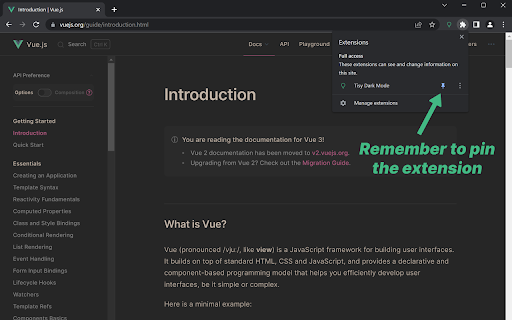
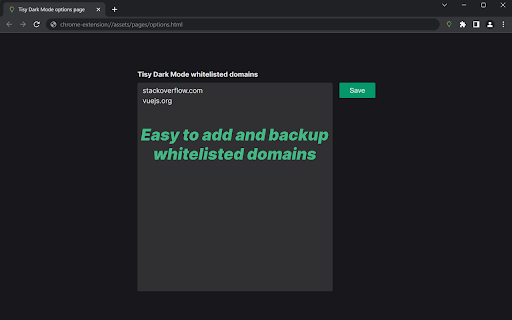
Apply dark mode for any website • Apply dark mode for any website (except pages protected by the browser of course). • Super simple and easy to use with one click. • Instantly apply for all other tabs having the same domain. • Day and Night styles (Day style has more contrast). • An option page that allows manually input and backup whitelisted domains.

Dark Mode for Chrome
Now enjoy Dark Mode on all the websites using this Extension. Simple one click turn ON/OFF. Features: # Simple to use. # Light Weight # Turn ON/OFF in a single step. This extension works on all the websites opened in the browser. Note: Refresh the page if dark mode is not applied to the page when turned ON.

Dark Mode Extension
Save your eyes and browse in comfort with Dark Mode Extension! Transform any website into a sleek, dark theme that's easy on the eyes, especially at night. Reduce eye strain, improve readability, and create a more relaxing browsing experience. Universal Dark Mode: Works on all your favorite websites! Customization Options: Choose from mild to strong inversion, adjust brightness and contrast, or even enable grayscale or sepia mode. Easy to Use: Simple one-click activation and deactivation from the toolbar. Take control of your browsing experience and Embrace the Dark Side with Dark Mode Extension!

Midnight Dark mode - Dark theme Chrome
Turn on dark mode across all websites. Customize dark theme and brightness. Dark reader - dark skin for Chrome. Dark Mode - Midnight Chrome: A Night-Time Companion for Your Browsing Experience Transform your browsing experience with Dark Mode - Midnight Chrome, the ultimate Chrome extension designed for comfortable and eye-friendly internet usage at any hour.* Key Features and Benefits: 1. Universal Dark Mode: Instantly apply a sleek, dark theme across all your favorite platforms, including YouTube, Facebook, and more, ensuring a consistent and strain-free viewing experience. 2. Reading Night Shift Mode: Automatically adjusts your screen to warmer tones during night-time, reducing blue light exposure and aiding in better sleep quality. 3. Collaborative Browsing Support: Enhance group work or shared screen experiences with an interface that's easy on everyone's eyes, ideal for late-night study sessions or team projects. 4. Customizable Viewing: Tailor your browsing experience with adjustable brightness, contrast, grayscale, and color temperature settings, providing personalized comfort and accessibility. 5. Enhanced Contrast for Accessibility: Specialized contrast settings to aid users with visual impairments, ensuring the web is accessible and enjoyable for everyone. 6. Free to Use: Enjoy all these premium features at no cost, making it an ideal choice for students, professionals, and casual users alike. 7. Multi-Language Support: Catering to a global audience, ensuring a user-friendly experience for diverse users. 1. Install with a Click: Simply add the "Dark Mode - Midnight Chrome" extension to your Chrome browser from the Chrome Web Store. 2. One-Touch Activation: Enable dark mode across all sites with just one click. 3. Customize Your Experience: Access the extension's menu to adjust brightness, contrast, and more to fit your viewing preferences. 4. Enjoy Collaborative and Individual Browsing: Whether it's for personal use or while collaborating, the extension adapts to your needs. - Eye Comfort: Reduces eye strain, particularly during night-time browsing. - Enhanced Readability: Improves text clarity and reduces glare. - Energy Efficient: Can lead to reduced screen power consumption. - User-Friendly: Intuitive design for ease of use and customization. With "Dark Mode - Midnight Chrome," night-time browsing is no longer a strain on your eyes. Whether you're a night owl, a professional working late, or someone who enjoys a customizable browsing experience, this extension is your go-to solution for a more comfortable and personalized internet experience.

DarkLume - Dark mode for websites
Set dark theme on every websites by using modern CSS. Lightweight and fastest dark mode. Optimal eye protection. Open source 📢 Apply dark theme on any websites by using modern CSS. Lightweight and fastest dark mode. ✪ No signup or permission required ✪ Don't ask permission: "Read and change all your data on all websites". ✪ Apply dark theme without losing website styles. ✪ Use modern CSS feature to apply dark themes. ✪ Better color output as compare to other dark mode extensions. ✪ darkEye doesn't disturb existing dark mode websites. ✪ darkEye doesn't inject complex css selector that hurt performance. ✪ Adjust brightness & warm color (coming soon) ✪ Inject custom css rules ✪ Free and Open source:https://github.com/anilkumarum/dark-lume ✪ Lightweight 20KB only ✪ No tracking & no Ads. ⌨ Keyboard shortcut: Press "Alt+D" to open extension's popup window With Night Eye, you can effortlessly enable dark mode on any website, ensuring optimal readability and reducing eye strain, especially in low light environments. ✅ Apply darkTheme on specific domains or all domains darkEye doesn't apply darkTheme until you give permission. Open extension's popup window to enable dark mode. ℹ️ Support Please report issues on github issues https://github.com/anilkumarum/dark-eye/issues For contact, Please mail us on 📧 webrailhelp@gmail.com Join DarkEye on google Groups: https://groups.google.com/g/darkeye ⚠️ Note: This extension is still in beta
