
eimadpbcbfnmbkopoojfekhnkhdbieeh
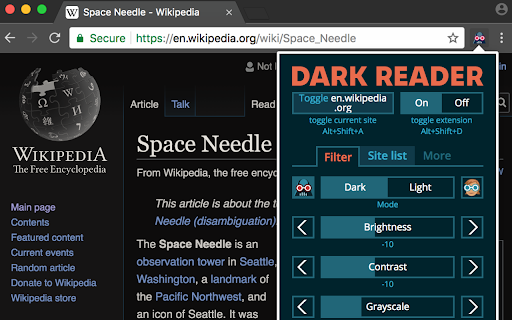
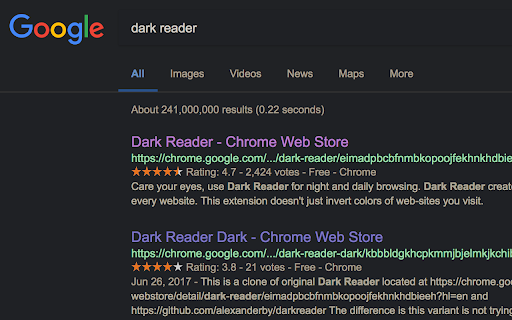
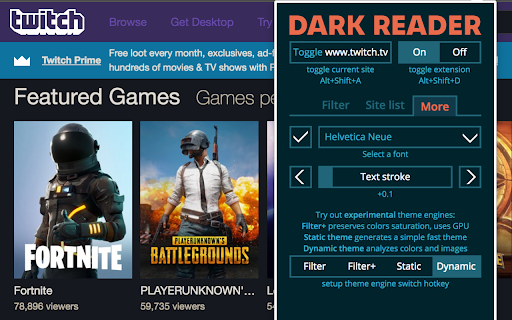
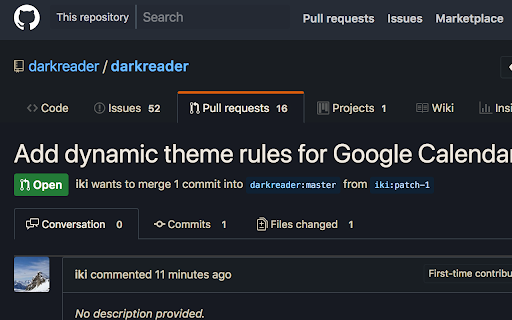
Dark mode for every website. Take care of your eyes, use dark theme for night and daily browsing. This eye-care extension enables night mode by creating dark themes for websites on the fly. Dark Reader inverts bright colors to make web pages high contrast and easier to read. Adjust brightness, contrast, the sepia filter, font preferences. Enable dark mode on every web page or give websites a sepia tone. Enable or disable Dark Reader for specific websites, automatically sync with system dark mode, or detect already dark websites and leave them unchanged. This is the original Dark Reader extension. Since 2014, we continuously evolve alongside modern web technologies to deliver fast and reliable dark mode support for people sensitive to bright light. By installing the extension you agree to these terms of use https://darkreader.org/terms/

Dark Reader - Dark Mode for Chrome
Turn on dark mode for Chrome. Take care of your eyes, and use a dark theme for the night and daily browsing. Dark Reader - Dark Mode for Chrome is a fast, lite, and simple extension that automatically turns the colors of your browser content warmer or darker. This eye-care extension enables night mode by creating dark themes for websites on the fly. Dark Reader inverts bright colors, making them high contrast and easy to read at night. What will you get from the Dark Mode extension: 1) An easy way to create dark mode on every website. In addition, you can customize your dark theme visual from Brightness, Contrast, to Saturation. 2) A night shift mode that changes the website’s color to warmer, making it much more pleasing to watch. Night Shift Activate Night Shift mode to invert the usual light from the screen to a warmer tone, thus, preventing your eyes from harm. You can turn the tool on and off with a single click when you need it. Dark Mode extension automatically shifts the colors of your browser content to the warmer end of the color spectrum after dark. Dark Reader extension will put a dark theme on all websites, suitable for those who work at night and dark reader for online news or book reading. Dark Theme for YouTube extension converts the YouTube theme to a highly customizable dark charcoal/blue theme. This Dark Reader extension is built on top of the default YouTube theme (native dark theme).

Dark Night Mode
It is a night mode for the entire Internet. It darkens all the websites you visit so that you can browse without straining your eyes Dark Night Mode is a Free Open Source Software which makes all the websites you browse into dark/night mode so that you can browse the internet without straining your eyes. It is an extremely useful chrome extension for those who use internet especially at night. We use a unique algorithm to apply dark mode to all the websites in real-time as you browse. It basically detects the color of each element of a website and intelligently converts it to a darker shade. Bright colors are darkened at more intensity than dark colors so that most of the colors are preserved. Unlike other similar extensions, we do NOT invert the colors, so black websites will not change its color into white. An added benefit is that the images will also not be distorted! I think we were hit by the one-star-bot-ratings because we were the only extension to have this intelligent-algorithm. Now, after this extension became popular, one another super famous extension have copied this feature of ours. We have also put immense effort in eliminating the flashes of bright white screen while loading different websites. It was a challenging task due to the limitations of chrome, but we were able to eliminate this problem with 99.9% success rate. Using the brightness slider, you can adjust the brightness of your browser beyond what your computer's brightness adjuster allows. This is useful in dimming the brightness to your likening. For example, by default the images are shown with normal color, but you can darken it by sliding down the brightness slider. There is also an Auto mode which will automatically turn on the Dark Mode at night 8:00PM and will turn off at morning 6:00AM. It was complicated to develop an option to customize this timing, but we are working on it and may add this option in the future versions. There is also Whitelist feature which can be helpful if you do not want the dark mode to work on certain websites. Since this extension will darken all the websites you visit at night, you will initially not enjoy it due to the huge change in your routine. However, our internal studies have shown that people start getting used to it after about three weeks of use. Some people have claimed that this extension helps them sleep better while some others have said that it helped them reduce the burning sensation in their eyes caused by extensive browsing of the internet in the dark. This plugin is NOT 100% perfect. It never will be perfect because many websites are developed in a non-standard fashion and there is no easy way to detect a site and perfectly change its colors in real time withing milli-seconds so that the user do not see the bright colors. It is a double edged sword - If we add more conditions to make the algorithm smarter, then it will affect the processing speed and the user will see flashes of white light, so we had to make some choices to get an optimal balance. If you want your browser window to also look black similar to how it is shown in the screenshots, then you must install a Dark Chrome theme as well. We suggest to search "Morpheon Dark Theme" and install it in google chrome. It took us - two developers two whole months of full time developmental efforts to conceptualize, design, code, test, calibrate and deploy this extension. We had initially started it as a side project aiming to make it in couple of days, but it ended up taking significantly more time than expected! We hope you enjoy it.

Dark Mode - Night Eye
Dark Mode: Switch to dark reading for night & day browsing. More than dark theme style, it ensures optimal eye protection. Night Eye brings dark mode to almost any website, helping you browse, read, work, and study more comfortably in low-light environments. Instead of simply inverting colors, Night Eye analyzes each page and converts bright interfaces into a smooth dark theme while preserving important images, videos, and media. You can also fine-tune the look of each website with brightness, contrast, saturation, warmth, dimming, and other visual controls. Night Eye is used by over 1,000,000 users across major browsers and has been actively maintained since 2018. ➤ Dark mode for websites that do not offer one ➤ Custom brightness, contrast, saturation, warmth, and dim controls ➤ Blue light reduction for late-night browsing ➤ Schedule dark mode to turn on and off automatically ➤ Support for PDFs ➤ Integration with websites that already have built-in dark themes ➤ Sync with your operating system or browser color scheme ➤ Import and export settings between browsers ➤ Per-website and global customization ➤ No ads ➤ No selling of user data Dark Mode Converts website colors, icons, and small visual elements to create a comfortable dark browsing experience. Filtered Mode Keeps the original website colors while allowing you to adjust brightness, contrast, warmth, and other visual settings. Normal Mode Turns Night Eye off for the current website and restores the original page appearance. Night Eye gives you control over how each website looks. You can apply settings globally or customize individual websites. Images Night Eye focuses on converting small images, icons, and interface elements. Larger media such as photos, videos, and social media posts are preserved so websites remain usable and natural. Brightness, Contrast, and Saturation Adjust the visual intensity of websites to match your personal preference and reduce discomfort during long browsing sessions. Blue Light / Warmth Reduce cold screen light during evening or late-night browsing by increasing warmth. Dim Lower overall page brightness when browsing in a dark room or when your screen feels too bright. Some websites already include their own dark themes. Night Eye can work with supported built-in dark themes, giving you easier control from one place. Night Eye Lite is the forever-free version of Night Eye. It allows dark mode on up to 5 websites of your choice, with no ads and no hidden charges. New users can try Night Eye Pro for 3 months with no credit card required. Paid plans are available for users who want more websites and additional usage options: • Night Eye Pro • Night Eye Pro Max • Night Eye Ultimate - one-time purchase option For the latest pricing and plan details, visit: https://nighteye.app/how-to-start/ Night Eye needs permission to read and change website content so it can detect page colors and apply dark mode. This is how the extension changes bright pages into darker, more comfortable versions. Night Eye does not sell your data and does not use third-party analytics such as Google Analytics inside the extension. Your visual preferences, such as website-specific color settings, brightness, contrast, saturation, warmth, and dim level, are stored locally on your device. These settings are used to remember how you want each website to look. For more information, see our privacy policy: https://nighteye.app/privacy-policy/ Need help or found a website that does not look right? Contact our support team and we will help you resolve the issue. You can also follow product updates and release notes here: https://nighteye.app/changelog

Dark Mode for Chrome
Dark mode for all websites. Use dark theme for night and daily browsing with dark reader. Night shift mode. Dark Mode and Dark Reader makes all the websites you browse into dark/night mode so that you can browse the internet without straining your eyes. It is an extremely useful chrome extension for those who use internet especially at night. The Dark theme extension. Works with all websites! You need to refresh all the tabs, which were opened BEFORE the dark reader was installed. You can also restart the Chrome to refresh all the tabs at once. Otherwise, dark mode and night shift mode will work only with the newly opened tabs. If the website has built-in night theme, you can control it directly from extension and if it doesn't like Gmail, Google Docs, Office Online, GitHub and millions others, we will convert the colors to provide you with smooth transition on dark mode. What will you get from Dark Reader extension: 1. An easy way to create dark mode on every website. In addition, you can customize your black theme visual from Brightness, Contrast, to Saturation. 2. A Night Shift mode which changes the website's color to warmer, making it much more pleasing to watch. You can choose to use either dark theme or night shift mode, or both. You can also quickly activate these modes with simple keyboard shortcuts. 3. You can set up schedule for each dark theme and night shift mode, and decide when you want to auto-activate dark theme. Also Dark for YouTube extension converts YouTube theme to a highly customizable dark charcoal/blue theme. This extension is built on top of the default YouTube theme, so it is very light-weighted compare to using themes injected by stylish or stylus extensions Note: Remember to disable any similar Night Theme extension to prevent compatibility issues! We hope you enjoy it.
