
mmjgchjpejidmgmemdpemiojmblddmfb

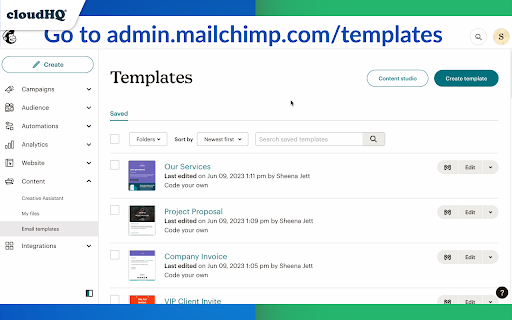


Import and integrate MailChimp templates into Gmail Integrate your Mailchimp email templates directly into Gmail™ for seamless access and increased productivity! This extension allows you to: ✅ Import Mailchimp email templates to Gmail™ ✅ Send your MailChimp template via Gmail™ without leaving the Mailchimp editor ✅ No more sending emails from impersonal "no-reply@url.com" email addresses; they are sent from your email address ✅ After importing your Mailchimp email templates into Gmail, you can access them in your new Gmail email template library without ever leaving Gmail. Whether you're a sales professional, small business owner, designer, marketer or anyone needing access to their Mailchimp templates, this app simplifies the process and keeps you productive. This is your solution to conveniently send high quality, personalized emails. ~~~ Key Features ~~~ 🌟 Import your Mailchimp templates directly into Gmail™. 🌟 Send your Mailchimp templates using your email, without ever leaving Mailchimp. 🌟 Unlimited template storage for Premium Plan users. 🌟 Quick and easy installation, works in Chrome and Microsoft Edge without consuming space on your computer. 🌟 5-Star ratings by our highly satisfied users. 1. Install the extension. 2. Go to https://admin.mailchimp.com/templates/ 3. Choose the template you want to send. 4. You will see a "Gmail" icon next to your template. Click on it and your template will show in your Gmail email compose window. 5. Send your email using your own Gmail address, without leaving Mailchimp. Mailchimp Templates in Gmail by cloudHQ is perfect for: 🎯 **Small Business Owners** who appreciate the convenience of sending customized emails right from their Gmail. 🎯 **Designers and Marketers** who love to send visually stunning emails from their Gmail without leaving Mailchimp. No more switching between platforms or impersonal emails. Start improving your productivity with Mailchimp Templates in Gmail by cloudHQ. cloudHQ. Helping your productivity, 1 click at a time. cloudHQ website: https://www.cloudhq.net/ App website: https://www.mailchimp-templates.com Pricing: https://www.mailchimp-templates.com/pricing Support page: https://support.cloudhq.net/?s=mailchimp Blog: https://blog.cloudhq.net

Email Sender Icons by cloudHQ
Identify Companies in Your Inbox. It's no secret that companies have more purchasing power than individuals, so identifying them in your inbox can be helpful when you need to triage who you reply back to first. Email Sender Icons by cloudHQ does just that. It visually associates an official company logo (favicon) to someone who sends you an email, without having to open the email itself. It's like "caller id" for your email. Now you can prioritize triaging your email response time to large companies first, instead of individuals with a free email account on platforms like Gmail™, Yahoo, Hotmail, etc. Easily Identify: - Companies in your inbox - Invoices to pay (Paypal, Venmo, etc) - Inter-office emails - Purchase Orders The icon (aka favicon) is determined by the sender's email domain address, and appears on the same line as your email preview. For example, if you receive an email from elon@tesla.com, this Gmail™ extension will add the Tesla logo next to your message preview so that you can immediately identify that Elon is probably very important and you should return his message before others in your inbox. A note on privacy and security: All logo (favicon) processing is done locally within your browser, and no Gmail™ data is ever uploaded or shared anywhere. cloudHQ. Helping your productivity, 1 click at a time. cloudHQ Website: https://www.cloudhq.net/ App Website: https://www.email-sender-icons.com Pricing: FREE Support page: https://support.cloudhq.net Blog: https://support.cloudhq.net/category/browser-extensions/email-sender-icons/

ChatGPT for Google by cloudHQ
This extension gives you ChatGPT query responses alongside Google search engine results. This extension is easy to use and enhances your Google search experience. Features: ✅ OpenAI Responses alongside your Google search results ✅ A summary of search results ✅ Supplement responses with data after 2021 via search results ✅ OpenAI API and multiple version support ✅ Toggle on/off as desired ✅ Copy to clipboard ~~~How to use it~~~ 1. Get an OpenAI account here if you don't already have one: https://chat.openai.com/chat and create an account 2. Install this extension 3. Open Chrome and search for anything in Google Search 4. AI-generated responses alongside conventional search engine results will be displayed on the right side of your window 5. When in ChatGPT, simply type in your prompt, and the results will be ChatGPT's response, and will then provide you with a Google Search summary on the subject (very helpful for up to date information) ~~~FAQ~~~ 1. What is ChatGPT? ChatGPT is a computer program created by OpenAI that can generate human-like text. It's like a super-advanced version of autocorrect: it predicts and generates what it thinks should come next in a conversation or a piece of writing. This is useful for many things, such as writing emails, creating content, answering questions, and even tutoring in different subjects. It's important to note that it doesn't know any personal data unless you tell it during the conversation, and it doesn't know specifics about the documents it learned from. 2. What does this extension do? This browser extension is developed by cloudHQ LLC. The extension enhances search engine results with the power of artificial intelligence from OpenAI. The extension operates by displaying AI-generated responses alongside conventional Google search engine results, offering users an enhanced search result experience. 3. Is this extension free to use? Yes, the extension is free to use. 4. Is this extension integrated with other cloudHQ products? Yes. This extension is fully integrated with other cloudHQ products such as Save Emails to PDF by cloudHQ, Export Emails to Sheets by cloudHQ, and more. 5. Do I need an OpenAI (chat.openai.com) account? Yes, you need to have an OpenAI account to use this extension. Go to https://chat.openai.com/chat and create an account. If you choose to use an API, you need to have a developer account. You can create it here: https://platform.openai.com/ We hope you enjoy your new search result experience and find it helpful for your overall knowledge about anything you wish to know about. cloudHQ. Helping your productivity, 1 click at a time. cloudHQ website: https://www.cloudhq.net/ App website: https://www.chatgpt-for-google-search.com/ Pricing: https://www.chatgpt-for-google-search.com/pricing Support page: https://support.cloudhq.net/category/browser-extensions/chatgpt-for-google/ FAQ page: https://support.cloudhq.net/ Blog: https://blog.cloudhq.net

ChatGPT for Gmail by cloudHQ
Automatically write emails using ChatGPT for Gmail 🚀 Supercharge Your Email Game with ChatGPT for Gmail! 🚀 Introducing the ultimate Chrome extension for Gmail that revolutionizes the way you write emails! Unleash the power of cutting-edge AI technology to elevate your communication skills and make every email count. 🌟 What's in store for you? 🌟 🔥 AI-Powered Email Composer: Generate entire emails and messages using the groundbreaking OpenAI AI, meticulously crafted to work seamlessly with Gmail. 🎯 Key Functions Tailored for You: ✅ Instant Grammar Guru: Say goodbye to embarrassing typos! ChatGPT intelligently checks and edits your grammar on the fly. ✅ Context-Smart Replies: Create contextually appropriate responses for any email you receive, boosting your efficiency and professionalism. ✅ Effortless Outreach: Generate persuasive and engaging outreach emails from scratch, making connections easier than ever. 🌠 Exclusive Features: ✅ Privacy-First AI: ChatGPT for Gmail respects your privacy, ensuring your data stays safe and secure. ✅ Unparalleled Quality: Experience the finest responses, outshining all other natural language processing AIs in the market. ✅ Gmail-Optimized: Enjoy a seamless integration with Gmail, designed for your convenience. ✅ Multilingual Magic: Break language barriers with support for all languages, empowering global communication. 🎉 Download ChatGPT for Gmail now and experience email mastery like never before! 🎉 ~~~How to use it~~~ 1. Go to https://chat.openai.com/chat and create an account. 2. Install this extension. 3. Open Gmail and compose a new email. 4. Click on the "ChatGPT for Gmail" icon and enter your ChatGPT prompt to complete your email message. You can also type @chatgpt 5. If you are satisfied with the message, simply click on send. Text Enhancement: Simply select any text in your email, right-click to access the context menu, and choose options like "Fix Grammar" or "Summarize" for instant improvements. Smart Reply Assistance: Click on our extension's icon adjacent to the 'Reply' button to access a variety of response prompts. For instance, select "Answer to the Best of Your Knowledge" for AI-assisted responses tailored to the email's content. Custom Prompts: Personalize your experience by adding your own prompts. To do this, click on our extension icon located in the top-right corner of your browser. ~~~FAQ~~~ Q: What is ChatGPT for Gmail? A: It's an extension that integrates OpenAI with Gmail to assist in drafting and replying on emails. Q: What are the requirements to use it? A: A valid OpenAI account is necessary. Go to https://chat.openai.com/chat and create an account. Q: What functions does it offer? A: Creating or replying to emails, correcting grammar and spelling, enhancing or rewriting text, and sending instructions to ChatGPT directly. It also includes prompt library. Q: How does it help draft emails? A: Through writing suggestions, automated responses, and grammar and spell checking. Q: Can I use my own API key with it? A: Yes, you can use your own OpenAI API key. Q: Can I use my own fine-tuned model? A: Yes, you can use your fine-tuned model. Please contact us to help you setup a system to create a fine-tuned model. Q: How can I create a library of prompts? A: Yes. You can use Gmail Snippets by cloudHQ extension to create shortcuts for prompts. You can also customize context prompts and auto-reply prompts. cloudHQ website: https://www.cloudhq.net/ App website: https://www.chatgpt-for-gmail.com/ Pricing: https://www.chatgpt-for-gmail.com/pricing Support page: https://support.cloudhq.net/category/browser-extensions/chatgpt-for-gmail/ FAQ page: https://support.cloudhq.net/google-chatgpt-faq-frequently-asked-questions/ Blog: https://blog.cloudhq.net Gmail, Google Calendar, and Google Workspace are trademarks of Google LLC. Use of these trademarks is subject to Google Permissions.

Outlook Email Templates by cloudHQ
Beautiful email templates for Microsoft Outlook With over 1,500 professionally-designed, email templates at your disposal, you can send beautiful emails that significantly increases your click through rates. Open a template directly in your Outlook email compose window. Once you’ve personalized your template, you’ll be able to send it out like any other email in Outlook. This extension is very easy to use: 1) Install the add on 2) Go to your Office 365 email (https://outlook.office.com/mail/) or Outlook email (https://www.outlook.com) 3) Click on the "Compose" button 4) Click on the new "Browse Templates" button 5) Select any template from our library of pre-designed email templates 6) Edit the email 7) Send email Great for: ✅ Newsletters ✅ Discount sales ✅ Party invitations ✅ Congratulations ✅ Holiday greetings ✅ Event emails (like when you need to send a client a reminder to pay their bill) ✅ Common email responses (like asking a potential customer to fill out an intake form, troubleshooting instructions, etc.) ✅ Business email templates ✅ Birthday greetings ✅ Education-specific email templates ✅ Job seeker templates ✅ Legal email templates ✅ Marketing email templates ✅ Online class email templates ✅ Real estate email templates ✅ Reminders ✅ Stationery ✅ ecards We continuously add new templates to provide you with even greater value. 🔥🔥🔥 You can view our template library here: 👇 https://www.email-templates.com/email-templates App website: https://www.email-templates.com cloudHQ website: https://www.cloudhq.net Pricing: https://www.email-templates.com/pricing Support page: https://support.cloudhq.net/category/browser-extensions/outlook-email-templates FAQ page: https://support.cloudhq.net/outlook-email-templates-faq-frequently-asked-questions/ Blog: https://blog.cloudhq.net
