
llhlhokgnabmiikbjdgjblajbbbenemj


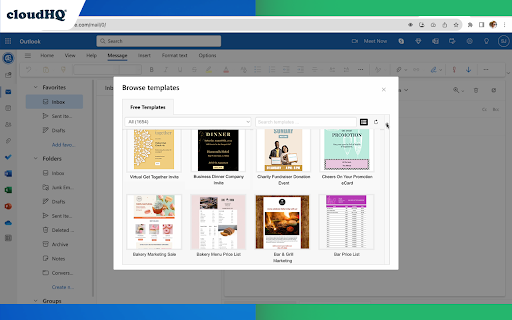
Beautiful email templates for Microsoft Outlook With over 1,500 professionally-designed, email templates at your disposal, you can send beautiful emails that significantly increases your click through rates. Open a template directly in your Outlook email compose window. Once you’ve personalized your template, you’ll be able to send it out like any other email in Outlook. This extension is very easy to use: 1) Install the add on 2) Go to your Office 365 email (https://outlook.office.com/mail/) or Outlook email (https://www.outlook.com) 3) Click on the "Compose" button 4) Click on the new "Browse Templates" button 5) Select any template from our library of pre-designed email templates 6) Edit the email 7) Send email Great for: ✅ Newsletters ✅ Discount sales ✅ Party invitations ✅ Congratulations ✅ Holiday greetings ✅ Event emails (like when you need to send a client a reminder to pay their bill) ✅ Common email responses (like asking a potential customer to fill out an intake form, troubleshooting instructions, etc.) ✅ Business email templates ✅ Birthday greetings ✅ Education-specific email templates ✅ Job seeker templates ✅ Legal email templates ✅ Marketing email templates ✅ Online class email templates ✅ Real estate email templates ✅ Reminders ✅ Stationery ✅ ecards We continuously add new templates to provide you with even greater value. 🔥🔥🔥 You can view our template library here: 👇 https://www.email-templates.com/email-templates App website: https://www.email-templates.com cloudHQ website: https://www.cloudhq.net Pricing: https://www.email-templates.com/pricing Support page: https://support.cloudhq.net/category/browser-extensions/outlook-email-templates FAQ page: https://support.cloudhq.net/outlook-email-templates-faq-frequently-asked-questions/ Blog: https://blog.cloudhq.net

Enhanced Outlook Web App
Improves the default behaviour of the Outlook Web App. This extension improves the free version of the Outlook Web App where ads are being blocked and spam-mails are automatically moved to the spam-folder. Filtration of mails is based on senders and subjects which you define yourself. Ads which currently are blocked include "ad-mails" and "Upgrade to Microsoft 365 Premium". If you should encounter any issues, problems or bugs please report them to: eowa.bug.report@outlook.com

ChatGPT Sidebar by cloudHQ
ChatGPT sidebar as your AI assistant on any page Welcome to the ChatGPT Sidebar by cloudHQ, an AI assistant that emerges from the side of any webpage you browse. As you navigate different webpages, your email inbox, or any online document, ChatGPT Sidebar can be accessed with just a click of a button. The information you get with this handy sidebar provides you with straightforward knowledge about whatever it is that you're browsing. Whether you're deciphering a dense article, exploring new topics, or just casually browsing, our ChatGPT Sidebar is designed to enrich your understanding, streamline information, and answer any queries you might have—immediately. How to use ChatGPT Sidebar? 1. Go to any website 2. Select the text 3. Click on ChatGPT Sidebar icon on the right side of your screen, select the prompt and click on "Send to ChatGPT". 1. Use ChatGPT prompts across websites for tasks like: ✔️ Summarize ✔️ Rewrite ✔️ Check Grammar ✔️ Translate ✔️ Clarify code ✔️ Summarize the web page ✔️ Your own prompts 2. Access our ready-to-use prompt library, where you can further customize any prompts for your own needs. 3. Full support for both ChatGPT-4 and ChatGPT-3.5 4. Full support for Open AI API Refine your web experience with ChatGPT, and become smarter in 1 click! 🌟 cloudHQ website: https://www.cloudhq.net/ App website: https://www.gpt-sidebar.com Pricing: https://www.gpt-sidebar.com/pricing Support page: https://support.cloudhq.net/category/browser-extensions/chatgpt-sidebar/ FAQ page: https://support.cloudhq.net/chatgpt-sidebar-faq-frequently-asked-questions/ Blog: https://blog.cloudhq.net

HubSpot Templates for Gmail™ by cloudHQ
Send HubSpot templates with your Gmail™ email address, and import them to Gmail™ for easier access! This extension allows you to: ✅ Import HubSpot® email templates to Gmail™ ✅ Send your HubSpot template via Gmail™ without leaving the HubSpot® editor ✅ No more sending emails from impersonal "no-reply@url.com" email address; they are sent from your email address. ✅ After importing your HubSpot email templates into Gmail, you can access them in your new Gmail email template library without ever leaving Gmail. If you're in sales, run a small business, work in design or marketing, or simply need access to your HubSpot templates, this app gets the job done. It serves as an efficient solution for you to send superior, custom-tailored emails with the ease of Gmail. ~~~ Key Features ~~~ 🌟 Import your HubSpot templates directly into Gmail. 🌟 Send your HubSpot templates using your Gmail address, without ever leaving HubSpot. 🌟 Unlimited template storage for Premium Plan users. 🌟 Quick and easy installation, works in Chrome browser without consuming space on your computer. 🌟 5-Star ratings by our highly satisfied users. 1) Install the extension 2) Navigate to your HubSpot email templates manager 3) Select the template you wish to send in Gmail 4) An icon labelled "Gmail" will be visible next to your template. Click on it, and the selected template will populate your Gmail email composition window. 5) Finally, dispatch your email from your personal Gmail address, all while remaining within HubSpot. 6) Once you imported your Hubspot template to Gmail, you can access them from there. 7) Compose a new email 8) On the bottom of your email, click on the "Email Template" icon 9) You will see a pop up of your email template library. Select one to download into your compose window of Gmail. 10) Send! cloudHQ's HubSpot Templates in Gmail is ideally suited for: 🎯 **Sales Professionals** requiring their email templates within Gmail for easier client communication. 🎯 **Business Owners** valuing the simplicity of sending personalized emails straight from their Gmail account. 🎯 **Designers and Marketers** who prefer crafting visually engaging emails from their Gmail interface without the need to leave HubSpot. Additionally, it's great to keep people out of your email designs in Hubspot who can sometimes accidentally ruin them. That saves you time from having to redo them. They can access your designer templates from their Gmail accounts instead. No more switching between platforms or impersonal emails. Start improving your productivity with HubSpot Templates for Gmail™ by cloudHQ today! cloudHQ. Helping your productivity, 1 click at a time. cloudHQ website: https://www.cloudhq.net/ App website: https://www.hubspot-templates-in-email.com Pricing: https://www.hubspot-templates-in-email.com/pricing Support page: https://support.cloudhq.net/?s=hubspot Blog: https://blog.cloudhq.net

Highlight Emails in Gmail by cloudHQ
✅ Select from a choice of calming or bright colors. ✅ Adjust background color based on email status, such as read/unread or selected. ✅ Customize the background color highlight depending on the sender’s email domain. ✅ Focus mode minimizes distractions, specifically designed to assist individuals with neurodevelopmental disorders to more easily navigate, read, and concentrate. In short, with this extension you can inbox customization through color-coding, allowing users to visually categorize emails. For example, assigning the color red to emails from security domains like security@google.com enhances the ability to quickly spot and prioritize critical alerts or notifications, streamlining inbox management and efficiency. Imagine having all your emails from clients, vendors, or internal company emails neatly color-highlighted. It's like having a personalized filing system right in your inbox. You'll easily spot emails that need your attention, while also decluttering your digital workspace. This is a game changer for anyone dealing with heaps of emails daily. This app isn't just about managing your inbox; it's about managing your time and focus too. There's even a unique "Focus Mode" that works when you hover over an email. That email stands out while everything else recedes into the background. All other emails gray out, removing distractions and letting you zero in on that single email. It's the visual equivalent of noise-canceling headphones for your inbox. This way, you can devote your full attention to each email in turn, without missing any important details. Perfect for anyone who needs a little help focusing amidst the constant barrage of incoming emails. Focus Mode is more than a feature, it's a way to reclaim control over your digital environment. ~~~~ Instructions for Use ~~~~ 1. Install the extension. 2. You can get started now by clicking on: - The cloudHQ log on the top of your Gmail inbox - Click on "Highlight Emails" - Click on "Highlight Rows (ON/OFF)" to toggle the feature on and off 3. To activate the "Focus Mode," just toggle "Reading Focus (ON/OFF)" to enable distraction-free reading. 4. To disable, toggle the feature off. cloudHQ website: https://www.cloudhq.net/ App website: https://www.highlight-emails.com Pricing: https://www.highlight-emails.com/pricing Support page: https://support.cloudhq.net/category/browser-extensions/highlight-emails/ FAQ page: https://support.cloudhq.net/highlight-emails-faq-frequently-asked-questions/ Blog: https://blog.cloudhq.net Gmail, Google Calendar, and Google Workspace are trademarks of Google LLC. Use of these trademarks is subject to Google Permissions.
