
cnolfepmniiiapbenelaofkgcfoaenih
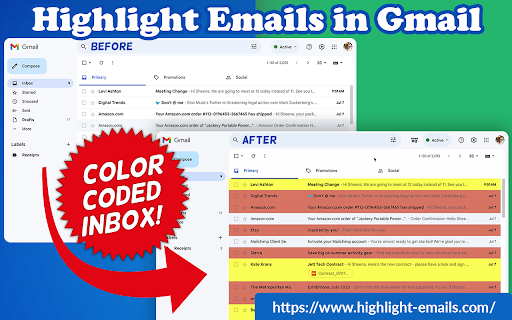
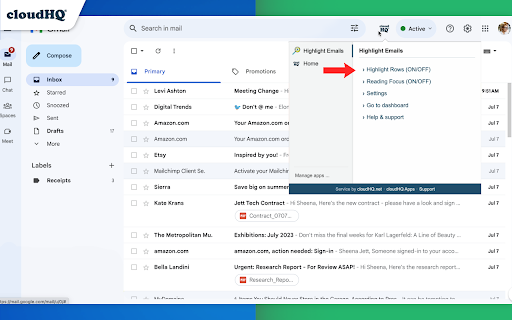

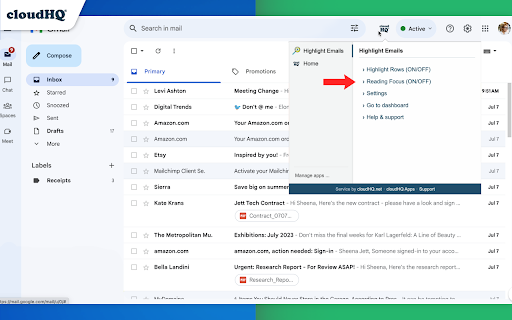

✅ Select from a choice of calming or bright colors. ✅ Adjust background color based on email status, such as read/unread or selected. ✅ Customize the background color highlight depending on the sender’s email domain. ✅ Focus mode minimizes distractions, specifically designed to assist individuals with neurodevelopmental disorders to more easily navigate, read, and concentrate. In short, with this extension you can inbox customization through color-coding, allowing users to visually categorize emails. For example, assigning the color red to emails from security domains like security@google.com enhances the ability to quickly spot and prioritize critical alerts or notifications, streamlining inbox management and efficiency. Imagine having all your emails from clients, vendors, or internal company emails neatly color-highlighted. It's like having a personalized filing system right in your inbox. You'll easily spot emails that need your attention, while also decluttering your digital workspace. This is a game changer for anyone dealing with heaps of emails daily. This app isn't just about managing your inbox; it's about managing your time and focus too. There's even a unique "Focus Mode" that works when you hover over an email. That email stands out while everything else recedes into the background. All other emails gray out, removing distractions and letting you zero in on that single email. It's the visual equivalent of noise-canceling headphones for your inbox. This way, you can devote your full attention to each email in turn, without missing any important details. Perfect for anyone who needs a little help focusing amidst the constant barrage of incoming emails. Focus Mode is more than a feature, it's a way to reclaim control over your digital environment. ~~~~ Instructions for Use ~~~~ 1. Install the extension. 2. You can get started now by clicking on: - The cloudHQ log on the top of your Gmail inbox - Click on "Highlight Emails" - Click on "Highlight Rows (ON/OFF)" to toggle the feature on and off 3. To activate the "Focus Mode," just toggle "Reading Focus (ON/OFF)" to enable distraction-free reading. 4. To disable, toggle the feature off. cloudHQ website: https://www.cloudhq.net/ App website: https://www.highlight-emails.com Pricing: https://www.highlight-emails.com/pricing Support page: https://support.cloudhq.net/category/browser-extensions/highlight-emails/ FAQ page: https://support.cloudhq.net/highlight-emails-faq-frequently-asked-questions/ Blog: https://blog.cloudhq.net Gmail, Google Calendar, and Google Workspace are trademarks of Google LLC. Use of these trademarks is subject to Google Permissions.

Formatted Email Subject Lines by cloudHQ
Are you looking for a way to make your emails stand out in someone's inbox? This extension lets you to change the format style of your email subject line, and helps your emails get opened faster because they stand out from the crowd. You can change your email subject line formats to: - 𝗕𝗼𝗹𝗱 - 𝙄𝒕𝒂𝒍𝒊𝒄𝒔 - 𝘽𝙤𝙡𝙙 𝙄𝙩𝙖𝙡𝙞𝙘 - U̲n̲d̲e̲r̲l̲i̲n̲e̲ - 𝔻𝕠𝕦𝕓𝕝𝕖 𝕊𝕥𝕣𝕦𝕔𝕜 - S̶t̶r̶i̶k̶e̶t̶h̶r̶o̶u̶g̶h̶ - 🅆🄷🄸🅃🄴🅂🅀🅄🄰🅁🄴 - B🅻🅰🅲🅺🆂🆀🆄🅰🆁🅴 - Ⓦⓗⓘⓣⓔⓑⓤⓑⓑⓛⓔ - 🅑🅛🅐🅒🅚🅑🅤🅑🅑🅛🅔 To change the format style of your email subject line, just do the following: 1. Select text in the subject line by highlighting it 2. Click on the "Subject Style" icon on right side of subject line 3. Select the format style you prefer! You can can have formatted subject line like: - *𝟮𝗡𝗗 𝗥𝗘𝗤𝗨𝗘𝗦𝗧* I'd really appreciate your help - U̲R̲G̲E̲N̲T̲: Must respond by 𝗘𝗢𝗗 𝗧𝗢𝗗𝗔𝗬 - 𝘚𝘱𝘦𝘤𝘪𝘢𝘭 𝘊𝘢𝘳𝘦 𝘐𝘯𝘴𝘵𝘳𝘶𝘤𝘵𝘪𝘰𝘯𝘴 𝘐𝘯𝘴𝘪𝘥𝘦 - Holiday Gift to You (was $2̶0̶0̶.0̶0̶, now $𝟭𝟬.𝟬𝟬) This is an excellent solution for: - Marketing professionals - Sales professionals - Teammates - Anyone who wants their emails to stand out cloudHQ. Helping your productivity, 1 click at a time. cloudHQ website: https://www.cloudhq.net/ App website: https://www.format-email-subject.com Pricing: https://www.format-email-subject.compricing Support page: https://support.cloudhq.net/category/browser-extensions/format-email-subject/ Blog: https://blog.cloudhq.net Demo: https://www.cloudhq.net/demo Google Workspace, Google Sheets, Google Drive, Google Alerts and Gmail are trademarks of Google LLC. Use of this trademark is subject to Google Permissions.

Email Zoom Text Reader by cloudHQ
Gmail magnification and reading program tailored for low-vision users Do you have trouble reading email text? Are regular page magnifying apps bothering you because it magnifies so many other things on your page, along with your email text? We understand your pain point, but you don't have to suffer anymore! Now you can install Email Zoom Text Reader by cloudHQ for free, and enjoy magnified text in your emails, as you see 👀 fit. (See what we did there? 😊) This extension will *only* modify the font size of Gmail messages without changing the page width, size of icons, menus, etc. cloudHQ website: https://www.cloudhq.net/ App website: https://www.email-zoom-text-reader.com/ Pricing: https://www.email-zoom-text-reader.com/pricing Support page: https://support.cloudhq.net/category/browser-extensions/email-zoom-text-reader/ FAQ page: https://support.cloudhq.net/email-zoom-text-reader-faq-frequently-asked-questions/ Blog: https://blog.cloudhq.net

Resize Gmail Sidebar by cloudHQ
Now you can resize the label column in Gmail Gmail™ labels are a great way to stay organized, but your Gmail™ label names get hidden by the sidebar when their names are too long. Not anymore! With Resize Gmail Sidebar, you'll get all the space you need to reorganize your viewing space and become more efficient! You can easily slide your sidebar left or right, thereby increasing or decreasing your Gmail label view. Now you're in control of my inbox and can quickly locate the emails and information I need in my Gmail™ labels. cloudHQ. Helping your productivity, one step at a time. cloudHQ website: https://www.cloudhq.net/ App website:https://www.gmail-sidebar-resizer.com/ Pricing: https://www.gmail-sidebar-resizer.com/pricing (basically FREE but we offer paid support) Support page:https://support.cloudhq.net/category/browser-extensions/gmail-sidebar-resizer/ FAQ page: https://support.cloudhq.net/gmail-sidebar-resizer-faq-frequently-asked-questions/ Blog: https://blog.cloudhq.net

Email Reply Status
Stop wasting time sorting through emails: Instantly know which of your emails needs a reply back. Never drop the ball again. Now you can know exactly which emails need a reply with Email Reply Status. You'll have an inbox indicator that will tell you: 1. Which emails you need to reply to 2. The emails that you already replied to 3. Those that you don't need to reply to at all *NOTE*: For best performances set Gmail page size to 50 emails or less. It's a perfect tool for: ✅ Small business owners ✅ Sales people ✅ Business people who are just too busy to keep track of emails ✅ Customer service representatives ✅ Customer support personnel With Email Reply Status, never miss another opportunity again! cloudHQ. Helping your productivity, 1 click at a time. cloudHQ website: https://www.cloudhq.net/ App website: https://www.email-reply-status.com/ Pricing: https://www.email-reply-status.com/pricing Support page: https://support.cloudhq.net/category/browser-extensions/gmail-reply-status/ Blog: https://blog.cloudhq.net
