
ggmjpbolghodajmlbemkmflffcnfjgeb
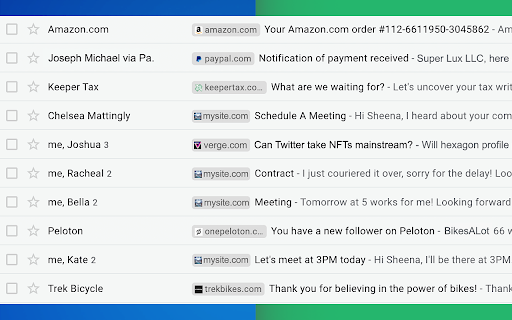


Identify Companies in Your Inbox. It's no secret that companies have more purchasing power than individuals, so identifying them in your inbox can be helpful when you need to triage who you reply back to first. Email Sender Icons by cloudHQ does just that. It visually associates an official company logo (favicon) to someone who sends you an email, without having to open the email itself. It's like "caller id" for your email. Now you can prioritize triaging your email response time to large companies first, instead of individuals with a free email account on platforms like Gmail™, Yahoo, Hotmail, etc. Easily Identify: - Companies in your inbox - Invoices to pay (Paypal, Venmo, etc) - Inter-office emails - Purchase Orders The icon (aka favicon) is determined by the sender's email domain address, and appears on the same line as your email preview. For example, if you receive an email from elon@tesla.com, this Gmail™ extension will add the Tesla logo next to your message preview so that you can immediately identify that Elon is probably very important and you should return his message before others in your inbox. A note on privacy and security: All logo (favicon) processing is done locally within your browser, and no Gmail™ data is ever uploaded or shared anywhere. cloudHQ. Helping your productivity, 1 click at a time. cloudHQ Website: https://www.cloudhq.net/ App Website: https://www.email-sender-icons.com Pricing: FREE Support page: https://support.cloudhq.net Blog: https://support.cloudhq.net/category/browser-extensions/email-sender-icons/

Highlight Emails in Gmail by cloudHQ
✅ Select from a choice of calming or bright colors. ✅ Adjust background color based on email status, such as read/unread or selected. ✅ Customize the background color highlight depending on the sender’s email domain. ✅ Focus mode minimizes distractions, specifically designed to assist individuals with neurodevelopmental disorders to more easily navigate, read, and concentrate. In short, with this extension you can inbox customization through color-coding, allowing users to visually categorize emails. For example, assigning the color red to emails from security domains like security@google.com enhances the ability to quickly spot and prioritize critical alerts or notifications, streamlining inbox management and efficiency. Imagine having all your emails from clients, vendors, or internal company emails neatly color-highlighted. It's like having a personalized filing system right in your inbox. You'll easily spot emails that need your attention, while also decluttering your digital workspace. This is a game changer for anyone dealing with heaps of emails daily. This app isn't just about managing your inbox; it's about managing your time and focus too. There's even a unique "Focus Mode" that works when you hover over an email. That email stands out while everything else recedes into the background. All other emails gray out, removing distractions and letting you zero in on that single email. It's the visual equivalent of noise-canceling headphones for your inbox. This way, you can devote your full attention to each email in turn, without missing any important details. Perfect for anyone who needs a little help focusing amidst the constant barrage of incoming emails. Focus Mode is more than a feature, it's a way to reclaim control over your digital environment. ~~~~ Instructions for Use ~~~~ 1. Install the extension. 2. You can get started now by clicking on: - The cloudHQ log on the top of your Gmail inbox - Click on "Highlight Emails" - Click on "Highlight Rows (ON/OFF)" to toggle the feature on and off 3. To activate the "Focus Mode," just toggle "Reading Focus (ON/OFF)" to enable distraction-free reading. 4. To disable, toggle the feature off. cloudHQ website: https://www.cloudhq.net/ App website: https://www.highlight-emails.com Pricing: https://www.highlight-emails.com/pricing Support page: https://support.cloudhq.net/category/browser-extensions/highlight-emails/ FAQ page: https://support.cloudhq.net/highlight-emails-faq-frequently-asked-questions/ Blog: https://blog.cloudhq.net Gmail, Google Calendar, and Google Workspace are trademarks of Google LLC. Use of these trademarks is subject to Google Permissions.

Sort Gmail Inbox by cloudHQ
Find an email in seconds with free preset filters Find an email in seconds with these free preset filters We know how much you hate having to spend time searching for email. We hate it too! No more searching for the emails you need to find quickly—have the most popular filters set up in your Gmail label area so that you can easily find what you need in seconds. With this free Chrome extension, you'll be able to sort your Gmail inbox by: ✅ Unread emails ✅ Contacts who you need to respond back to ✅ Contacts who need to respond back to you ✅ Received Date organized by year, month, or exact date ✅ A specific person ✅ A specific company, like anyone with emails that have the domain "@youtube.com" ✅ Attachment size, and attachment type, too (no more searching for your presentation when you're about to present!) You'll also be able to: ✅ Save your contacts' emails to a PDF doc for backing them up for safekeeping ✅ Save your contacts' emails in a Google Spreadsheet to view them easily as a report ✅ Set up SMS text alerts for when important contacts email you If you're looking for a way to methodically work through your emails, this is the most effective way to get through them in an organized way that will help you get your work done, lightening bolt fast. cloudHQ. Helping your productivity, 1 click at a time. cloudHQ website: https://www.cloudhq.net/ App website: https://www.sort-gmail-inbox.com/ Pricing: https://www.sort-gmail-inbox.com/pricing Support page: https://support.cloudhq.net/category/browser-extensions/sort-gmail-inbox/ Blog: https://blog.cloudhq.net Demo: https://www.cloudhq.net/demo Google Workspace, Google Sheets, Google Drive, Google Alerts and Gmail are trademarks of Google LLC. Use of this trademark is subject to Google Permissions.

Email Signature Generator by cloudHQ
Email signature generator and signature templates Are you looking for an amazing email signature tool that'll take seconds to create? Presenting: Email Signature Generator by cloudHQ, where you'll be able to easily create an email business card at the end of your emails as your email signature in Gmail™. You'll be able to include: ✅ Your company information ✅ Multiple aliases support ✅ An image like a logo, or your headshot ✅ A meeting calendar link ✅ A "big sale" link to your sales website ✅ A link to a YouTube video where you can put extra information about what your product does, or create a customized one created right inside the email signature generator ✅ A banner to wish your email recipients happy holidays ✅ A confidentiality clause ✅ A "save the planet" green quote so please don't print your email and hurt the environment ✅ An area for HTML if you want to include something of your very own Key features: * Customizable Signature Templates * Ready-to-Use Banner Designs * Integration with Google Workspace™ Admin Console * Multi-User Management Capability Your email signature template is highly customizable where you can choose your font size, colors, and anything else you want to include. How use this extension: 1) Install the extension 2) Compose a new email 3) Click on Email Signature Generator icon (next to your Send button) 4) Design your signature and save it Our platform also offers integration with Google Workspace™ admin console, enabling administrators to effortlessly manage and maintain consistent email signatures for all company employees. This feature allows for centralized control and uniformity in signatures across the organization. cloudHQ. Helping your productivity, 1 click at a time. cloudHQ website: https://www.cloudhq.net/ App website: https://www.email-signature-generator.com Pricing: https://www.email-signature-generator.com/pricing Support page: https://support.cloudhq.net/category/browser-extensions/email-signature-generator/ Blog: https://blog.cloudhq.net Gmail and Google Workspace are trademarks of Google LLC. Use of these trademarks is subject to Google Permissions.

Email Reply Status
Stop wasting time sorting through emails: Instantly know which of your emails needs a reply back. Never drop the ball again. Now you can know exactly which emails need a reply with Email Reply Status. You'll have an inbox indicator that will tell you: 1. Which emails you need to reply to 2. The emails that you already replied to 3. Those that you don't need to reply to at all *NOTE*: For best performances set Gmail page size to 50 emails or less. It's a perfect tool for: ✅ Small business owners ✅ Sales people ✅ Business people who are just too busy to keep track of emails ✅ Customer service representatives ✅ Customer support personnel With Email Reply Status, never miss another opportunity again! cloudHQ. Helping your productivity, 1 click at a time. cloudHQ website: https://www.cloudhq.net/ App website: https://www.email-reply-status.com/ Pricing: https://www.email-reply-status.com/pricing Support page: https://support.cloudhq.net/category/browser-extensions/gmail-reply-status/ Blog: https://blog.cloudhq.net
