
fcblgiphlneejkokhnaagmjombnfdnog


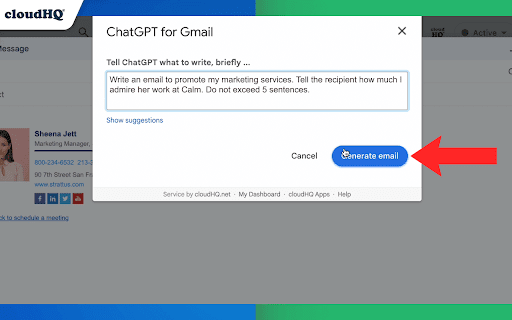


Automatically write emails using ChatGPT for Gmail 🚀 Supercharge Your Email Game with ChatGPT for Gmail! 🚀 Introducing the ultimate Chrome extension for Gmail that revolutionizes the way you write emails! Unleash the power of cutting-edge AI technology to elevate your communication skills and make every email count. 🌟 What's in store for you? 🌟 🔥 AI-Powered Email Composer: Generate entire emails and messages using the groundbreaking OpenAI AI, meticulously crafted to work seamlessly with Gmail. 🎯 Key Functions Tailored for You: ✅ Instant Grammar Guru: Say goodbye to embarrassing typos! ChatGPT intelligently checks and edits your grammar on the fly. ✅ Context-Smart Replies: Create contextually appropriate responses for any email you receive, boosting your efficiency and professionalism. ✅ Effortless Outreach: Generate persuasive and engaging outreach emails from scratch, making connections easier than ever. 🌠 Exclusive Features: ✅ Privacy-First AI: ChatGPT for Gmail respects your privacy, ensuring your data stays safe and secure. ✅ Unparalleled Quality: Experience the finest responses, outshining all other natural language processing AIs in the market. ✅ Gmail-Optimized: Enjoy a seamless integration with Gmail, designed for your convenience. ✅ Multilingual Magic: Break language barriers with support for all languages, empowering global communication. 🎉 Download ChatGPT for Gmail now and experience email mastery like never before! 🎉 ~~~How to use it~~~ 1. Go to https://chat.openai.com/chat and create an account. 2. Install this extension. 3. Open Gmail and compose a new email. 4. Click on the "ChatGPT for Gmail" icon and enter your ChatGPT prompt to complete your email message. You can also type @chatgpt 5. If you are satisfied with the message, simply click on send. Text Enhancement: Simply select any text in your email, right-click to access the context menu, and choose options like "Fix Grammar" or "Summarize" for instant improvements. Smart Reply Assistance: Click on our extension's icon adjacent to the 'Reply' button to access a variety of response prompts. For instance, select "Answer to the Best of Your Knowledge" for AI-assisted responses tailored to the email's content. Custom Prompts: Personalize your experience by adding your own prompts. To do this, click on our extension icon located in the top-right corner of your browser. ~~~FAQ~~~ Q: What is ChatGPT for Gmail? A: It's an extension that integrates OpenAI with Gmail to assist in drafting and replying on emails. Q: What are the requirements to use it? A: A valid OpenAI account is necessary. Go to https://chat.openai.com/chat and create an account. Q: What functions does it offer? A: Creating or replying to emails, correcting grammar and spelling, enhancing or rewriting text, and sending instructions to ChatGPT directly. It also includes prompt library. Q: How does it help draft emails? A: Through writing suggestions, automated responses, and grammar and spell checking. Q: Can I use my own API key with it? A: Yes, you can use your own OpenAI API key. Q: Can I use my own fine-tuned model? A: Yes, you can use your fine-tuned model. Please contact us to help you setup a system to create a fine-tuned model. Q: How can I create a library of prompts? A: Yes. You can use Gmail Snippets by cloudHQ extension to create shortcuts for prompts. You can also customize context prompts and auto-reply prompts. cloudHQ website: https://www.cloudhq.net/ App website: https://www.chatgpt-for-gmail.com/ Pricing: https://www.chatgpt-for-gmail.com/pricing Support page: https://support.cloudhq.net/category/browser-extensions/chatgpt-for-gmail/ FAQ page: https://support.cloudhq.net/google-chatgpt-faq-frequently-asked-questions/ Blog: https://blog.cloudhq.net Gmail, Google Calendar, and Google Workspace are trademarks of Google LLC. Use of these trademarks is subject to Google Permissions.

Email Reply Status
Stop wasting time sorting through emails: Instantly know which of your emails needs a reply back. Never drop the ball again. Now you can know exactly which emails need a reply with Email Reply Status. You'll have an inbox indicator that will tell you: 1. Which emails you need to reply to 2. The emails that you already replied to 3. Those that you don't need to reply to at all *NOTE*: For best performances set Gmail page size to 50 emails or less. It's a perfect tool for: ✅ Small business owners ✅ Sales people ✅ Business people who are just too busy to keep track of emails ✅ Customer service representatives ✅ Customer support personnel With Email Reply Status, never miss another opportunity again! cloudHQ. Helping your productivity, 1 click at a time. cloudHQ website: https://www.cloudhq.net/ App website: https://www.email-reply-status.com/ Pricing: https://www.email-reply-status.com/pricing Support page: https://support.cloudhq.net/category/browser-extensions/gmail-reply-status/ Blog: https://blog.cloudhq.net

Auto Label for Google Gmail™ by cloudHQ
Automatically create filters and labels for clients, customers, prospects, etc. Auto Label for Gmail by cloudHQ categorizes email messages by client email address and/or domain name, and automatically creates filters and catalogs them inside one of 6 Gmail Labels. This extension is a unique app because it not only filters and labels new emails, but also automatically organizes all your old email exchanges with that email address and/or domain name. These are the 6 Gmail Labels that this app organizes for your inbox: 1. Clients 2. Leads 3. Prospects 4. Opportunities 5. Team 6. Suppliers Here's why we think you need these 6 Gmail Label categories: 1. Clients: are your current clients. 2. Leads: are possible prospects who are not yet qualified. 3. Prospects: are qualified leads where your contact person makes buying decisions. 4. Opportunities: are when your contact considers your product/service. 5. Team: are your internal team that you work with. 6. Suppliers: are your external team that you hired. With these 6 Gmail Labels, you're ready to catalog and organize your inbox to be the most productive self you can be while working in Gmail. This extension allows you to create filters and labels for any recipient or domain with one click. Here is how to use it: 1. Compose your email 2. Enter your recipient's email address 3. Click on the "Gmail Auto Label" button and select the label name for this email recipient or recipients' domain Website: https://www.gmail-auto-label.com Pricing: FREE Support page: https://support.cloudhq.net/category/browser-extensions/gmail-auto-label/ Blog: https://blog.cloudhq.net

Formatted Email Subject Lines by cloudHQ
Are you looking for a way to make your emails stand out in someone's inbox? This extension lets you to change the format style of your email subject line, and helps your emails get opened faster because they stand out from the crowd. You can change your email subject line formats to: - 𝗕𝗼𝗹𝗱 - 𝙄𝒕𝒂𝒍𝒊𝒄𝒔 - 𝘽𝙤𝙡𝙙 𝙄𝙩𝙖𝙡𝙞𝙘 - U̲n̲d̲e̲r̲l̲i̲n̲e̲ - 𝔻𝕠𝕦𝕓𝕝𝕖 𝕊𝕥𝕣𝕦𝕔𝕜 - S̶t̶r̶i̶k̶e̶t̶h̶r̶o̶u̶g̶h̶ - 🅆🄷🄸🅃🄴🅂🅀🅄🄰🅁🄴 - B🅻🅰🅲🅺🆂🆀🆄🅰🆁🅴 - Ⓦⓗⓘⓣⓔⓑⓤⓑⓑⓛⓔ - 🅑🅛🅐🅒🅚🅑🅤🅑🅑🅛🅔 To change the format style of your email subject line, just do the following: 1. Select text in the subject line by highlighting it 2. Click on the "Subject Style" icon on right side of subject line 3. Select the format style you prefer! You can can have formatted subject line like: - *𝟮𝗡𝗗 𝗥𝗘𝗤𝗨𝗘𝗦𝗧* I'd really appreciate your help - U̲R̲G̲E̲N̲T̲: Must respond by 𝗘𝗢𝗗 𝗧𝗢𝗗𝗔𝗬 - 𝘚𝘱𝘦𝘤𝘪𝘢𝘭 𝘊𝘢𝘳𝘦 𝘐𝘯𝘴𝘵𝘳𝘶𝘤𝘵𝘪𝘰𝘯𝘴 𝘐𝘯𝘴𝘪𝘥𝘦 - Holiday Gift to You (was $2̶0̶0̶.0̶0̶, now $𝟭𝟬.𝟬𝟬) This is an excellent solution for: - Marketing professionals - Sales professionals - Teammates - Anyone who wants their emails to stand out cloudHQ. Helping your productivity, 1 click at a time. cloudHQ website: https://www.cloudhq.net/ App website: https://www.format-email-subject.com Pricing: https://www.format-email-subject.compricing Support page: https://support.cloudhq.net/category/browser-extensions/format-email-subject/ Blog: https://blog.cloudhq.net Demo: https://www.cloudhq.net/demo Google Workspace, Google Sheets, Google Drive, Google Alerts and Gmail are trademarks of Google LLC. Use of this trademark is subject to Google Permissions.

Email List Builder by cloudHQ
Build a spreadsheet with all your Gmail contacts and emails Are you looking for an email list builder that will create an email list for you in a matter of seconds? Email List Builder by cloudHQ gets you a list all of the people that you've ever had contact with in your Gmail™, into a neat and organized Google Sheet™ for you. This is an excellent solution to use so that you can: ✅ Create an email list to send an email campaign (*tip: use mailking.io, another one of our services for free email campaigns) ✅ Monitor interactions with your customers or your suppliers ✅ Keep an updated list of your email contacts in Google Sheets™ You'll get every email merge tag identifier needed in order to build an impressive email list of all your contacts and their information. You can even set this service up so that it can continuously update the contact information from your Gmail™ emails, to be captured and updated for you in your Google Sheet™ spreadsheet. Here is a list of all the email merge tag identifiers that you'll get in separate columns in your Google Sheet™: 1) Email Address 2) First name 3) Last Name 4) Full Name 5) Bio 6) Location 7) Personal Website 8) Last Sent Email Date (Last email sent to the contact) 9) Last Sent Email (A link to the actual email you sent) 10) Total Number of Emails Sent 11) Awaiting for Reply? (Awaiting reply from the contact) 12) Last Received Email Date (Last email received from the contact) 13) Last Received Email (A link to the actual email you received) 14) Total Number of Emails Received 15) Not Replied? (Not replied to the contact) 16) Company Name 17) Role at Company 18) Company Website 19) Company Logo 20) LinkedIn (Link to profile) 21) Facebook (Link to profile) 22) Twitter (Link to profile) We hope you enjoy this simple solution to help you build your email list! Happy email campaigning from your friends at cloudHQ. This is an excellent solution for small businesses to improve communications with their customer or supplier relationships. Your spreadsheet will automatically be updated in real-time as new emails or new contacts come into your inbox, so you will always have full visibility of each business-related relationship in an organized report whenever you need it, in a shareable way via Google Sheets. cloudHQ. Helping your productivity, 1 click at a time. cloudHQ website: https://www.cloudhq.net/ App website: https://www.email-list-builder.com/ Pricing: https://www.email-list-builder.com/pricing Support page: https://support.cloudhq.net/category/browser-extensions/email-list-builder/ Blog: https://blog.cloudhq.net Google Gmail and Google Sheets are trademarks of Google LLC. Use of these trademark are subject to Google Permissions.
