
hbnpppemeehgdkepgiemjkaolkijcilj

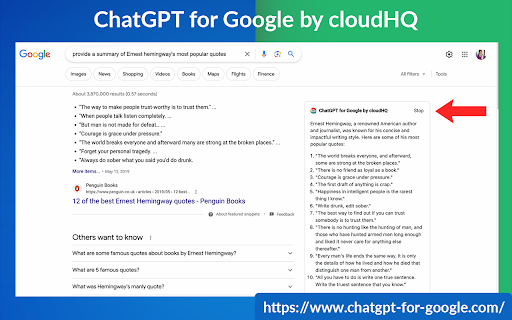
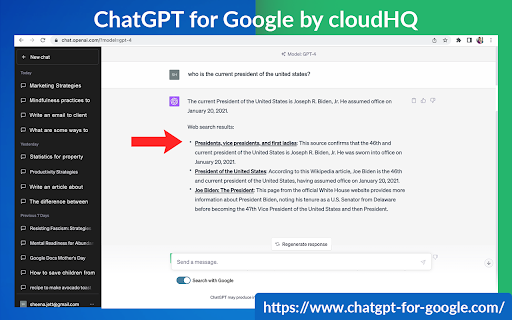


This extension gives you ChatGPT query responses alongside Google search engine results. This extension is easy to use and enhances your Google search experience. Features: ✅ OpenAI Responses alongside your Google search results ✅ A summary of search results ✅ Supplement responses with data after 2021 via search results ✅ OpenAI API and multiple version support ✅ Toggle on/off as desired ✅ Copy to clipboard ~~~How to use it~~~ 1. Get an OpenAI account here if you don't already have one: https://chat.openai.com/chat and create an account 2. Install this extension 3. Open Chrome and search for anything in Google Search 4. AI-generated responses alongside conventional search engine results will be displayed on the right side of your window 5. When in ChatGPT, simply type in your prompt, and the results will be ChatGPT's response, and will then provide you with a Google Search summary on the subject (very helpful for up to date information) ~~~FAQ~~~ 1. What is ChatGPT? ChatGPT is a computer program created by OpenAI that can generate human-like text. It's like a super-advanced version of autocorrect: it predicts and generates what it thinks should come next in a conversation or a piece of writing. This is useful for many things, such as writing emails, creating content, answering questions, and even tutoring in different subjects. It's important to note that it doesn't know any personal data unless you tell it during the conversation, and it doesn't know specifics about the documents it learned from. 2. What does this extension do? This browser extension is developed by cloudHQ LLC. The extension enhances search engine results with the power of artificial intelligence from OpenAI. The extension operates by displaying AI-generated responses alongside conventional Google search engine results, offering users an enhanced search result experience. 3. Is this extension free to use? Yes, the extension is free to use. 4. Is this extension integrated with other cloudHQ products? Yes. This extension is fully integrated with other cloudHQ products such as Save Emails to PDF by cloudHQ, Export Emails to Sheets by cloudHQ, and more. 5. Do I need an OpenAI (chat.openai.com) account? Yes, you need to have an OpenAI account to use this extension. Go to https://chat.openai.com/chat and create an account. If you choose to use an API, you need to have a developer account. You can create it here: https://platform.openai.com/ We hope you enjoy your new search result experience and find it helpful for your overall knowledge about anything you wish to know about. cloudHQ. Helping your productivity, 1 click at a time. cloudHQ website: https://www.cloudhq.net/ App website: https://www.chatgpt-for-google-search.com/ Pricing: https://www.chatgpt-for-google-search.com/pricing Support page: https://support.cloudhq.net/category/browser-extensions/chatgpt-for-google/ FAQ page: https://support.cloudhq.net/ Blog: https://blog.cloudhq.net

Gmail™ Email Templates by cloudHQ
Beautiful email templates for Gmail. Design your templates or import templates from Mailchimp. With team sharing! Create and share beautiful email templates! With this Chrome extension, you can: 1) Select any template from our free library of pre-designed email templates 2) Use our intuitive email design creator to create your own email (equipped with free stock photos!) 3) Copy someone's email template to make your own by clicking on a button from any email that you received in your inbox 4) Upload your own email templates from Mailchimp or HubSpot 5) Share your email templates with your team 6) Use our HTML editor in cases where you know how to code in HTML 7) Access and send your email templates from your mobile phone Great for: ✅ Newsletters ✅ Discount sales ✅ Party invitations ✅ Congratulations ✅ Holiday greetings ✅ Event emails (like when you need to send a client a reminder to pay their bill) ✅ Common email responses (like asking a potential customer to fill out an intake form, troubleshooting instructions, etc) Open a template directly in your Gmail email compose window. Once you’ve personalized your template you’ll be able to send it out like any other email in Gmail. The email templates library is FREE to use, and we’re adding new templates all the time. 📲 Do you also want to access your email templates on your mobile phone? Just install our mobile add-on and send your email template responses while on-the-go: https://workspace.google.com/marketplace/app/email_templates_by_cloudhq/183322770515 If you are a designer and would like to showcase your email templates, please contact marketing@cloudhq.net and include "Influencer program" in the subject line. NOTE: For easy access to your settings and other cloudHQ apps, look for the cloudHQ icon in the top right corner of your Gmail inbox. Click on it to get started! NOTE: To access Hubspot and Mailchimp templates, simply click on the Hubspot or Mailchimp tab in the template browser to install the necessary extensions. cloudHQ website: https://www.cloudhq.net/ App website: https://www.email-templates.com/ Pricing: https://www.email-templates.com/pricing Support page: https://support.cloudhq.net/category/gmail-email-templates/ Blog: https://blog.cloudhq.net Gmail, Google Shared Drive, Google Drive, and Google Workspace are trademarks of Google LLC. Use of these trademarks is subject to Google Permissions.

Highlight Emails in Gmail by cloudHQ
✅ Select from a choice of calming or bright colors. ✅ Adjust background color based on email status, such as read/unread or selected. ✅ Customize the background color highlight depending on the sender’s email domain. ✅ Focus mode minimizes distractions, specifically designed to assist individuals with neurodevelopmental disorders to more easily navigate, read, and concentrate. In short, with this extension you can inbox customization through color-coding, allowing users to visually categorize emails. For example, assigning the color red to emails from security domains like security@google.com enhances the ability to quickly spot and prioritize critical alerts or notifications, streamlining inbox management and efficiency. Imagine having all your emails from clients, vendors, or internal company emails neatly color-highlighted. It's like having a personalized filing system right in your inbox. You'll easily spot emails that need your attention, while also decluttering your digital workspace. This is a game changer for anyone dealing with heaps of emails daily. This app isn't just about managing your inbox; it's about managing your time and focus too. There's even a unique "Focus Mode" that works when you hover over an email. That email stands out while everything else recedes into the background. All other emails gray out, removing distractions and letting you zero in on that single email. It's the visual equivalent of noise-canceling headphones for your inbox. This way, you can devote your full attention to each email in turn, without missing any important details. Perfect for anyone who needs a little help focusing amidst the constant barrage of incoming emails. Focus Mode is more than a feature, it's a way to reclaim control over your digital environment. ~~~~ Instructions for Use ~~~~ 1. Install the extension. 2. You can get started now by clicking on: - The cloudHQ log on the top of your Gmail inbox - Click on "Highlight Emails" - Click on "Highlight Rows (ON/OFF)" to toggle the feature on and off 3. To activate the "Focus Mode," just toggle "Reading Focus (ON/OFF)" to enable distraction-free reading. 4. To disable, toggle the feature off. cloudHQ website: https://www.cloudhq.net/ App website: https://www.highlight-emails.com Pricing: https://www.highlight-emails.com/pricing Support page: https://support.cloudhq.net/category/browser-extensions/highlight-emails/ FAQ page: https://support.cloudhq.net/highlight-emails-faq-frequently-asked-questions/ Blog: https://blog.cloudhq.net Gmail, Google Calendar, and Google Workspace are trademarks of Google LLC. Use of these trademarks is subject to Google Permissions.

Formatted Email Subject Lines by cloudHQ
Are you looking for a way to make your emails stand out in someone's inbox? This extension lets you to change the format style of your email subject line, and helps your emails get opened faster because they stand out from the crowd. You can change your email subject line formats to: - 𝗕𝗼𝗹𝗱 - 𝙄𝒕𝒂𝒍𝒊𝒄𝒔 - 𝘽𝙤𝙡𝙙 𝙄𝙩𝙖𝙡𝙞𝙘 - U̲n̲d̲e̲r̲l̲i̲n̲e̲ - 𝔻𝕠𝕦𝕓𝕝𝕖 𝕊𝕥𝕣𝕦𝕔𝕜 - S̶t̶r̶i̶k̶e̶t̶h̶r̶o̶u̶g̶h̶ - 🅆🄷🄸🅃🄴🅂🅀🅄🄰🅁🄴 - B🅻🅰🅲🅺🆂🆀🆄🅰🆁🅴 - Ⓦⓗⓘⓣⓔⓑⓤⓑⓑⓛⓔ - 🅑🅛🅐🅒🅚🅑🅤🅑🅑🅛🅔 To change the format style of your email subject line, just do the following: 1. Select text in the subject line by highlighting it 2. Click on the "Subject Style" icon on right side of subject line 3. Select the format style you prefer! You can can have formatted subject line like: - *𝟮𝗡𝗗 𝗥𝗘𝗤𝗨𝗘𝗦𝗧* I'd really appreciate your help - U̲R̲G̲E̲N̲T̲: Must respond by 𝗘𝗢𝗗 𝗧𝗢𝗗𝗔𝗬 - 𝘚𝘱𝘦𝘤𝘪𝘢𝘭 𝘊𝘢𝘳𝘦 𝘐𝘯𝘴𝘵𝘳𝘶𝘤𝘵𝘪𝘰𝘯𝘴 𝘐𝘯𝘴𝘪𝘥𝘦 - Holiday Gift to You (was $2̶0̶0̶.0̶0̶, now $𝟭𝟬.𝟬𝟬) This is an excellent solution for: - Marketing professionals - Sales professionals - Teammates - Anyone who wants their emails to stand out cloudHQ. Helping your productivity, 1 click at a time. cloudHQ website: https://www.cloudhq.net/ App website: https://www.format-email-subject.com Pricing: https://www.format-email-subject.compricing Support page: https://support.cloudhq.net/category/browser-extensions/format-email-subject/ Blog: https://blog.cloudhq.net Demo: https://www.cloudhq.net/demo Google Workspace, Google Sheets, Google Drive, Google Alerts and Gmail are trademarks of Google LLC. Use of this trademark is subject to Google Permissions.

Display Email Time by cloudHQ
Show full date and time of email messages in Gmail Gmail shows the date and time of an email in the last column of your inbox. Depending on how old the email is, the display date format changes, which can cause confusion and oversights. This extension shows *the exact* date and time of your emails–no more confusing information like: showing only time, showing only date, time locale, etc. With Display Email Time, you can easily alter how you see your email date and timestamps in Gmail with these features: ✅ Custom date and time formats ✅ Custom font styles ✅ Custom font sizes ✅ Custom font colors ✅ Custom background colors You can select from a variety of display email formats. Great if you prefer: 🗓️ Date and time format consistency 🗓️ Time Locale 🗓️ Your email weekday format displayed alphabetically 🗓️ The day and month sequence reversed for international users 🗓️ Bold, Italics 🗓️ Larger or smaller sized fonts 🗓️ Different font or background colors Give it a try and see how you like it. This is part of cloudHQ's ecosystem of over 50 freemium email productivity apps that can be found on https://cloudhq.net/apps, where we're happy to welcome you as part of our family to help you work smarter, not harder. cloudHQ. Helping your productivity, 1 click at a time. cloudHQ website: https://www.cloudhq.net Website: https://www.display-email-time.com/ Pricing: https://www.display-email-time.com/pricing Support page: https://support.cloudhq.net/category/browser-extensions/display-email-time/ Support email: support@cloudhq.net Blog: https://blog.cloudhq.net
