
lpofefdiokgmcdnnaigddelnfamkkghi
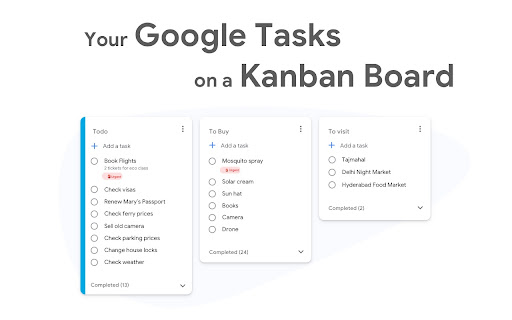


Standalone Desktop app for Google Tasks. Export and share your Google Tasks lists in one click. The TasksBoard Chrome extension let you add a task to your Google Tasks in one click from any page on Google Chrome. ✅ TasksBoard lets you manage, edit and share your Google Tasks on a full-screen interface. 👥 Collaborate with your team in real-time with the option to share the lists. ✨ TasksBoard offers a Premium plan with additional features such as unlimited shared lists, customisable boards, tags and more. 👌 Increase your productivity: Drag and drop your tasks from one list to another 🤝 Collaborate with your team: Share your Google Tasks lists with anyone 🗄️ Keep everything organized: Create multiple boards for each of your projects 🌈 Better Task management: Set highlight color to your lists to find them instantly 🏷️ Easily organize and prioritize your tasks with custom labels 📁 Attach documents from Google Drive directly to your tasks ✉️ Make emails actionable by turning them into tasks from within your Gmail inbox 💻 Access your Google Tasks directly on the desktop by installing the desktop app 🔑 Ensure secure sign-on with your team's existing Google credentials through Single-Sign-On authentication Need a helping hand? Have a look to our extensive guides, the documentation on https://tasksboard.com/support and/or contact us at contact@tasksboard.app TasksBoard has individual and enterprise Premium plans available. Check our pricing options: https://tasksboard.com/pricing By design, your data stays at all times on Google servers. We have no access to your data, and we never copy your tasks on our server.. Here's all the data we need in order to make TasksBoard work: - Your email address - to know who you are - Campaigns sent metadata (spreadsheet name, date of sending - that's all) - Emails sent metadata (date of sending, open / clicks events - that's all again) TasksBoard / TaskBoard complies with privacy laws (especially GDPR) to protect your data. Check out the full privacy policy on this page https://tasksboard.com/privacy

Button for Google Calendar
Check Google Calendar schedule and join meetings with one click. It fully integrates with Zoom, Google Meet, Microsoft Teams, etc. Experience seamless integration with Google Calendar using the Button for Google Calendar™ extension. Trusted by over 100,000 users, our extension provides the ultimate convenience for managing your schedule: • Instant Access: Open Google Calendar to view your schedule and join meetings directly from the toolbar. • Quick Event Creation: Navigate effortlessly to Google Calendar to create new events. • Real-Time Notifications: Get timely reminders for upcoming events and meetings. • Customizable Interface: Adjust settings to personalize your calendar experience and boost productivity. Join a growing community of users relying on Button for Google Calendar™ to simplify scheduling. Download now and enhance your calendar management! KEY FEATURES • Toolbar Button: Immediate access to Google Calendar from your browser. • Meeting Integration: Join Google Meet and other video calls with ease. • Event Creation: Quickly open Google Calendar to add new events. • Customization: Personalize notifications and calendar views to suit your needs. HELP • Authorization: Works correctly only in Google Chrome. • Multiple Accounts: Supports only one Google Calendar account. To receive notifications from multiple calendars, select the primary account and grant it access to the secondary calendar. • Time Format: Automatically synchronizes with your Calendar upon installation. • Corporate Accounts: If using a corporate Google Workspace account and facing authorization issues, contact your domain administrator to add our "Button" to the list of trusted extensions. • Support: For problems or bugs, contact us at support@browsecraft.com. ADS You may encounter ads when using Button for Google Calendar. These ads allow us to offer this extension for free. DISCLAIMER Button for Google Calendar is not made by Google™ or affiliated with Alphabet Inc. Supported with ❤️ by the BrowseCraft gang. Stand with Ukraine 💙💛.

Add to Microsoft To Do
It's the easiest way to save anything from the web to your ToDo lists. ❗ This is not an official Microsoft extension. The extension allows you to add information about the current page to ToDo: title, selected text, and URL. FEATURES * Adding using the extension interface - you can add page information, select the desired list, and set the reminder time beforehand. * Quick Add - adds page (or link) information to the default list without demonstrating the extension interface. * Assigning keyboard shortcuts for both types of operations. * Flexible configuration of the expansion interface: time and date formats, default list (with ability to remember last used), default reminder time (or last used). UNEXPECTED BEHAVIOR * If more than 24 hours have passed since the previous use of the extension, then when you start it you will see a browser tab automatically opening in the background. The extension uses this tab to obtain an updated access token. It is due to the features of the Microsoft identity platform. Details: https://github.com/MicrosoftDocs/azure-docs/issues/62164. KNOWN DISADVANTAGES * When you select a list, the lists are shown in an un-grouped form. Reason: the public API does not allow you to get information about grouping lists. * This is not an official extension. But unfortunately, there's no official extension at this time – https://todo.uservoice.com/forums/597175-feature-suggestions/suggestions/32661145-browser-extension-firefox-chrome-edge-opera-s * The extension requires the seemingly unnecessary "Read browsing history" permission. But this permission is needed for an alternative implementation of user authentication. The reason is the inability to use the stock chrome.identity.launchWebAuthFlow with the Microsoft identity platform. More details: https://github.com/MicrosoftDocs/azure-docs/issues/62164.

ToDo for Google Tasks
It is an application for convenient use of Google Tasks in 3 columns. Best app to use Google Tasks. Task display of "today", "tomorrow", "the day after tomorrow", "overdue", "all", global search, alphabetical or date sorting and dark mode support! ◆Sync with Google Tasks It also syncs quickly with Google Tasks and Google Calendar! ◆Narrow down tasks You can display tasks as "today", "tomorrow", "the day after tomorrow", "overdue", and "all"! ◆Sort tasks You can sort by "drag & drop", "date order", and "alphabetical order"! ◆Full search You can quickly search for the task you want to find from all tasks! ◆Security - We do not send your data to non-Google servers. - Data is exchanged directly with Google. Even developers can't see what's inside. - Do not ask for passwords or save them at all. ◆Support If you have any problems, we will help you as soon as possible. Please feel free to contact us at the email address below. info@thetodo.net

Customize Tabs for Google Keep™
Customize Tabs for Google Keep™ Do you use Google Keep™ a lot to write notes, personal reminders etc? Currently, all your notes are organized on the same page and are not organized by categories. Having all the notes on the same page wont be an issue if you have a few notes written down. But it can become messy once you have over 20+ notes on the same page. You need a way to organize and keep track of notes inside Google Keep™. This extension helps you create separate categories for Google Keep™, this helps you manage your notes more clearly and easily. Choose the color you want for each new Category Tab you make in Google Keep™. Keep all your notes clearly separated and manage your Google Keep™ notes in a more efficient manner today. Disclaimer: Please note this extension is NOT made by Google and is made by an independent development team. All copyrights belong to their respective owners. Google doesn’t endorse or sponsor this Chrome extension. Customize Tabs for Google Keep™ is not owned by, is not licensed by and is not a subsidiary of Google Inc.
