
lfjnmopldodmmdhddmeacgjnjeakjpki
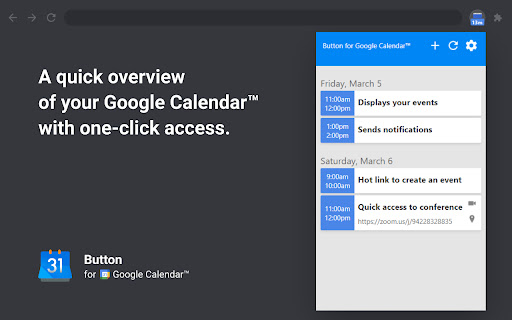

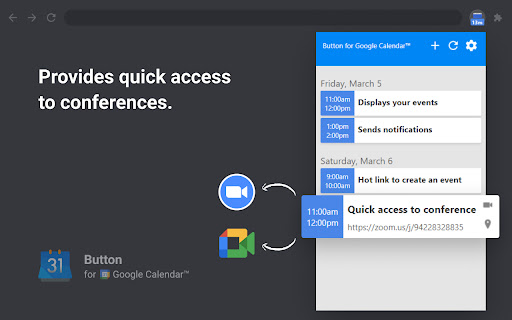

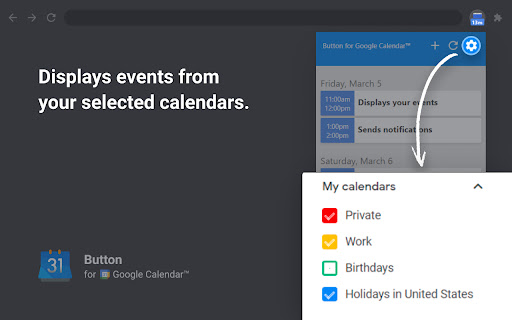
Check Google Calendar schedule and join meetings with one click. It fully integrates with Zoom, Google Meet, Microsoft Teams, etc. Experience seamless integration with Google Calendar using the Button for Google Calendar™ extension. Trusted by over 100,000 users, our extension provides the ultimate convenience for managing your schedule: • Instant Access: Open Google Calendar to view your schedule and join meetings directly from the toolbar. • Quick Event Creation: Navigate effortlessly to Google Calendar to create new events. • Real-Time Notifications: Get timely reminders for upcoming events and meetings. • Customizable Interface: Adjust settings to personalize your calendar experience and boost productivity. Join a growing community of users relying on Button for Google Calendar™ to simplify scheduling. Download now and enhance your calendar management! KEY FEATURES • Toolbar Button: Immediate access to Google Calendar from your browser. • Meeting Integration: Join Google Meet and other video calls with ease. • Event Creation: Quickly open Google Calendar to add new events. • Customization: Personalize notifications and calendar views to suit your needs. HELP • Authorization: Works correctly only in Google Chrome. • Multiple Accounts: Supports only one Google Calendar account. To receive notifications from multiple calendars, select the primary account and grant it access to the secondary calendar. • Time Format: Automatically synchronizes with your Calendar upon installation. • Corporate Accounts: If using a corporate Google Workspace account and facing authorization issues, contact your domain administrator to add our "Button" to the list of trusted extensions. • Support: For problems or bugs, contact us at support@browsecraft.com. ADS You may encounter ads when using Button for Google Calendar. These ads allow us to offer this extension for free. DISCLAIMER Button for Google Calendar is not made by Google™ or affiliated with Alphabet Inc. Supported with ❤️ by the BrowseCraft gang. Stand with Ukraine 💙💛.

Google Calendar Event Checker
Mark events as completed or cancelled in Google Calendar with emojis or strikethroughs. Mark Google Calendar events as completed with checkmarks, emojis, or strikethrough and turn your calendar into a task tracker. It’s the perfect tool for professionals, students, and anyone who wants to mark events as done or canceled and boost productivity. 🆓 Free Version Features 🆓 Available immediately after installation - no sign-in or subscription required: ▸ Customizable completion marks: choose between emojis (✅ or ❌), unicode checkmark (✓), or strikethrough effect (title crossed off). ▸ Automatic timestamps: save completion date/time in event description for easy reference. ▸ Edit-page marking: mark events as done from the calendar event edit page. ▸ Minimal and Privacy-Oriented: the extension is designed to be minimalistic and don’t track any user data. ⭐ Premium Version Features ⭐ Unlock advanced productivity and simplicity features: ▸ Quick-mark from event dialog: complete events with one click from the event popup. ▸ Daily events dashboard: view all today's events in the extension popup with completion status. ▸ Mark from any tab: complete calendar events without opening Google Calendar. ▸ Custom checkmark slots: add up to 5 emojis or unicode symbols as completion markers. ▸ Still Minimal and Privacy-Oriented: we don't see or store any of your events and never share your data. How to use free version: ▸ Install the extension, no sign in needed ▸ Open any Google Calendar event for editing ▸ Click the completion mark button (✅) ▸ Save the event ▸ Go to the extension's options to configure the completion marks and a strike-through effect. How to use premium version: ▸ Pin extension and sign in with your Google account ▸ Start free trial (no credit card needed) ▸ Mark events as completed from an event dialog ▸ Mark events as completed from "Today events" view ▸ Configure custom checkmarks and a strike-through effect in ⚙️ User Settings page (available after sign in). ⚠️ Troubleshooting ⚠️ If something isn't working properly, here's what you can try: ▸ Make sure you can edit event title from an event edit page - some events are not editable at all - for example: working locations, contacts’ birthdays calendar, shared calendars if you don’t have proper permissions. ▸ Sign out and sign back to the extension (for premium users). ▸ Reinstall the extension. ▸ Report an issue to support@calcheckr.com, include screenshots if possible as it might help to resolve your case more quickly, make sure to mention what browser you’re using. ❓Frequently Asked Questions❓ Q: How do I mark Google Calendar events as completed? A: Install the extension, open any event, and use the completion button or choose your preferred visual mark (checkmark, emoji, or strikethrough). Q: Will other people see my completion marks? A: Yes! Since changes save directly to Google Calendar, anyone with calendar access sees the completion marks. Great for team collaboration. Q: Does this work with Google Workspace? A: Absolutely! Works with personal Google accounts and Google Workspace (formerly G Suite) accounts. Q: Does it work with recurring events? A: Yes! Mark individual instances or the entire series. Q: Can I use the free version forever? A: Yes! The free plan includes core features. Upgrade to Premium only if you want one-click marking, daily views, and custom checkmarks. Q: Is my calendar data secure? A: Absolutely! We use only Google infrastructure. Authentication tokens are encrypted, and we never see, store, or share your calendar events data. Q: How do I cancel Premium? A: Cancel anytime from the Stripe customer portal. Premium features remain active until your billing period ends, then you automatically return to the free plan. 📧 Contacts 📧 For any questions, comments and ideas please reach out to support@calcheckr.com 2.2.0 - 12/10/2025: - premium: strikethrough effect in popup view - premium: date picker for quick navigation 2.1.2 - 12/06/2025: - internal fixes: make completion detection to be based on the default + custom checkmarks only 2.1.1 - 12/03/2025: - internal fixes - options page UI refactoring 2.0.2 - 11/24/2025: - internal fixes - add support id in extension options 2.0.1 - 11/18/2025: - internal fixes - show onboarding page once - start introducing premium version 1.6.2 - 12/13/2022: - Fix issue with not showing button (input selector got updated) 1.6.0 - 10/09/2022: - Add error and usage reporting option 1.3.0 - 10/07/2021: - the strikethrough effect is now configurable in options 1.2.0 - 10/05/2021: - issue with search was fixed by saving origin event's title in the description area (configurable in options) - add date and time label when it was completed to the description textarea (configurable in options) 1.1.0 - 10/04/2020: - add check emoji in the beginning (configurable in options) - fix issue for event titles with emojis

Quick GTasks
Quickly access and edit your Google Tasks™ conveniently from within Google Chrome I use Google Tasks™ many, many times every day. After several of the Google Tasks™ Chrome extensions I used stopped working back in 2019, I began working on my own extension as a hobby project. Most of the functionality is currently included. Please let me know if you run into any bugs, and thanks for trying my extension!

Screenity - Screen Recorder & Annotation Tool
The free and privacy-friendly screen recorder for everyone. Capture, annotate, edit videos and more - all with no sign in needed. Screenity is a powerful privacy-friendly screen recorder and annotation tool to make better videos for work, education, and more. You can create stunning product demos, tutorials, presentations, or share feedback with your team - all from your browser. 🎥 Make unlimited recordings of your tab, a specific area, desktop, any application, or camera 🎙️ Record your microphone or internal audio, and use features like push to talk ✏️ Annotate by drawing anywhere on the screen, adding text, arrows, shapes, and more ✨ Use AI-powered camera backgrounds or blur to enhance your recordings 🔎 Zoom in smoothly in your recordings to focus on specific areas 🪄 Blur out any sensitive content of any page to keep it private ✂️ Remove or add audio, cut, trim, or crop your recordings with a comprehensive editor 👀 Highlight your clicks and cursor, and go in spotlight mode ⏱️ Set up alarms to automatically stop your recording 💾 Export as mp4, gif, and webm, or save the video directly to Google Drive to share a link ⚙️ Set a countdown, hide parts of the UI, or move them anywhere 🔒 Only you can see your videos, we don’t collect any of your data. You can even go offline! 💙 No limits, make as many videos as you want, for as long as you want …and much more - all for free & no sign in needed! Best of all, the Screenity extension is open source. If you prefer, you can self-host Screenity by going to our GitHub repository: https://github.com/alyssaxuu/screenity Screenity Pro is an all-in-one platform to create, edit, and share videos with style - right from your browser. Pro includes: 📁 50GB cloud storage - share videos with a link 🎬 Multi-scene editing for tutorials, demos, or full stories 🎨 Customizable animated templates and camera layouts ✨ Keyframes and automatic zoom on click 🔡 Auto-generated captions with customizable styles 🖼️ Add frames, device mockups, backgrounds, and more 🇪🇺 EU-based infrastructure (no US data transfers) Pro is totally optional. The core extension will always be free, private, and open source. But if you want to support Screenity and help me as a solo indie developer, you can try Pro at screenity.io/pro ❤️ If you need any help, or want to become a Screenity expert, you can browse articles and guides in the Screenity help center: https://help.screenity.io/ You can also reach out with any questions or feedback at support@screenity.io Screenity is developed and maintained by Alyssa X: https://alyssax.com/

Google Calendar Weekend Highlighter
Custom Colour for Weekends in Google Calendar >>>>>>>>>>>>>>>>>>> LET'S GO DARK! >>>>>>>>>>>>>>>>> Important NOTE!!! >>>>>>>>>>>>>>>>>>>>> DONATE!
