
jlgndcbgcfaaidgacjgelccmedbjenhb
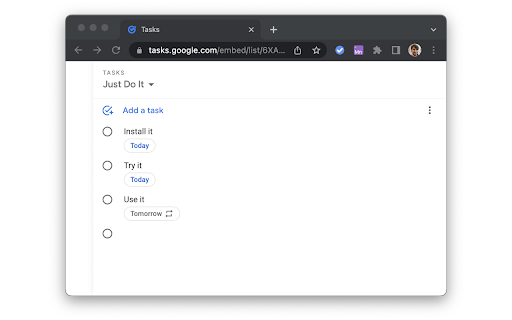
Enhance your productivity with Sidebar for Google Tasks! Our extension provides a convenient way to access, manage, and organize your Google Tasks directly from Chrome's side panel. Key Features: • Quick Access: Open Google Tasks with a single click from your toolbar. • Task Management: Easily add, edit, and delete tasks. • Reminders: Set and receive notifications for your tasks. • Synchronization: Sync tasks across all your devices in real time. • Customization: Personalize your task list with custom colors and labels. • Drag-and-Drop: Reorder tasks with simple drag-and-drop functionality. • Search Functionality: Quickly find tasks with the built-in search feature. • Offline Access: Manage tasks even when you're offline. Why choose Sidebar for Google Tasks? • Efficiency: Save time by accessing your tasks directly from your browser. • User-Friendly: Intuitive interface designed for maximum productivity. • Regular Updates: Frequent updates to ensure compatibility with the latest Google Tasks features. The Sidebar for Google Tasks is perfect for anyone looking to stay organized and productive. Get it now to streamline your task management. Download Google Tasks for Sidebar today and take control of your to-do list! ADS When using the Input Tab in Google Keep, you may encounter ads. These situational ads allow us to develop the product and make it free. — Made with ❤️ by BrowseCraft gang.

ToDo for Google Tasks
It is an application for convenient use of Google Tasks in 3 columns. Best app to use Google Tasks. Task display of "today", "tomorrow", "the day after tomorrow", "overdue", "all", global search, alphabetical or date sorting and dark mode support! ◆Sync with Google Tasks It also syncs quickly with Google Tasks and Google Calendar! ◆Narrow down tasks You can display tasks as "today", "tomorrow", "the day after tomorrow", "overdue", and "all"! ◆Sort tasks You can sort by "drag & drop", "date order", and "alphabetical order"! ◆Full search You can quickly search for the task you want to find from all tasks! ◆Security - We do not send your data to non-Google servers. - Data is exchanged directly with Google. Even developers can't see what's inside. - Do not ask for passwords or save them at all. ◆Support If you have any problems, we will help you as soon as possible. Please feel free to contact us at the email address below. info@thetodo.net

Send to Google Tasks
Send the page you are reading to Google Tasks Send to Google Tasks is a chrome extension that performs one simple thing: it send the page or link from your chrome browser to Google Tasks. Attribution for the icons and graphics: - Icons are made by Pixel perfect (https://www.flaticon.com/authors/pixel-perfect) from Flaticon (https://www.flaticon.com).

Manganum: Sidebar with Gmail and Google Calendar
One-click access to your tools, even Gmail and Google Calendar. Boost your productivity with Manganum — an all-in-one sidebar for Chrome that integrates Gmail, Google Calendar, Drive, Keep, and more. Access mail, calendar, notes, tasks, and AI tools like ChatGPT with one click on any tab. Key Features: — Unified Sidebar: Access Gmail, Google Calendar, Drive, Keep, and more in one click, directly from the sidebar. — Inbox App: Quick access to your Gmail inbox, allowing you to check emails without fully opening Gmail. — Calendar App: View your Google Calendar schedule and receive reminders for upcoming events. Join video calls with a single click. — AI Integration: Get instant access to ChatGPT and Google Bard for AI-powered assistance on any tab. — Drive Integration: Access your Google Drive files without opening additional tabs. — Translator: Translate text across more than 100 languages directly in your browser. — Tasks & Notes: Manage your tasks with Google Tasks or Todoist, and jot down ideas in Google Keep or Manganum Notes. — Customizable New Tab: Personalize your new tab page with motivational quotes, stunning backgrounds, and practical widgets. — Sync SMS: Receive SMS from your Android phone directly in the sidebar. — Games & Tools: Take a break with classic arcade games like Pacman and 2048, or use calculators and other tools. Customization: — Dark Mode: Enjoy a darker interface in Inbox, Translator, and Tasks. — Pin Mode: Keep the sidebar always visible as you switch between tabs. — Auto-Open: Set your favorite sidebar app to open automatically with each new tab. Manganum simplifies your digital life by bringing all essential tools into one place. Whether you’re managing emails, scheduling meetings, or using AI, Manganum keeps everything accessible with just one click. Maximize your efficiency and stay organized with Manganum. Install now and revolutionize your browsing experience with Gmail, Google Calendar, and other essential tools. Click ""Add to Chrome"" to get started! Created with ❤️.

Button for Google Calendar
Check Google Calendar schedule and join meetings with one click. It fully integrates with Zoom, Google Meet, Microsoft Teams, etc. Experience seamless integration with Google Calendar using the Button for Google Calendar™ extension. Trusted by over 100,000 users, our extension provides the ultimate convenience for managing your schedule: • Instant Access: Open Google Calendar to view your schedule and join meetings directly from the toolbar. • Quick Event Creation: Navigate effortlessly to Google Calendar to create new events. • Real-Time Notifications: Get timely reminders for upcoming events and meetings. • Customizable Interface: Adjust settings to personalize your calendar experience and boost productivity. Join a growing community of users relying on Button for Google Calendar™ to simplify scheduling. Download now and enhance your calendar management! KEY FEATURES • Toolbar Button: Immediate access to Google Calendar from your browser. • Meeting Integration: Join Google Meet and other video calls with ease. • Event Creation: Quickly open Google Calendar to add new events. • Customization: Personalize notifications and calendar views to suit your needs. HELP • Authorization: Works correctly only in Google Chrome. • Multiple Accounts: Supports only one Google Calendar account. To receive notifications from multiple calendars, select the primary account and grant it access to the secondary calendar. • Time Format: Automatically synchronizes with your Calendar upon installation. • Corporate Accounts: If using a corporate Google Workspace account and facing authorization issues, contact your domain administrator to add our "Button" to the list of trusted extensions. • Support: For problems or bugs, contact us at support@browsecraft.com. ADS You may encounter ads when using Button for Google Calendar. These ads allow us to offer this extension for free. DISCLAIMER Button for Google Calendar is not made by Google™ or affiliated with Alphabet Inc. Supported with ❤️ by the BrowseCraft gang. Stand with Ukraine 💙💛.
