
jejaagembgeeipilhpjpndednmcphenh
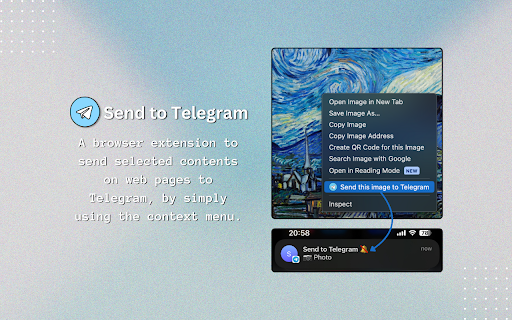
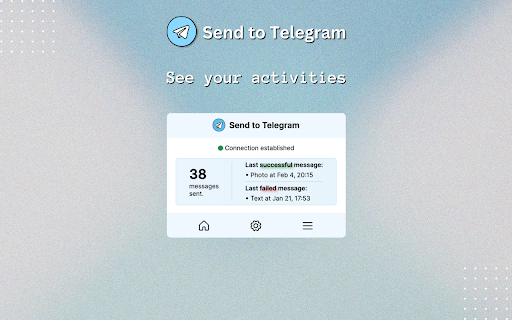

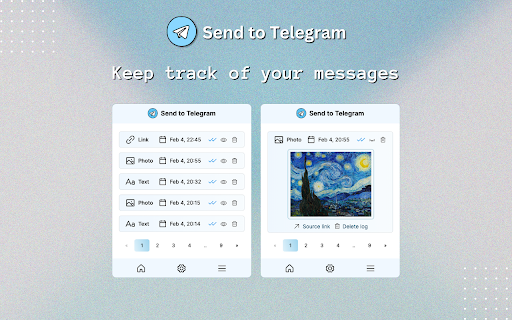
A browser extension to send selected contents on web pages to Telegram via Telegram Bot API. 🛫 Send to Telegram extension helps you send texts, links, and images on web pages easily to yourself or group chats using the context menu of the browser, as a Telegram message. It has an optional logging feature to save the messages that you have sent, similar to bookmarks. 📣 Join our Telegram channel for the updates, quick tips, and questionnaires about new features: https://t.me/send_to_telegram 1. Create a Telegram Bot and obtain a Chat ID to start sending messages. You can follow the steps in the installation wizard to complete the setup process. 2. In the Telegram app, open the chat dialog with your bot and type /start so that it can access to the chat. 3. Go to the Settings page and save your credentials. 4. Start sending messages by simply right-clicking on the content and then clicking on the 'Send this to Telegram' option. - Connection Status: Checks if the Telegram Bot Token is correct and functional. - Total Messages Sent: Increments upon each successful message sent. - Last Messages: Time and content type of the last successful/failed messages. - Telegram Bot Token: The token that you obtain by messaging @BotFather on Telegram. The process of getting a token is super easy; don't be discouraged thinking it's necessary to be tech-savvy. Simply start chatting with the bot and you'll figure it out. - Chat ID: Your personal identifier on Telegram which is required for the Bot to be able to find and text you. You can use @userinfobot. Simply start chatting with this bot and it will reply with your id. (It's safe, you can block the bot afterward if you want.) - Disable Notification Sound: The message notification of the bot is delivered silently to you. - Disable Link Preview: The OpenGraph title, description and image of the link won't be shown. - Add Source Link: The source link of the content will be added to the message as a button. - Send as Photo: The image will be shown on the chat directly. This option compresses the image upon sending it; however, it's not noticeable for regular content where you don't expect the image to be high quality. - Send as Document: The image will be sent without compression, and you will have to download it to see the image. - Send as Link: Images won't get uploaded to Telegram and only the image of the link will be sent. Store Timestamps Only: Only the message date and content type will be saved, the message content won't be available to check out later. Store Everything: You will be able to see the content you sent as well as its delivery date and content type. 2️⃣ . 4️⃣ Hashtag Settings You can add hashtags to your messages to easily group them on Telegram. Enable it and save your tags, then you will find the tags in the context menu options. 3️⃣ Logs - If the logging type is set to 'Everything' when a message is sent, you can expand or collapse the log container to view the message content by clicking on the 'Eye' icon. - If the logging type is set to 'Timestamp-only' when a message is sent, you will only see the message date and content type. - If logging is turned off when a message is sent, the message won't appear here. - You can delete the log by clicking on the Trash icon. - Disabling logging doesn't delete the previous logs. To report an issue, please use the support link below. Thank you for installing! ☀️

Telegram Blur - Advanced Telegram Web Privacy
Blur and Hides your messages on Telegram until you hover over them. Blur and Hides your messages on Telegram until you hover over them. To increase privacy in public spaces the Telegram Blur Extension For Telegram Web blurs your messages as well as other content. And only reveals one when you hover over it with your mouse cursor. Additionally, you can quickly toggle all effects by using a keyboard shortcut (Alt+X) or by clicking the toggle button in the extension menu. It adapts to your needs by letting you decide which elements you want to blur. Your options: - Blurs all messages in the current chat. - Blurs all message previews on the left. - Blurs all images, videos, stickers, ... in separation from the text. - Blurs all small icons of images, videos, ... while viewing an image, video, ... - Makes the color in your input field lighter to make it hard to read. - Blurs all profile pictures. - Blurs all groups and users names. - Allows you to turn off the delay before revealing an item on hover. - Unblurs all elements when you hover over the Telegram Web app. --- This extension does not collect information about you or your messages. Disclaimer: Telegram is a trademark of Telegram Inc., registered in the U.S. and other countries. This extension is an independent and has no relationship to Telegram or Telegram Inc. We display a banner ads and affiliate link redirection as a sort of monetization, thank you for your support.

Messenger for Telegram™
Access to Telegram's web application in a separate window or tab and get notified when new messages received This extension opens the official Telegram's web client in a sandboxed window or a browser tab. If an existing window is found, the extension activates the window without opening a new instance. Also, when the interface is open, the extension updates its badge number based on the total unread conversions that the user has. This number ignores muted conversions. Also, automatically updates when a conversion is read. After installation, if you haven't used Telegram on this browser yet, you will need to login into your Telegram account. Simply, press the newly added icon on the toolbar area (the icon might be inside the extensions panel; if so pin the icon to the toolbar area). Now enter your Telegram's phone number and check another device that has a Telegram client on it. Enter the PIN code into the web client and wait for Telegram to sync your data. If you already have open Telegram tabs, make sure to refresh them for the extension to inject the badge monitoring script into these pages. To protect user privacy, this extension does not send any data to any server whatsoever. It is only a shortcut to access your beloved messenger. What is Telegram? Telegram is a freeware, cross-platform, cloud-based instant messaging software and application service similar to WhatsApp and Signal messengers. The service also provides end-to-end encrypted video calling, VoIP, file sharing, and several other features. -- Legal This extension is an open-source project to open the official Telegram's web client. It has nothing to do with Telegram development and is an independent project.

Share via Telegram
Allows to share current page via Telegram messenger in just one click This extension allows you to share URL of the current page or selected text/link/image to the Telegram app. 'Reading your browsing history' permission is required to get the url of the page you're currently on. Works with Telegram Desktop apps for Windows, MacOS and Linux.

TG Sender - TG bulk message send and invite
Scrape Telegram group members and send bulk message, invite bulk members automatically on Telegram This Chrome extension helps you scrape any group members, send messages to many people, and add members to Group automatically. Use the extension, you don't need one by one sending off messages to all your customers anymore. you boost your work. It is very easy to use and saves a lot of time for you. And this extension doesn't require your account and password and runs only locally on your browser, so services don't depend on any 3rd parties. Frequently Asked Questions: ➢ How to Scrape Group Members? 1. Login account on web.telegram.org and check K version 2. Click Group that you want to scrape 3. Set the number you want to scrape 4. Click START SCRAPING button to scrape ➢ How to Send Bulk Messages? 1. Input a list of usernames/Groups/phone numbers 2. Input the message/sticker 3. Set the interval between two messages 4. Click START MESSAGING button to send it automatically ➢ How to Invite Bulk Members to your Group? 1. Login account on web.telegram.org and check K version 2. Input a list of usernames or paste usernames from the clipboard 3. Set the interval between two Invites 4. Click START INVITING button to invite automatically ➢ How many messages should we send per day to keep your account safe? There are no restrictions on sending messages to your mutual contacts (contacts you have already chatted with) on TG; This means that you can send messages to as many people as you want with your TG account and you would not face any problems. But the story is different for sending messages to strangers (contacts you have no chat history with). In general, depending on the positive score of your TG account, you can send up to 50 messages to strangers in one day. ➢ How can I get new accounts to send more messages? 1. Upload a photo for your profile and complete the profile information 2. If your account gets older (since the date of its creation) 3. And the most important point: when you chat with different people on TG and they respond to your messages, your account will receive more positive scores If you collect more positive scores for your TG account by doing the above-mentioned activities, TG will find your account more authoritative and won't grow suspicions of your account activities. If you have more questions, feel free to join our group to discuss together, we have many partners here to discuss how to play with TG Marketing (the link to the group is inside the Extension) Note: Telegram Sender is an independent project and has no relationship to Telegram Inc.
