
kchbblidjcniipdkjlbjjakgdlbfnhgh

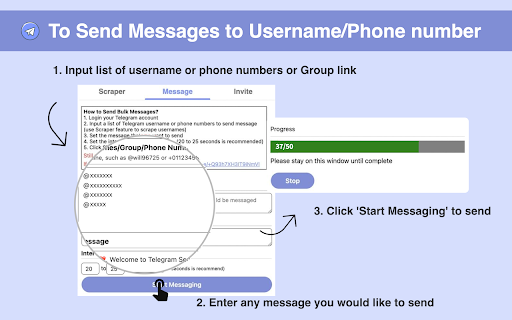
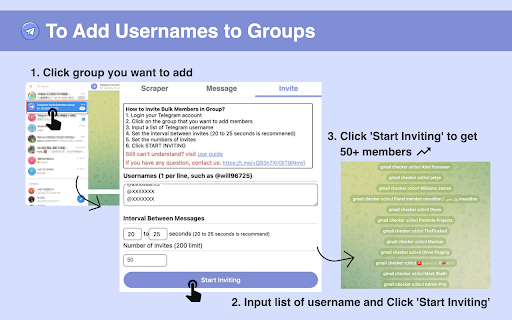
Scrape Telegram group members and send bulk message, invite bulk members automatically on Telegram This Chrome extension helps you scrape any group members, send messages to many people, and add members to Group automatically. Use the extension, you don't need one by one sending off messages to all your customers anymore. you boost your work. It is very easy to use and saves a lot of time for you. And this extension doesn't require your account and password and runs only locally on your browser, so services don't depend on any 3rd parties. Frequently Asked Questions: ➢ How to Scrape Group Members? 1. Login account on web.telegram.org and check K version 2. Click Group that you want to scrape 3. Set the number you want to scrape 4. Click START SCRAPING button to scrape ➢ How to Send Bulk Messages? 1. Input a list of usernames/Groups/phone numbers 2. Input the message/sticker 3. Set the interval between two messages 4. Click START MESSAGING button to send it automatically ➢ How to Invite Bulk Members to your Group? 1. Login account on web.telegram.org and check K version 2. Input a list of usernames or paste usernames from the clipboard 3. Set the interval between two Invites 4. Click START INVITING button to invite automatically ➢ How many messages should we send per day to keep your account safe? There are no restrictions on sending messages to your mutual contacts (contacts you have already chatted with) on TG; This means that you can send messages to as many people as you want with your TG account and you would not face any problems. But the story is different for sending messages to strangers (contacts you have no chat history with). In general, depending on the positive score of your TG account, you can send up to 50 messages to strangers in one day. ➢ How can I get new accounts to send more messages? 1. Upload a photo for your profile and complete the profile information 2. If your account gets older (since the date of its creation) 3. And the most important point: when you chat with different people on TG and they respond to your messages, your account will receive more positive scores If you collect more positive scores for your TG account by doing the above-mentioned activities, TG will find your account more authoritative and won't grow suspicions of your account activities. If you have more questions, feel free to join our group to discuss together, we have many partners here to discuss how to play with TG Marketing (the link to the group is inside the Extension) Note: Telegram Sender is an independent project and has no relationship to Telegram Inc.

ChatGPT Automation - Auto ChatGPT on chatgpt.com
Auto ChatGPT for your prompts at scale. Batch generate and auto-download responses and images on ChatGPT.com. ChatGPT Automation is an Auto ChatGPT tool built to fully automate your workflow on OpenAI's chatgpt.com. No more manually typing prompts one by one — let ChatGPT run automatically. This extension turns ChatGPT into a batch-processing engine, allowing you to auto-submit prompts, auto-generate content, and auto-download results at scale. 🔥 What ChatGPT Automation does Auto ChatGPT prompts continuously without manual interaction Batch generate AI text, images, and visual content Automatically download results with smart file naming Handle long prompt queues safely with smart random delays 🤖 Auto ChatGPT Batch Processing Queue dozens or hundreds of prompts and let ChatGPT Automation automatically: - Submit prompts to ChatGPT - Wait for generation to complete - Move to the next prompt No clicks. No babysitting. 🎨 Image to Image Transformation Batch transform and enhance images using AI with text prompts Chain mode: automatically use the previous generated image as input for the next prompt 🧩 Ingredients to Text Mode Upload reference images and batch-process them with prompts Auto-add character images based on filename matching ⚙️ Professional Automation Controls - Smart Random Delay System to avoid rate limits - Configurable min/max delay between prompts - Auto Download once generation completes with custom folder organization - Auto-rename files based on prompt content - Max Retries on failure — automatically retry failed prompts - Multiple outputs per prompt (1–4) 📊 Real-time Queue Monitoring - Live prompt queue with per-prompt status (Queued → Running → Completed) - Visual progress tracking inside the Side Panel - Retry counter per prompt ✅ Perfect for - Content creators and copywriters - AI image and visual producers - Automation & productivity users - Anyone who wants to Auto ChatGPT at scale

Telegram Video Downloader - TG Downloader & Media Saver
Telegram Video Downloader - Download Telegram Videos, Photos, Music, GIFs from Private/Restricted Channels and Groups & Export Chats Telegram Video Downloader is a fast, simple, and lightweight Chrome extension designed to help you download Telegram videos, audio, photos, GIFs, music, audiobooks, and media files from Telegram Web in just a few clicks. Whether you want to save media from Telegram channels, groups, chats, private channels, or restricted Telegram communities, this Telegram video downloader makes it easy to download and store Telegram content locally on your computer. No complicated setup, no Telegram API configuration, and no technical skills required. - 🎬 Telegram Video Downloader - Easily download Telegram videos from chats, channels, groups, private channels, and restricted Telegram channels. - 🗂️ Telegram Media Downloader - Save videos, photos, images, GIFs, audio files, music, audiobooks, documents, and other Telegram media resources. - ⚡ Bulk Telegram Download - Select multiple media files and batch download Telegram videos, pictures, and audio content with one click. - 📥 Single File Download - Download an individual Telegram video, image, audio file, or document directly from the Telegram Web chat window. - 🔒 Download from Telegram Private Channels - Save video, audio, photo, and media content from private Telegram channels and personal shares. - 🚫 Restricted Telegram Channel Downloader - Download media from restricted Telegram groups and channels and keep important files locally. - 🌐 Telegram Web Downloader - Fully supports Telegram Web A and Telegram Web K versions, including https://web.telegram.org/a and https://web.telegram.org/k. - 📦 Large File Support - Easily download large Telegram videos, media files, and 1GB+ content from Telegram Web. - 🧩 No API Required - Start downloading Telegram media without Telegram bot API setup, developer configuration, or extra technical steps. - ✅ Easy to Use - A clean and beginner-friendly interface makes Telegram video download simple for every user. 🚀 How to Use 1. 🛒 Install the Telegram Video Downloader Chrome extension from the Chrome Web Store. 2. 📌 Pin the extension to your browser toolbar. 3. 🌐 Open Telegram Web at https://web.telegram.org/k or https://web.telegram.org/a. 4. 🔎 Browse the Telegram chat, group, channel, private channel, or restricted channel you want to download from. 5. 🧩 Click the extension icon to view captured Telegram media resources. 6. ✅ Select videos, photos, audio, GIFs, or files. 7. 📥 Click Download to save Telegram media locally. 📁 Supported Telegram Downloads - 🎥 Telegram Videos - Download videos from Telegram chats, groups, channels, and private shares. - 🖼️ Telegram Photos - Save Telegram images, pictures, and photo albums to your computer. - 🎧 Telegram Audio - Download Telegram music, voice files, audio messages, and audiobooks. - ✨ Telegram GIFs - Save animated GIFs and media previews from Telegram Web. - 📄 Telegram Documents - Download shared files and documents from Telegram conversations. - 📢 Telegram Channel Media - Batch download media from Telegram public, private, or restricted channels. - 👥 Telegram Group Media - Save videos, images, audio, and files from Telegram groups. - 🌐 Telegram Web A/K Media - Works with both major Telegram Web versions. 👤 Who Is This For? - 💬 Telegram Users - Save useful videos, photos, music, and documents from Telegram Web for local access. - 🗃️ Content Collectors - Organize Telegram media files from different chats, groups, and channels. - 📢 Community Managers - Download and back up shared Telegram media from groups and channels. - 🎓 Students and Researchers - Save Telegram videos, documents, audio lessons, and learning materials. - 💼 Business Users - Keep important Telegram media, files, and shared resources organized offline. ⭐ Why Choose This Telegram Video Downloader? Telegram Video Downloader helps users save time when downloading media from Telegram Web. Instead of manually opening each file one by one, you can quickly collect Telegram videos, photos, audio files, and other media resources in bulk. It is ideal for users looking for a Telegram video download extension, Telegram media saver, Telegram bulk downloader, Telegram private channel downloader, Telegram restricted channel downloader, or Telegram Web video downloader. Telegram Video Downloader is a Chrome extension that helps users download Telegram videos, audio, photos, GIFs, documents, and other media files from Telegram Web. Yes. You can use this Telegram video downloader to save videos from Telegram channels, groups, chats, private channels, and restricted channels that you can access in Telegram Web. ⚡ Does this extension support bulk Telegram downloads? Yes. Telegram Video Downloader supports bulk download, allowing you to select multiple Telegram videos, images, audio files, and media resources and download them together. 🎧 Can I download Telegram audio and music files? Yes. This Telegram media downloader supports audio files, music, audiobooks, voice files, and other supported Telegram audio resources. 🌐 Does it work with Telegram Web A and K versions? Yes. The extension supports both Telegram Web A and Telegram Web K, including https://web.telegram.org/a and https://web.telegram.org/k. No. You do not need to configure the Telegram API, create a bot, or enter any API token. The extension works directly in your browser. Yes. Telegram Video Downloader supports large media files, including 1GB+ Telegram videos and other large Telegram files. 🖼️ Can I save photos and GIFs from Telegram? Yes. You can download Telegram photos, images, picture albums, animated GIFs, videos, audio, and documents from Telegram Web. Yes. The extension can help download media from Telegram private channels and groups that are visible and accessible in your Telegram Web account. Yes. Telegram Video Downloader can help save videos, audio, photos, and other media from restricted Telegram channels and groups that you can open in Telegram Web. ℹ️ Is this extension affiliated with Telegram? No. Telegram Video Downloader is an independent third-party Chrome extension and is not affiliated with, endorsed by, or officially connected to Telegram. Please use this Telegram downloader responsibly. Users are responsible for how they download, save, and use Telegram media content. Do not download or distribute copyrighted content without proper permission. Telegram Video Downloader is an independent third-party Chrome extension and is not affiliated with, endorsed by, or officially connected to Telegram Messenger Inc., Telegram Web, or any related Telegram services.

Telegram Media Downloader - TG Downloader
Save Telegram photos and videos in 1 click. Free Telegram Media Downloader for private channels, groups & chats. Telegram Media Downloader is the ultimate Chrome extension for anyone who wants to download Telegram photos, videos, files, and documents directly from Telegram Web. Fast ⚡, secure 🔒, and hassle-free 🎉 — it’s the perfect tool for content creators, group admins, researchers, and everyday users who need to bulk download Telegram media or save specific files instantly. With just a single click, you can download from private channels, groups, and chats — all while keeping your data safe on your own device. 🔑 Key Features 1. 🎥 Download in Original Quality Get Telegram videos, images, and files without compression — exactly as they were uploaded. 2. 🔐 Access Private & Restricted Content Save media from private Telegram groups, secret chats, and closed channels with ease. 3. 📦 Bulk & Selective Downloads Choose between downloading everything at once or selecting individual photos, videos, or files. 4. 🛡️ 100% Secure & Private Your downloads stay on your device. No tracking, no servers, no spying — everything is processed locally. 5. 📁 Auto-Organized Folders Files are neatly sorted into folders by Telegram account, making it simple to manage your saved content. 6. ⚡ One-Click Simplicity No technical skills needed — just open Telegram Web, launch the extension, and click “Download.” 1️⃣ Open Telegram Web in your browser. 2️⃣ Navigate to the chat, group, or channel with the media you want. 3️⃣ Click on the Telegram Media Downloader icon. 4️⃣ Hit Start Download and your files will be instantly saved to your device. 📥 Done — your Telegram media is ready to use offline anytime. If you’re searching for: • ✅ Telegram photo downloader • ✅ Telegram video downloader • ✅ Bulk Telegram file exporter • ✅ Private Telegram media saver • ✅ Chrome extension to download Telegram files 👉 Then this is the best Telegram media downloader for you. Simple, reliable, and built for speed. We take privacy seriously. All downloads are handled 100% locally on your computer. • 🚫 No cloud uploads • 🚫 No third-party servers • 🚫 No personal data collection Your Telegram files remain yours — safe and secure. This is an independent browser extension created by a third-party developer. It is not affiliated with Telegram Messenger Inc., nor is it an official Telegram product. ✨ Start saving your Telegram media today with Telegram Media Downloader — the easiest way to download Telegram photos, videos, and files instantly.

Telegram Group Parser by CRMChat
Scrape full list of members in private and public groups you're a part of. Use it for LeadGen on Telegram Turn any public or private Telegram chat into a lead source. Extract complete member lists with usernames, names, and profile data in seconds. Export to CSV and launch targeted Telegram outreach campaigns. Get started in seconds ⚡ In a matter of clicks, you can: 👥 Extract complete member lists from Telegram groups and chats you're part of 📊 Export usernames, names, user IDs, and profile data to CSV 📁 Download clean spreadsheets ready for any CRM or outreach tool ⚙️ Customize scraping speed with adjustable click delays 💬 Optionally check message history to identify active participants 🎯 Build targeted prospect databases from niche communities 🔗 Integrate seamlessly with CRMChat for automated campaigns More than 300+ sales teams have already leveled up their lead generation with CRMChat 🚀 Telegram Group Scraper is best for: 💼 Sales & Business Development 🎯 Lead Generation Specialists 📈 Growth Marketers 🌐 Web3, Crypto and iGaming Teams Step 1: Open Telegram Web (web.telegram.org) in Chrome Step 2: Navigate to any group you're a member of Step 3: Click "Find Members" to load all group participants Step 4: Click "Start Scraping" in the extension popup Step 5: Download your CSV file with complete member data That's it! Your prospect list is ready for outreach.
