
eoaapiimcaimddnfhfnifgkinmpcbccp


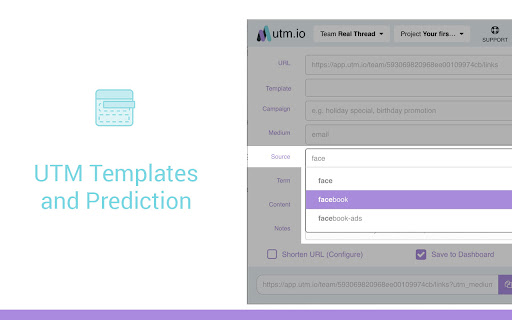

Quickly create UTMs to track your content across the web **No sign up or sign in required to use UTM Extension** This UTM.io extension is a better version of the Google Analytics URL Builder. You can use your newly tagged URLs to measure your campaigns in Google Analytics, Mixpanel, Kissmetrics, Amplitude and just about any other analytics tools. UTM Builder Extension Features: - Bulk create links and save time - Custom branded domain link shortener - No more messy spreadsheets - Save templates for UTM campaigns - Sync utm templates across your team - URL auto-populated into form field - Auto-fill fields for speed and consistency - Cloud storage integration for logging - Share directly to Facebook and Twitter - Shorten UTMs with Bit.ly integration - Save all links and user activity to your account Save time by efficiently generating Google Analytics tracking links, aka UTM tracking codes with never leaving your Chrome browser. Get your Google Analytics URL builder for free. Everyone should use UTM tracking codes with their links in Kissmetrics, Mixpanel and Google Analytics accounts. This is how you effectively track your online marketing campaigns in Google Analytics, KISSmetrics, Mixpanel, and Amplitude. Use our simple Chrome extension and build Google Analytics tracking URLs in no time. Creating UTMs to track your digital marketing campaigns is the best way to gauge their effectiveness. However, creating UTMs can be tedious and time-consuming. As digital marketers, we know this firsthand. We've created a simple tool to build UTMs with never leaving your browser. We've integrated time-saving features to reduce the amount of effort it takes to creating UTMs. Our favorite feature is the ability to create UTM templates- solving the headache of repeated copy and pasting the same data.

Adswerve - dataLayer Inspector+
DataLayer Tools for Digital Analysts The Adswerve dataLayer Inspector+ is a tool kit of utilities for a digital analyst. Inspect Google Analytics activity - Monitor the dataLayer in real time - See the Google Analytics hits in the console, as they happen - Evaluate common dataLayer pushes formats: events and ecommerce Insert additional resources in the page - Push a dataLayer message for setup - Add a GTM container to test it - Insert code into the page to monitor and modify How to use the dataLayer Inspector+: https://adswerve.com/resources/adswerve-data-layer-inspector-2 Update for v2024.11.1.1 Due to new restrictions on external script tags in Chrome extensions, the "Insert GTM Container" option has been removed from dataLayer Inspector+. Follow these steps to insert a GTM container into a web page with the "Inject Code" feature instead: Go to tagmanager.google.com. Under the Admin tab for your container, select "Install Google Tag Manager." As shown in the screenshot below, where it says "Paste this code as high in the of the page as possible," copy just the snippet code content. Note: Do not include , only the code between them. In the DataLayer Inspector popup, under "Add Functionality," check "Inject Code." Paste the code snippet from Tag Manager into the text box that appears. Click the button to "Save Settings & Reload." The GTM container will be inserted until the "Inject Code" box is unchecked and "Save Settings & Reload" is clicked again. Be sure to do this when you've finished testing.

McGaw.io AB Testing Tracking Tool
This extension allows you to calculate the statistical significance & conversion rate of your A/B tests. Our Statistical Significance Calculator features: - Color coded bar to show Statistical Significance - Split test calculator - AB Test Calculator - Direct comparison of conversion results. - Ability to calculate significance of ab tests anywhere and with any tool You may be asking yourself, what is ab testing? Or even, why do I need to calculate it? Well, lets makes this easy for you. AB testing is one of the cornerstones to digital marketing, it is when you test two version of your site, email, ppc or other mediums against each other to see which one win. That said, when you run one of these comparative tests, you need to make sure you have a calculate statistical significance. How do we calculate statistical significance? We use a probability calculator based on statistics which will help us know if one test has enough volume and distribution to have a higher probability of being the correct outcome. If you do not measure the level of significance, you may launch a split test winner to production and find out that the results were not good. Tools like Visual Website Optimizer, Optimizely and other ab testing tools have their own built in ab test calculators, but we do not trust/recommend these. You need to be measuring your AB tests in your analytics tools and calculating statistical significance of of that data. This will give you the best test of significance. Once we have run our statistical significance test we can verify if we have a real winner or not. With our tool you can calculate statistical significance right in your Chrome browser. You can use this for email ab testing, website ab testing, mobile app ab testing, ppc ab testing and just about any testing period. Calculating the significance of AB test results is always a hassle. Some analytics tools attempt to tell you when significance has been reached, and others simply pretend it doesn’t matter. Using the McGaw.io Statistical Significance and AB Test Calculator you’ll be able to quickly determine whether your test results are significant - all from a simple chrome extension. Stop opening new tabs and searching for statistical significance calculators that are hard to use and harder to understand.

Express UTM-Builder
No more messy spreadsheets: Create UTM-Links & track your campaigns! Quickly and precisely create UTM-tagged links to track your content. Our click-based interface removes typing errors from your UTM process. Perfect for teams of marketers and content creators. -- Try our demo, with no need to sign up. -- Express UTM-Builder can create links compatible with Google Analytics, as well as Adobe Analytics, Matomo/Piwik, Amplitude, Mixpanel, Kissmetrics or any other analytics tool on the market. Express UTM-Builder ensures speed along with precision when creating trackable links. Make no mistakes when it comes to UTM Tracking. You can also say goodbye to your messy UTM spreadsheet. Express UTM-Builder Features: - Use a button interface to create links - Tag the current URL or input a URL of your choice - Ensure your UTM convention is followed by the whole team, every time - 0 training time for new team members - Define and share a convention across the whole team - Define complex rules and taxonomy to match your business - Collect more than the standard UTMs (utm_source, utm_medium, etc.) - Bit.ly integration - Bulk create links - Complete history of all created links - Link shortening and custom vanity domains - Replace hard-to-manage spreadsheets - Restrict and control access (perfect for agencies!) - Share parts of your convention externally (great for affiliate programs, customer support etc.) - Integrate everything with your data stores, via our API - Use ID based UTM tagging, so that urls are not publicly readable Save time and improve data quality by generating tracking links/UTMs right inside your Chrome browser. Improve your teams performance by leaving the Google URL builder behind.

Elevar GTM Event Builder
Browser extension for Google Tag Manager The fastest and easiest way to add GA4 custom event tags via Google Tag Manager. With Elevar's GTM Event Builder you can point-and-click your way to creating new GA4 tags and triggers inside of Google Tag Manager! This extension allows you to create the following events for Google Analytics: - Form Submissions - Click events - Visibility events - Pageview events - Automatically select the DOM element required for custom click triggers - Google Analytics event tags with associated triggers automatically assigned Once done tagging your site you can import these events in 1-click to GTM.
