
ijndnpondlemhcgdmbdljpgohnlpejhp


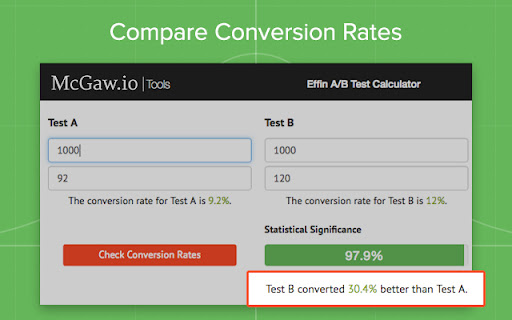
This extension allows you to calculate the statistical significance & conversion rate of your A/B tests. Our Statistical Significance Calculator features: - Color coded bar to show Statistical Significance - Split test calculator - AB Test Calculator - Direct comparison of conversion results. - Ability to calculate significance of ab tests anywhere and with any tool You may be asking yourself, what is ab testing? Or even, why do I need to calculate it? Well, lets makes this easy for you. AB testing is one of the cornerstones to digital marketing, it is when you test two version of your site, email, ppc or other mediums against each other to see which one win. That said, when you run one of these comparative tests, you need to make sure you have a calculate statistical significance. How do we calculate statistical significance? We use a probability calculator based on statistics which will help us know if one test has enough volume and distribution to have a higher probability of being the correct outcome. If you do not measure the level of significance, you may launch a split test winner to production and find out that the results were not good. Tools like Visual Website Optimizer, Optimizely and other ab testing tools have their own built in ab test calculators, but we do not trust/recommend these. You need to be measuring your AB tests in your analytics tools and calculating statistical significance of of that data. This will give you the best test of significance. Once we have run our statistical significance test we can verify if we have a real winner or not. With our tool you can calculate statistical significance right in your Chrome browser. You can use this for email ab testing, website ab testing, mobile app ab testing, ppc ab testing and just about any testing period. Calculating the significance of AB test results is always a hassle. Some analytics tools attempt to tell you when significance has been reached, and others simply pretend it doesn’t matter. Using the McGaw.io Statistical Significance and AB Test Calculator you’ll be able to quickly determine whether your test results are significant - all from a simple chrome extension. Stop opening new tabs and searching for statistical significance calculators that are hard to use and harder to understand.

ObservePoint Debugger
Troubleshoot analytics tags, variables, events, cookies, and more. Supports Adobe Analytics, Google Analytics, and thousands more. Now with GPC, Accessibility Scanning, and a dedicated Cookies tab! Easily audit page accessibility, and view, search, and manage all browser cookies—the perfect all-in-one replacement for niche debugging tools. Overview ObservePoint’s Debugger is a free Chrome Extension for troubleshooting analytics, marketing tags, cookies, and web accessibility directly in Chrome DevTools. It captures page-load and event-triggered requests, parsing them into a clean, human-readable format for easy debugging and compliance checks. Key Features 🔹Simulate GPC Signals Instantly: Validate and compare tag and cookie compliance with Global Privacy Control (GPC) enabled directly inside the extension, eliminating the need for separate browser plugins or manual header workarounds. 🔹Accessibility Testing: Instantly scan any page for WCAG compliance issues. Identify errors in color contrast, ARIA labels, heading structures, and more to ensure an inclusive user experience. 🔹Cookies Tab: Quickly inspect all browser cookies in one place—including those set by tags and scripts. Filter and sort by name, value, domain, path, and expiration to understand privacy implications. 🔹Tag Inspection: See exactly what data is being sent to your analytics and marketing platforms in real-time. Why Use ObservePoint The Debugger is the first step toward comprehensive governance of your digital properties. The full ObservePoint platform helps you: 🔹 Audit Accessibility: Scan entire domains for WCAG 2.1/2.2 compliance. 🔹 Monitor Data Accuracy: Scan pages or user flows to ensure tags fire correctly. 🔹 Protect Privacy: Identify and categorize cookies set by third-party scripts. 🔹 Test Pre-Release: Validate implementations in dev and staging environments. 🔹 Automate Quality: Get alerts when tracking, compliance, or critical paths fail. How It Works After installation, open Chrome DevTools → ObservePoint tab → Refresh the page. See which tags, cookies, and accessibility violations appear, including: 🔅 Accessibility Health: Details of WCAG errors and warnings. 🔅 Tag Details: Name (GA4, Adobe, OneTrust), Account ID, and Category. 🔅 Tag Performance Metrics: Status, Request Size, and Latency. 🔅 Cookie Intelligence: Expiration dates and source attribution. Click any item to view variables, decoded request data, or specific remediation guidance for accessibility errors. Export your findings as an Excel file for easy sharing. Get Started The ObservePoint Debugger is a powerful alternative to WASP, OmniBug, Accessibility Insights, or Tag Inspector. 1. Enable the extension under Chrome → More Tools → Extensions. 2. Open DevTools (Ctrl+Shift+I / Cmd+Opt+I). 3. Select the ObservePoint tab. 4. Refresh your page. For cookies and accessibility, no refresh is required. 5. Start debugging! By installing, you agree to the ObservePoint Terms of Service: https://www.observepoint.com/service-agreement/ Learn more: https://help.observepoint.com/en/articles/9113174-observepoint-debugger-chrome-extension

Google Analytics UTM Builder
Add UTMs to URL with this hyper version of Google Analytics UTM Builder. Add and manage UTM presets, create workspaces and share With this tool you can add UTM parameters to fully track your campaigns performance in Google Analytics: List of features: - Unlimited presets of tags for fast tagging - Grouping presets by subject, theme, client etc. - Dynamic sync to cloud - Create a presets hub to share with colleagues - Google Analytics4 new UTMs - Force Lowercase (on/off toggle) - Bit.ly shortening support - Auto generate the final URL - Copy to clipboard button - Remember your last UTM's set (for 60 minutes) - "Copy UTM's only" button - Import/Export presets for backup or sharing - Keep the tagging screen open all the time (docked version) 100% Privacy guaranteed! This extension does not collect your tagging data or browsing activity. Permissions are needed for features sake.

GTM Copy Paste
Copy your Tags, Triggers and Variables and Paste them into any other account Easily Copy and Paste your Tags, Triggers, and Variables from one Google Tag Manager account to the next. Simply add them to the extension and then paste them into your intended account. Your items will be uploaded through the GTM API. You can put together your own menu of Tags, Triggers and Variables that you want to copy to another account. No more Container exports and reimports through the GTM Admin interface. Notes: - The relationship between Tags and Triggers will remain intact as long as they are part of the same "paste". - If an asset (Tag, Trigger or Variables) under the same name already exists, the extension will upload the asset with "(#)" attached to the end of the name. - Completely re-written the extension (March 2025): - newly improved "copy" experience - new UI for the clipboard - dependency check feature to add all dependancy to the clipboard - the oauth scope now ask for less permissions - now supports templates, tag sequencing, built-in variables and dependency rewrites Known issues: - If you edit an item right before you copy it to the clipboard, it might not have the changes in the paste. That’s because the extension is working with a cached version of the container. - If you copy a tag connected to a template, the upload might fail because it can’t find the reference - If you delete a dependant item from the clipboard, the upload might fail as it doesn’t have the right items to connect back while pasting

Conversion.com's Optimizely Chrome Extension
This extension allows you to learn information about Optimizely on a given page - Displays if Optimizely is running on the page - See what active experiments are on the page - Turn on/off QA mode - View Optimizely events - Ability to change the variation you are on in an experiment - Copy the experiment URL to clipboard (including the variation that you have selected) - QR Code for the experiment URL (including the variation that you have selected) - Open all the variations of a certain experiment in different tabs - Directly access the Results and Editor page of an experiment - See the current Optimizely Revision ID - Get accounts saved status - Works with Optimizely Classic & Optimizely X - Realtime in-browser notifications for Optimizely events
