
flockfgmfgmpmimlfkkeepkblckodbjg

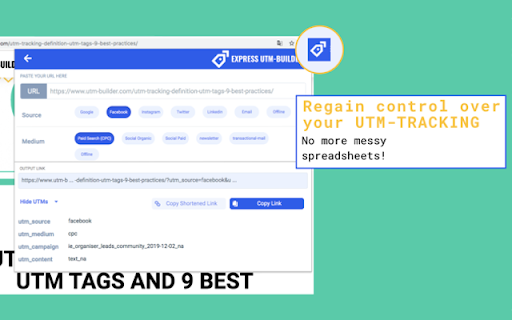
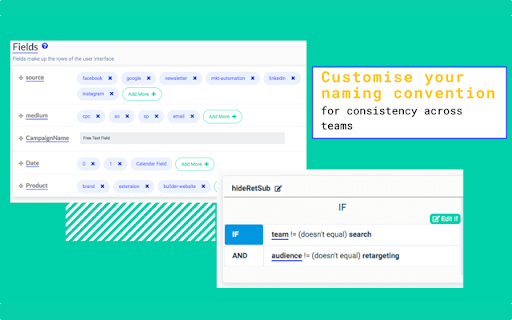
No more messy spreadsheets: Create UTM-Links & track your campaigns! Quickly and precisely create UTM-tagged links to track your content. Our click-based interface removes typing errors from your UTM process. Perfect for teams of marketers and content creators. -- Try our demo, with no need to sign up. -- Express UTM-Builder can create links compatible with Google Analytics, as well as Adobe Analytics, Matomo/Piwik, Amplitude, Mixpanel, Kissmetrics or any other analytics tool on the market. Express UTM-Builder ensures speed along with precision when creating trackable links. Make no mistakes when it comes to UTM Tracking. You can also say goodbye to your messy UTM spreadsheet. Express UTM-Builder Features: - Use a button interface to create links - Tag the current URL or input a URL of your choice - Ensure your UTM convention is followed by the whole team, every time - 0 training time for new team members - Define and share a convention across the whole team - Define complex rules and taxonomy to match your business - Collect more than the standard UTMs (utm_source, utm_medium, etc.) - Bit.ly integration - Bulk create links - Complete history of all created links - Link shortening and custom vanity domains - Replace hard-to-manage spreadsheets - Restrict and control access (perfect for agencies!) - Share parts of your convention externally (great for affiliate programs, customer support etc.) - Integrate everything with your data stores, via our API - Use ID based UTM tagging, so that urls are not publicly readable Save time and improve data quality by generating tracking links/UTMs right inside your Chrome browser. Improve your teams performance by leaving the Google URL builder behind.

Terminus UTM Builder
Terminus makes it easy for you and your team to build and manage all your UTM URLs in one place. Build a UTM tracking URL on any website and save it in your Terminus account. Terminus helps marketers build and manage UTM tracking URLs. It's a much more advanced version of Google URL Builder or any spreadsheet solution. It's built for serious marketers and marketing agencies to take their URL tracking to the next level. * Define and enforce any UTM conventions * Save all URLs, UTMs, custom parameters in once place * Add UTM tracking to all URLs in your emails with a couple of clicks. * Collaborate with your team with fine grained user permissions * Use dropdowns to choose from previously used values * You can use presets to save your favorite combination of campaign parameters. Apply them with a single click the next time you create a URL * Automatically shorten your URLs (you can even use your own shortener) Terminus is the most advanced solution in the market for building your tracking URLs. * Requires Terminus account. Signup for a zero-risk, free trial today at https://www.terminusapp.com Extension Permissions: - Read and change data on terminusapp.com sites This extension loads your Terminus account in an overlay. This requires modifying requests to terminusapp.com to facilitate this. - Read your browsing history The extension uses this permission to populate the current url in the UTM builder so that you don't have to copy-paste it.

UET Tag Helper (by Microsoft Advertising)
This extension helps to identify issues in Microsoft Advertising UET tags • Navigate to any page of your website and the tag helper will tell you which UET tags are on the page and if they are working correctly. • Find out if your conversion goals or Dynamic Remarketing lists have been set up correctly on your website. • Learn about the issues that are encountered and how to fix them.

TagHound - Analytics/GTM/Pixel Debugger
Debug Google Analytics, Google Tag Manager dataLayer, Google Ads, Facebook Ads & +18 ad platforms pixels: Twitter, TikTok and more TagHound Analytics/GTM/Pixel Debugger by Assaf Trafikant helps you validate your analytics tools implementation as well as ad platforms pixels and Google Tag Manager dataLayer events - all in one tool. It works all the time for all the supported platforms at once. In total, TagHound Analytics/GTM/Pixel Debugger supports 22 analytics and ad platforms, including Google Analytics 4 (and older versions) & Google Tag Manager (events and dataLayer viewer), to give you a holistic tracking and pixel analysis experience. Just navigate to any page, open your DevTools panel (F12), or click the extension icon (less information) and it will show you all your pixels and events, with a never-seen-before error validation (over 1200 validation rules). Just click the event to see all the data in a clear format, grouped by attributes. TagHound Analytics/GTM/Pixel Debugger allows you to group events by type, performance and attributes. You can RECORD your debugging activity while navigating through any website and even export the results. TagHound Analytics/GTM/Pixel Debugger his all-in-one tool, giving you a clear high-level overview as well as detailed data harmonization between all platforms . Three ways to see and debug the events ================================= 🟩 Clicking the extension icon 🟩 Using DevTools 🟩 On-screen toast messages TagHound Analytics debugger & Ad platforms pixel helper features ====================================================== 🟥 Read all supported pixels at once 🟥 Clear view of each pixel parameters, grouped into categories with over 1200 validation rules 🟥 Filter pixels by type 🟥 Record activity across page and export the results 🟥 Group tags by type/ad platforms 🟥 Sort tags by execution time, platforms, etc. 🟥 Exclude domains from being tracked by the extension to optimize performance Google Tag Manager features ======================== 🟨 dataLayer viewer 🟨 You can change the dataLayer name (the default dataLayer will always be tracked) 🟨 In the "Options" screen (the gear icon) you can add enhancements to Google Tag Manager Assistant (see pictures above): 🟪 Sort tags alphabetically 🟪 Highlight tags fired multiple times 🟪 Highlight tags with errors 🟪 Hide paused tags Release notes ============ 1.3.4 - Temporary removal of custom endpoints 1.3.2,1.3.3 - Minor bug fix 1.3.1 - Updating GA4 debugger, minor UI changes 1.3.0 - Supporting S2S custom endpoints 1.2.6 - Fixing Google Tag Assistant enhancements 1.2.5 - Update to GA4 debugger (new EU endpoints), design adjustments 1.2.2 - Update to GA4 debugger (privacy sandbox fine-tuning) 1.2.1 - Added Sleep-mode 1.2.0 - Adding on-screen debugging with toasts messages! Some refactoring for performance. 1.1.4 (1/4/2024) - Name change, performance optimization 1.1.3 - Adding Floodlight. Updating Facebook Ads pixel, improving performance and filters. 1.1.2 - Removal of self-hosted pixels tracking 1.1.1 - Bringing back GTM toggle to save browser memory. 1.1.0 - Improving GTM dataLayer parsing. 1.0.9 - Adding Google consent for Google-based tags 1.0.8 - Adding GTM toggle for less impact on browser memory. Turns OFF after 2 minutes of idle and redesign Settings page 1.0.7 - Updating Microsoft UET & LinkedIn ads tracking. Removing Google Optimize. 1.0.6 - Ability to change GTM dataLayer name, adding enhancements to GTM Tag Assistant 1.0.5 - Improving GA4 debugging 1.0.3 - Improving Facebook Pixel debugging 1.0.2 - Improving TikTok, LinkedIn & Taboola pixel tracking 1.0.1 - Removing redundant code and typo fix 0.9.3 - Google Ads conversion tracking improvement 0.9.1 - Google Analytics 4 debugger upgrade + code optimization 0.9.0 - Performance version. Decreasing the extension weight by 70%. 0.8.8 - Now supports Amplitude + improving Google Tag Manager performance. 0.8.7 - Adding Plausible Analytics, Umami Analytics & AB Tasty 0.8.6 - Fixing display bug for some users 0.8.5 - Improving GTM dataLayer viewer 0.8.4 - Improving Google Tag Manager events parsing 0.8.3 - Improving LinkedIn pixel tracking and Google Analytics 4 ecommerce validations 0.8.2 - Supporting the new TikTok custom events 0.8.1 - Upgrade Google Analytics debugging 0.8.0 - Update Google Analytics 4 CDN 0.7.9 - Updating Facebook pixel 0.7.8 - Upgrade Google Analytics debugging 0.7.7 - Removed cookie module 0.7.5 - Fixed: Some websites bloat GTM dataLayer with faulty values which caused the extension to break 0.7.4 - Adjusting TikTok standard events 0.7.3 - Major performance improvement, adding GTM JSON viewer 0.7.1 - Adding more events to Google Tag Manager dataLayer tracking 0.7.0 - Adding Google Tag Manager tracking 0.6.9 - Bing Ads changed to Microsoft Ads + minor bug fixes 0.6.8 - Adding MixPanel 0.6.5 - Adjusting to Facebook new pixel 0.6.1 - Faster recording 0.6.0 - Supports Snap Ads pixel, TikTok & Reddit pixel upgrade 0.5.9 - Adding Errors view in extension popup 0.5.2 - Fixing LinkedIn account ID identification 0.5.2 - Update TikTok pixel 0.5.0 - Adding Google Ads Conversion tracking 0.4.4 - Adding Google Ads Remarketing tracking and Bing Ads 0.4.2 - Adding AppsFlyer & TikTok tracking, update Twitter pixel 0.4.1 - Adding Pinterest pixel 0.4.0 - Adding Facebook & Quora & Google Optimize pixel tracking, Adding the ability to record activity 0.3.9 - Adding Taboola, Outbrain, LinkedIn and Google Analytics tracking 0.3.5 - Adding Twitter & Reddit pixel tracking 0.0.1 - Initial version

dataslayer
Debug and test tag management (Google Tag Manager, DTM, Tealium) and analytics implementations. dataslayer adds a panel to Chrome Developer Tools that monitors tag management data layers and displays changes in an easy-to-read, user-friendly format. Supported TMS/variables include: - Google Tag Manager dataLayer variable - Adobe Launch rules and data elements - Adobe DTM page load rules and detection - Tealium data layer - TagCommander data layer - custom data layers (any variable represented as a JavaScript object) dataslayer supports multiple data layers / GTM containers on a single page, including those in embedded iframes. dataslayer also decodes and displays tags (including pageviews, variables, and click events) from: - Google Analytics (including App + Web, Universal Analytics / analytics.js, dc.js, and ga.js) - Adobe Analytics / Omniture SiteCatalyst - Floodlight For feature requests and bug reports, please either use the 'Send Feedback' option in the Chrome Web Store or reach out directly to info@dataslayer.org Source lives at https://github.com/sean-adams/dataslayer if you'd like to contribute!
