
dnfmkfbhilcjkaeiapkjocbgghjiaknk

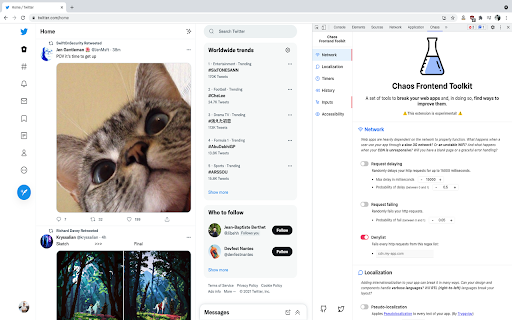
A set of tools to break your web apps and, in doing so, find ways to improve them. "Chaos Engineering is the discipline of experimenting on a system in order to build confidence in the system’s capability to withstand turbulent conditions in production." Even though it is usually applied to infrastructure, we can use Chaos Engineering principles on the front end part of our web applications. Network, Timers, History, Accessibility, Localization, Inputs: This web extension bundles tools intended to break your apps.

Subeditor: Webpage Text Editor
Edit the text of any webpage on the fly, directly in your browser. Web pages are read-only but did you know that it is possible to edit the content of a web page directly in your browser? Subeditor is a free browser extension that allows you to edit the text of any webpage on the fly. Simply enable Subeditor on the page you’re viewing, click the part of the page you’d like to edit and start typing! Built to be intuitive, easy to use, and lightning fast, Subeditor is a helpful and fun tool for anyone wanting to edit text on the web. Whether you are a content creator trying to craft a message, a designer trying to achieve pixel perfection with text, or someone just looking to have a bit of fun with full “creative direction”, Subeditor is the tool for you. Thanks for trying Subeditor! \(^-^)/ Please do note that web page edits are temporary and the changes are lost when you refresh the page or close the browser. By installing the extension, you agree to Subeditor’s Privacy Policy (https://subeditor.app/privacy)

Devbox
A UI for local storage A chrome extension which shows data from local storage for easy viewing & copy-paste. While development, there is a need to get fields from local storage (ex., userId, token, etc). This chrome extension helps create entries that read data from storage and show it in a small window at the bottom left corner of the development window. Features: - Create an entry by entering a local storage key name, path (if the key’s value is an object) & a label for reference. - Clicking value copies the content to the clipboard.

Logsly
log, error, fetch, SEO advice, ... all in one place! front-end developer assistant to never open the developer console again! Logsly show everything directly on your screen on top on every website !

Custom Menu
Add a custom menu to your browser toolbar. Create your own quick menu right in the toolbar. With this addon you can arrange your own simple list of links and pin them as a popup menu to the toolbar. Simple Menu Editor: The extension allows you to customize your browser's menu by adding, removing, and rearranging menu items. Simply click on the "Options" tab to access the menu editor. Add, Edit and Delete Menu Items: In the menu editor, you can add new menu items by clicking the "Add" button. Each item consists of a title and a URL. Click on the Title or URL to edit. You can also delete unwanted menu items by clicking the delete button associated with each item. Press and hold the drag icon to rearrange (menu items are draggable) Reset to Default: If you want to revert to the default menu settings, you can click the "Reset" button. This will remove all custom menu items and restore the original menu provided on the initial install by the extension. "Material design": The extension provides a sleek and modern user interface with extremely clean fonts and color scheme.
