
djejjjpgjfdejgggdhdamejokedmjppg



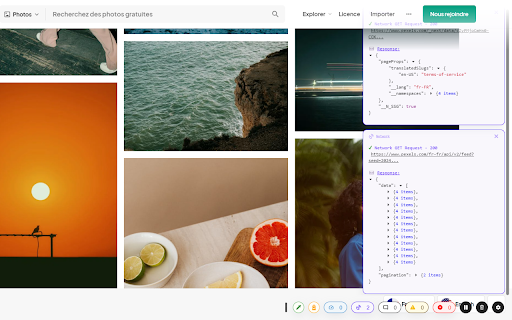

log, error, fetch, SEO advice, ... all in one place! front-end developer assistant to never open the developer console again! Logsly show everything directly on your screen on top on every website !

MerciApp - AI Writing Assistant
Write better, faster, wherever you work. MerciApp helps you correct, rephrase, and structure your writing instantly, right inside your browser. From emails and CRMs to messaging apps and collaborative tools, it improves your texts and speeds up repetitive replies without disrupting your workflow. More than just a spelling and grammar checker, MerciApp enhances the clarity, conciseness, and tone of your messages. Every suggestion comes with a clear explanation, so you understand the correction and keep improving. • Spelling mistakes and homophones (“I should of —> I should have ”) • Complex agreement rules, verb conjugations, and infinitive vs. past participle confusion • Overly long sentences, missing punctuation, excessive use of abbreviations • Contextual errors (capitalization, dates, consistency) Corrections appear as you type. No copy and paste. No interruptions. Transform • Rewriting and built-in AI assistants Reword, structure, or translate your text without leaving the tool you are using. Create custom assistants for meeting summaries, standard support replies, sales pitches, and more. Share them with your team to keep communication consistent and aligned. • Select a passage and request a clearer, more direct, more formal rewrite, or a structured summary • Set up business assistants, for example “turn my notes into a customer report,” and reuse them in just two clicks • Instantly translate an email into English, Spanish, German, and more, directly from the interface Expand • Smart snippets: reply in two seconds without copying and pasting Expand allows you to create reusable snippets: standard replies, signatures, greetings, product explanations, etc. Type a shortcut (e.g. `/acknowledgment`) → MerciApp instantly inserts “We have received your message and will get back to you within 24 hours.” Dynamic snippets: customize your templates with variables (customer first name, date, order reference, etc.) to save time without losing personalization. Share your snippets with your team to keep support, sales, and administrative responses consistent and on-brand. Works wherever you write MerciApp works seamlessly with your everyday tools. Correction and AI assistants are available with a single click, wherever you need them. Automatic language detection ensures MerciApp only corrects the language you’re writing in: English, Spanish, or others. The interface stays discreet, suggestions appear in context, and your workflow remains uninterrupted. Designed for teams • Corporate dictionary: add your business terms, acronyms, product names • Shared rules: harmonize tone, formulas, and writing standards • Snippets and team assistants: centralize updates to your tools. • Centralized management: access rights, usage tracking, configurable and shareable assistants Ideal for sales teams, customer support, account management, internal communications, and much more. MerciApp is built on 30 years of linguistic research and a dictionary of over 500,000 entries. Trusted by thousands of B2B users, it is recognized for its accuracy and full GDPR compliance. Install and get started 1. Add the extension to Chrome 2. Create your account (30-day free trial) 3. Start writing: MerciApp corrects and improves in real time By installing the extension, you agree to the Terms of Use(https://www.merci-app.com/en/gtu) and acknowledge that you have read the Cookie Policy (https://www.merci-app.com/en/cookies-policy).

Gimli Tailwind
A DevTools extension enabling smart tools for Tailwind CSS. The professional Devtools extension for Tailwind CSS developers. It lets you view and intuitively edit utility classes. Please note: Gimli Tailwind requires a $49 one-time lifetime license. No subscriptions. You can purchase your license via the extension (includes a 14-day money-back guarantee). ✔️ Autocomplete: Intelligent suggestions for class names. It also supports searching for CSS property names. ✔️ Quickly toggle utility values with Cmd/Ctrl + Click. ✔️ Intuitive UI We don't want to overwhelm developers with options and inputs. Here’s a list of features that enable developers to find relevant utilities quickly: ➤ Variant override: Displays what variant is active. ➤ Inputs are grouped the same way as in the official docs. ➤ Some sections like Grid and Flex will only be visible when relevant. ➤ Active inputs are always shown. ➤ Customizable UI.

Chaos Frontend Toolkit
A set of tools to break your web apps and, in doing so, find ways to improve them. "Chaos Engineering is the discipline of experimenting on a system in order to build confidence in the system’s capability to withstand turbulent conditions in production." Even though it is usually applied to infrastructure, we can use Chaos Engineering principles on the front end part of our web applications. Network, Timers, History, Accessibility, Localization, Inputs: This web extension bundles tools intended to break your apps.

GreenIT-Analysis
The extension allows: - to measure the ecoIndex of a web site as defined by the ecoindex web site http://www.ecoindex.fr/quest-ce-que-ecoindex/ - to verify the application of web eco-design best practices defined by the "Collectif numérique responsable": https://collectif.greenit.fr/ecoconception-web/ The extension needs the following permissions: activeTab: permission used to access the current tab and allow the analysis of the web page content : permission used to access urls for analysis browsingData: permission used for the clean browser cache feature. tabs: permission used to display the analysis history in a specific tab
