
fojckembkmaoehhmkiomebhkcengcljl
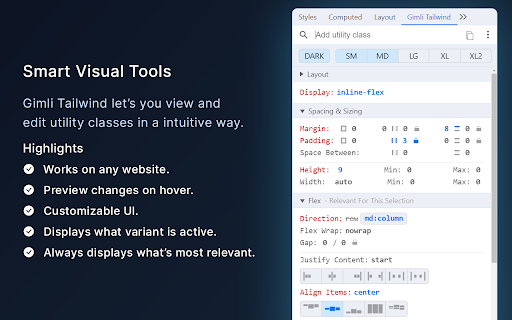

A DevTools extension enabling smart tools for Tailwind CSS. The professional Devtools extension for Tailwind CSS developers. It lets you view and intuitively edit utility classes. Please note: Gimli Tailwind requires a $49 one-time lifetime license. No subscriptions. You can purchase your license via the extension (includes a 14-day money-back guarantee). ✔️ Autocomplete: Intelligent suggestions for class names. It also supports searching for CSS property names. ✔️ Quickly toggle utility values with Cmd/Ctrl + Click. ✔️ Intuitive UI We don't want to overwhelm developers with options and inputs. Here’s a list of features that enable developers to find relevant utilities quickly: ➤ Variant override: Displays what variant is active. ➤ Inputs are grouped the same way as in the official docs. ➤ Some sections like Grid and Flex will only be visible when relevant. ➤ Active inputs are always shown. ➤ Customizable UI.

Supertweak
Visual editor for Tailwind CSS Supertweak is visual editor for Tailwind CSS to quickly tweak your website live, preview instantly and copy classes or html to use in your project. You can try it free for 7 days. Continued use requires activation key. You can purchase your copy of the extension at https://supertweak.dev 🎨 Tailwind editor Quickly modify property values for Tailwind classes, add or edit variants, manually add, edit or remove classes etc. right inside your browser. You can then copy the classes or html code from the elements with one click. Supports adding arbitrary values and variants and custom Tailwind config as well. 📱 Responsive Switcher You can quickly resize the window to responsive device widths. Since this resizes window, you will be able to use the editor in small screen widths too unlike the Devtools responsive mode. 📷 Quick Capture Supertweak lets you quickly take screenshot of visible screen or a selected area, which you can later download or copy to clipboard. This makes it easier to share the changes you made with your team and get feedback. 🪟 Children Editor You can easily re-arrange, remove or duplicate elements. Adding elements and text nodes are also supported. ⌨️ Edit Mode In Edit mode, you can edit the text in the page quickly without other distractions.

Atomic CSS Devtools
A devtool panel for debugging Atomic CSS rules as if they were not atomic A devtool panel for debugging Atomic CSS rules as if they were not atomic. Works with TailwindCSS, Panda CSS, and any atomic CSS library --- If you find this extension useful, please consider supporting it by giving it a 💫 star on GitHub, sharing it with your friends and colleagues https://github.com/astahmer/atomic-css-devtools or you could even sponsor me on Github here 🙏 https://github.com/sponsors/astahmer

Motion DevTools
Inspect, edit and export animations made with CSS and Motion One. Motion DevTools is a browser extension to inspect, edit and export animations made with CSS and Motion One. 🔍 Inspect: Press record and interact. Detected CSS and Motion One animations will be plotted on a classic timeline interface. Use the playback controls to scrub through and replay your animation from any point. ✍️ Edit: Add, move and remove keyframes. Edit values and easing with custom controls, and your edits will be reflected on the page in real-time. 🚢 Export: Perfected your animation? Hit the export button to instantly generate code. Export any animation into CSS transitions, CSS animations or Motion One.

Alpine.js devtools
DevTools extension for debugging Alpine.js applications. Alpine.js devtools is a Chrome extension for the Alpine.js JavaScript library. It allows you to detect, inspect and edit Alpine.js data and components in the Chrome Developer Tools. After installing you will see a new tab in the Chrome DevTools. This Alpine.js tab displays a list of Alpine.js components that are rendered on the page. By selecting one of the components in the list, you can inspect and edit its current data in the panel to the right. The ability to change data on the fly helps with debugging Alpine.js components. If your application uses Alpine stores or encounters evaluation errors, the stores and warnings tabs will be populated.
