
ngpohagmellcpabooffmhlieiemlaibg
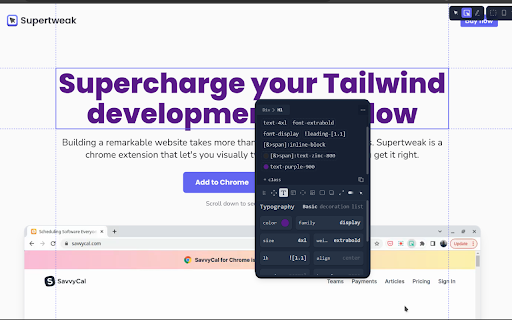
Visual editor for Tailwind CSS Supertweak is visual editor for Tailwind CSS to quickly tweak your website live, preview instantly and copy classes or html to use in your project. You can try it free for 7 days. Continued use requires activation key. You can purchase your copy of the extension at https://supertweak.dev 🎨 Tailwind editor Quickly modify property values for Tailwind classes, add or edit variants, manually add, edit or remove classes etc. right inside your browser. You can then copy the classes or html code from the elements with one click. Supports adding arbitrary values and variants and custom Tailwind config as well. 📱 Responsive Switcher You can quickly resize the window to responsive device widths. Since this resizes window, you will be able to use the editor in small screen widths too unlike the Devtools responsive mode. 📷 Quick Capture Supertweak lets you quickly take screenshot of visible screen or a selected area, which you can later download or copy to clipboard. This makes it easier to share the changes you made with your team and get feedback. 🪟 Children Editor You can easily re-arrange, remove or duplicate elements. Adding elements and text nodes are also supported. ⌨️ Edit Mode In Edit mode, you can edit the text in the page quickly without other distractions.

Amino: Live CSS Editor
Customize any website with your own CSS and see your changes instantly with Amino! Amino is a free CSS editor that lets you write and apply persistent CSS to any website. Use Amino to experiment with CSS in realtime, style your favorite websites, fix rendering issues—the applications are endless. Your CSS is stored in the cloud and is served every time you visit the page, making it effectively permanent as long as the extension is enabled. NEW FEATURE Guest mode: after many requests from users to be able to use amino without creating an account we've finally launched our Guest mode! It will work entirely locally with no need to create an account. If you want cloud storage you can simple create an account at anytime and enjoy the same great Amino experience sync'd across all your devices. Amino has previously been featured in: Chrome's ‘Top Picks’ in developer tool extensions, Smashing Magazine, Product Hunt, Designer News, Codrops, Sidebar, and more. FEATURES - Syntax highlighting - Automatic indenting and outdenting - Inspect tool - DevTools integration (*new*) - SCSS/Sass support - Autocomplete - Autosave - Data export - Multiple color schemes - Guest Mode USAGE TIERS - Guest & Free Cloud Tier - Free tiers are supported by ad displays in the sidebar/editor and cloud dashboard - Pro Cloud Tier - Remove ads - Access to collections - Unlimited Cloud Storage - Access to beta features BETA FEATURES (Pro Only) - AI Assistant to help write and understand your CSS rules For new feature announcements or just to say hello, please follow Amino on X: https://x.com/aminoeditor For more info or to sign up visit: https://amino.dev For frequently asked questions visit: https://amino.dev/faqs For documentation and guides on how to get the most out of Amino: https://docs.amino.dev For Amino's open source projects: https://github.com/aminoeditor By installing the extension or accessing the amino.dev website, you agree to Amino’s Privacy Policy (https://amino.dev/privacy) and Terms of Use (https://amino.dev/terms). TLDR: We care about user privacy, and we will never sell your data. To learn about the permissions this extension requests: https://amino.dev/permissions Thanks for giving Amino a try. If you like our product, please consider leaving us a review.

Tailwind Cheat Sheet Extension
The Chrome Extension for Tailwind Cheat Sheet Chrome extension to easily access Tailwind's classes. The extension provides following features: 1. Easily accessible tailwind classes 2. Click on the class to copy the same to clipboard 3. Search for classes 4. Open Source 5. Supports dark and light theme

InTab
edit any website's HTML and CSS visually 👓 Visually edit any website with InTab's No-Code CSS editor 🔍 Hover to inspect CSS - no need to open devtools 📱 Test your website responsiveness in 20+ devices with real-time sync 🏃♀️ Write CSS faster with built-in templates for animations/flexbox/grid layout 👇 1 Click to export auto-generated media quires and global CSS

Tailscan
Tailscan is the ultimate developer tool for Tailwind CSS The ultimate developer tool for Tailwind CSS. Build, design and debug your Tailwind website visually with Tailscan, right within the browser. 💡Check the demo video on https://tailscan.com ✨ Visual editor in the browser Add, remove or modify Tailwind classes in the browser. Even arbitrary classes or those purged during build time. Also works on any website, not just your own. You'll have the full power of Tailwind directly in the browser! 🔮 Copy element or class list Easily copy the class list or the entire element with the class changes you made to your clipboard. 📐 Guidelines and computed regions Check element alignment, Tailwind margin or padding values for each element or the element size easily with Guidelines and Computed Regions. 📱 Autocompletion Tailscan will suggest the right classes for you as you type, show the resulting CSS and if relevant, show a preview of that class. 🔁 Convert any element to a Tailwind component Tailscan can automatically convert any element to a Tailwind CSS component. It will match all the CSS styling to Tailwind classes and use arbitrary values if 1:1 conversion is not possible. 🔎 You can try Tailscan on the website https://tailscan.com. To use Tailscan on other websites, you need a license key (paid). For questions or support, feel free to email at info@tailscan.com
