
ehlgpljoffpijelfiegjpkfanlfhgeae


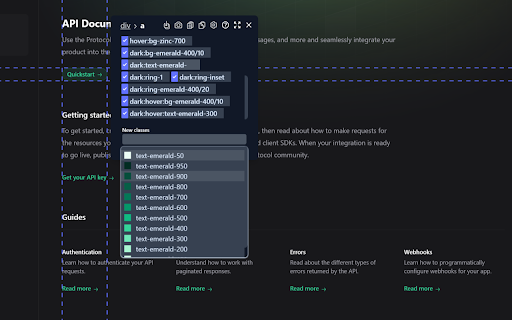
Tailscan is the ultimate developer tool for Tailwind CSS The ultimate developer tool for Tailwind CSS. Build, design and debug your Tailwind website visually with Tailscan, right within the browser. 💡Check the demo video on https://tailscan.com ✨ Visual editor in the browser Add, remove or modify Tailwind classes in the browser. Even arbitrary classes or those purged during build time. Also works on any website, not just your own. You'll have the full power of Tailwind directly in the browser! 🔮 Copy element or class list Easily copy the class list or the entire element with the class changes you made to your clipboard. 📐 Guidelines and computed regions Check element alignment, Tailwind margin or padding values for each element or the element size easily with Guidelines and Computed Regions. 📱 Autocompletion Tailscan will suggest the right classes for you as you type, show the resulting CSS and if relevant, show a preview of that class. 🔁 Convert any element to a Tailwind component Tailscan can automatically convert any element to a Tailwind CSS component. It will match all the CSS styling to Tailwind classes and use arbitrary values if 1:1 conversion is not possible. 🔎 You can try Tailscan on the website https://tailscan.com. To use Tailscan on other websites, you need a license key (paid). For questions or support, feel free to email at info@tailscan.com

Tailwind CSS Devtools
All-in-one browser extension for Tailwind CSS Developer. Features 🔥 🗂 Quickly inspect edit and filter HTML elements with TailwindCSS utility classes. ✨ Support Tailwindcss Intellisense autocompletion for JIT mode. ✔️ Custom config support. Personal data 🔒 Tailwind CSS Devtools had never collected and will never collect any personal data, browsing history, etc. Tailwind CSS Devtools also doesn't share/care about your data at all.

Gimli Tailwind
A DevTools extension enabling smart tools for Tailwind CSS. The professional Devtools extension for Tailwind CSS developers. It lets you view and intuitively edit utility classes. Please note: Gimli Tailwind requires a $49 one-time lifetime license. No subscriptions. You can purchase your license via the extension (includes a 14-day money-back guarantee). ✔️ Autocomplete: Intelligent suggestions for class names. It also supports searching for CSS property names. ✔️ Quickly toggle utility values with Cmd/Ctrl + Click. ✔️ Intuitive UI We don't want to overwhelm developers with options and inputs. Here’s a list of features that enable developers to find relevant utilities quickly: ➤ Variant override: Displays what variant is active. ➤ Inputs are grouped the same way as in the official docs. ➤ Some sections like Grid and Flex will only be visible when relevant. ➤ Active inputs are always shown. ➤ Customizable UI.

CSS Scanly - Copy CSS | Tailwind & Bootstrap
Copy CSS properties from any web element with CSS Scanly. Supports Tailwind & Bootstrap, Helpful for developers and designers CSS Scanly: Inspect, Analyze, and Edit CSS in Real-Time Discover the power of advanced CSS inspection and editing with CSS Scanly, the must-have tool for web developers, designers, and CSS enthusiasts. This Chrome extension transforms how you interact with web page styles, providing an intuitive and feature-rich environment for exploring and manipulating CSS on any website. Hover over any element to instantly view its applied styles See computed styles, including those from stylesheets and inline CSS Explore pseudo-class styles etc. without leaving the page Edit CSS properties on-the-fly and see changes immediately Experiment with styles without affecting the original page Perfect for prototyping and troubleshooting design issues Automatically detects and highlights Bootstrap and Tailwind CSS classes Gain insights into how popular frameworks are used on different websites Pin multiple CSS information boxes for easy comparison Ideal for analyzing styles across different elements simultaneously 5. Copy-to-Clipboard Functionality Quickly copy any CSS styles with a single click Streamline your workflow by easily transferring styles to your projects View applied media queries for responsive design analysis Understand how styles change across different screen sizes Intuitive control bar for easy navigation and tool management Keyboard shortcuts for enhanced productivity Pause and resume the scanner as needed Move the control bar to your preferred location on the screen Perfect For: Web Developers seeking to debug CSS issues Designers looking to analyze and draw inspiration from other websites Students learning web design and CSS QA testers verifying style implementations Anyone curious about the styles behind their favorite websites Elevate your web development and design process with CSS Scanly. Download now and start scanning the world of CSS like never before!

Tail Lens for Tailwind: Inspect, Edit, and Build Tailwind CSS Visually
Inspect. Edit. Build. Tailwind, right in your browser. Tail Lens is a developer-focused Chrome extension that works like devtools for Tailwind CSS. It is a Tailwind CSS inspector and visual class editor that helps you inspect Tailwind classes, debug Tailwind layouts, and speed up your frontend workflow. Inspect any element, see all its Tailwind utility classes at a glance, try class alternatives with live preview, and copy the final Tailwind class list in one click. No more digging through browser devtools, guessing which Tailwind CSS utility is affecting your layout, or constantly switching between editor and browser. Tail Lens turns Chrome into powerful Tailwind devtools so you can build, refactor, and debug Tailwind CSS faster. Works great with React, Next.js, Vue, Svelte, Laravel and any project using Tailwind CSS. 🔁 Smart Tailwind class alternatives - Instantly view and switch between Tailwind utility class alternatives. Get intelligent Tailwind suggestions based on your current classes, layout, and Tailwind config. 🔍 Search and preview any Tailwind CSS class - Search any Tailwind CSS class, including classes from your custom tailwind.config. - Hold Alt to preview a Tailwind class on hover directly in the page. Apply the class with a single click and see Tailwind changes instantly, without reloading. ⚡Live Tailwind class preview on hover - Hover over alternatives like flex, flex-col, items-center, gap-4, px-6, etc. Watch your Tailwind layout update live — no manual editing, no trial-and-error in the editor. 🧩 Inspect, pin and compare elements - Hover any element to open a clean Tailwind inspector panel showing all applied utility classes. - Press Space to pin the popup and inspect multiple elements side-by-side like real devtools. 🧪Toggle and test Tailwind classes instantly - Enable or disable any Tailwind class visually to test layout, spacing or visibility. - Perfect for debugging Tailwind CSS issues with alignment, gaps, responsive behavior and hover states. 📏Layout and spacing guides - See visual overlays for margin, padding, height, width and position. - Quickly understand how Tailwind spacing, sizing and positioning utilities affect the layout. ↩️Undo / redo Tailwind changes - Step backward and forward through your Tailwind edits with shortcuts. - Safely experiment with different Tailwind class combinations without losing context. 📋One-click Tailwind class copy - Copy the full Tailwind utility class string for any element in one click. - Paste it directly into your code editor, React component, Next.js page or Blade/Vue template. 🛠️Tailwind v3 / v4 + custom config support - Fully compatible with Tailwind CSS v3 and Tailwind CSS v4. - Understands your tailwind.config theme, colors, spacing scale, fonts and breakpoints. - Supports the new Tailwind v4 CSS-first config structure so the Tailwind inspector stays accurate even in modern setups. 👤 Who is Tail Lens for? • Frontend developers who use Tailwind CSS every day and want better Tailwind devtools. • Teams building React, Next.js, Vue, Svelte, Laravel or SPA/MPA projects with Tailwind. • Developers who want a visual Tailwind editor to inspect Tailwind classes, debug Tailwind layouts and refactor utility class chains quickly. If you have ever asked “Which Tailwind class is doing this?” or spent minutes tweaking long Tailwind class strings by hand, Tail Lens is the Tailwind Chrome extension built for you 🚀
