
gkhoalcdabjldlpoaoaknjipgiakljfj
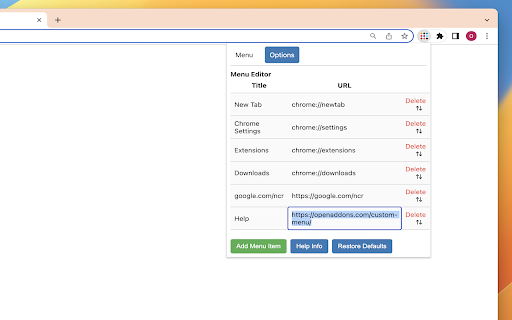

Add a custom menu to your browser toolbar. Create your own quick menu right in the toolbar. With this addon you can arrange your own simple list of links and pin them as a popup menu to the toolbar. Simple Menu Editor: The extension allows you to customize your browser's menu by adding, removing, and rearranging menu items. Simply click on the "Options" tab to access the menu editor. Add, Edit and Delete Menu Items: In the menu editor, you can add new menu items by clicking the "Add" button. Each item consists of a title and a URL. Click on the Title or URL to edit. You can also delete unwanted menu items by clicking the delete button associated with each item. Press and hold the drag icon to rearrange (menu items are draggable) Reset to Default: If you want to revert to the default menu settings, you can click the "Reset" button. This will remove all custom menu items and restore the original menu provided on the initial install by the extension. "Material design": The extension provides a sleek and modern user interface with extremely clean fonts and color scheme.

Simple Counter Button
Adds a counter controlled by a button to your Chrome Toolbar If you need a simple counter that can be incremented by clicking a button, this extension is for you. The counter can be set to increment by any value, positive or negative. The default step is +1 for each click. Right-click to quickly make a -1 step or to reset the counter. Additional functionalities (to be activated in the options page): 🔔 Notifications: you can set a limit and you will receive a notification when the counter reaches that number. 🔊 Sound: enable the sound option to hear a sound every time you press the button. 📅 Chronology: see a list with the date and time of the last 100 clicks. Right-click on the button and select "Options" to access the options page. ❗⌨️You can also set a custom keyboard shortcut for clicking the button by going here: chrome://extensions/shortcuts

Custom Scrollbars
Give your browser a personal touch with customized scrollbars! Give your browser a personalized touch with custom scrollbar colors! You can select from any range of colors and toggle between the default width and thin scrollbar... or hide it altogether if that's what floats your boat.

Custom Scrollbar
Custom Scrollbar is a Chrome extension that allows users to customize the appearance of scrollbars in their browser Discover a new level of personalization for your web experience with Custom Scrollbar for Google Chrome! Tired of standard scrollbars that feel as bland as a diet without color? 🍞🙄 Install Custom Scrollbar and make your browser stylish and expressive as you've always dreamed! Choose from over 20 different designs - from classic minimalism to vibrant neon fireworks. The choice is yours! Here are just a few of the options we have: 1. Classic white ⚪ 2. Black with sleek lines ⚫ 3. Minimalistic gray 🌑 4. Subtle night mode 🌙 5. Fun pastel shades 🌈 6. Bright neon colors 💡 7. Geometric shapes 🔷 8. Marble effect 🏛️ 9. Silky gloss ✨ 10. Forest shades of green 🌲 You can customize the design to your liking to find your perfect style. 💡 Simply download the extension from the Chrome Web Store, choose your favorite style, and enjoy a fresh look for your web browsing! Convenience and beauty - what could be better? 😉 Don't wait any longer, add a splash of color to your online life with Custom Scrollbar! Your browser deserves an upgrade that will lift your spirits and make online surfing more enjoyable!

Custom Cursors for Chrome
Enhance your Chrome experience with custom cursor. Give your mouse cursor a unique touch by replacing it with a custom cursor. It's such a cute custom cursors for Chrome. Show your individuality with the bright and gorgeous mouse pointer on every webpage. Forget about the boring and simple cursor that has many years to appear on the display. Now you are able to change your mouse pointer to something pink and cute ;) Forget the boring default mouse pointer, because now it can be something more! Something to inspire you, cheer you up and just make you happy. We're the Cute Cursors crew and we've made it our mission to pimp your cursor! We have breathed even more life into our mouse cursors. And so much so that now they have become alive. They shimmer in colors, move, spin, dance, and most importantly give even more expression and positive emotions. Custom cute cursors is a great extension for Chrome that lets you change your browsing experience by creating your own mouse pointers. With the library of this extension, you can find anything to suit your style, whether it's a set of animal symbols or something else entirely. Change your cursor now and get ready for an awesome experience! 5 reasons why you should install the Custom Cursors for Chrome extension: 1. Personalization - extension Custom Cursors for Chrome allows you to personalize your browsing experience by giving your mouse pointer a unique look. 2. Aesthetics - If you're someone who likes to pay attention to the little details, then this extension is perfect for you. Customized cursors can add a touch of aesthetic appeal to your browsing experience. 3. Easy to use - extension Custom Cursors for Chrome is incredibly easy to use. Simply install the extension and select your preferred cursor design. There's no technical knowledge required to use the extension. 4. Fun - Custom Cursors for Chrome can add a fun element to your browsing experience. With a variety of creative cursor designs available, you can swap out your mouse pointer design whenever you like to keep things interesting. 5. Improved visibility - If you struggle to see the default mouse cursor on your screen, then changing it to a customized design could improve your visibility. The increased visibility of a custom cursor can help you keep track of your mouse movements more easily. Attention! Make sure you use the Cute Cursors extension on any web page other than the Chrome Web Store, Google internal pages, and the Chrome home page, as Google policy prohibits the use of custom cursors on these pages.
