
bbnngmmocfegjkekebllkaijmfoelofn


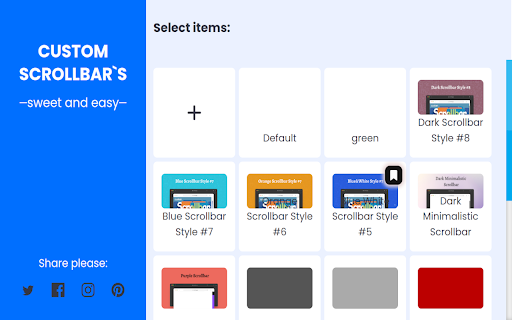


Custom Scrollbar is a Chrome extension that allows users to customize the appearance of scrollbars in their browser Discover a new level of personalization for your web experience with Custom Scrollbar for Google Chrome! Tired of standard scrollbars that feel as bland as a diet without color? 🍞🙄 Install Custom Scrollbar and make your browser stylish and expressive as you've always dreamed! Choose from over 20 different designs - from classic minimalism to vibrant neon fireworks. The choice is yours! Here are just a few of the options we have: 1. Classic white ⚪ 2. Black with sleek lines ⚫ 3. Minimalistic gray 🌑 4. Subtle night mode 🌙 5. Fun pastel shades 🌈 6. Bright neon colors 💡 7. Geometric shapes 🔷 8. Marble effect 🏛️ 9. Silky gloss ✨ 10. Forest shades of green 🌲 You can customize the design to your liking to find your perfect style. 💡 Simply download the extension from the Chrome Web Store, choose your favorite style, and enjoy a fresh look for your web browsing! Convenience and beauty - what could be better? 😉 Don't wait any longer, add a splash of color to your online life with Custom Scrollbar! Your browser deserves an upgrade that will lift your spirits and make online surfing more enjoyable!

Progress Bar - Sweet Progress Bar for YouTube
Progress Bar - customize the progress bar on YouTube with bright themes for even more enjoyable views! Color Themes List for Progress Bar for YouTube Friends, we have something wonderful for you! 🌟 Our extension "Progress Bar for YouTube" offers a wide selection of custom color themes that allow you to customize the progress bar on YouTube just the way you like it. Each custom theme is created with love and care for your comfort, making your video viewing experience even more enjoyable and captivating. Here are a few enchanting color themes: 1. Classic White - 🤍 an elegant and clean progress bar for those who appreciate simplicity and sophistication. 2. Calming Blue - 💙 the perfect progress bar for evening viewing, creating a cozy and peaceful atmosphere, as if you are embraced by the ocean. 3. Warm Orange - 🧡 adds comfort and coziness, like warm sun rays that warm you up. 4. Gentle Pink - 💗 a romantic and soft progress bar, like delicate rose petals, for those seeking something gentle. 5. Energetic Red - ❤️ for extra drive and motivation, a rich and bright progress bar, like the flame of passion. 6. Fresh Green - 💚 reminiscent of nature, a refreshing and calm progress bar, like a cool breeze on a summer day. 7. Deep Purple - 💜 for a mysterious and magical viewing experience, like a night sky filled with stars. 8. Sunny Yellow - 💛 lifts the mood and adds joy, a bright and sunny progress bar, like a cheerful summer sun. 9. Neon Turquoise - 🌈 modern and stylish, adding bright accents to the progress bar, like the shimmering of rainbow lights. 10. Electric Purple - 🔮 filled with energy and dynamism, for those who love futuristic shades, like the magic of the future. 🌟 Neon Colors: Brightness and Dynamism 🌟 Special attention should be paid to the neon colors in "Progress Bar for YouTube," which stand out with their brightness and modern look. They are perfect for those who want to add more energy and excitement while watching videos. 🔹 Neon Pink - 🌸 a bold choice for bright personalities, like a sparkling pink gem. 🔹 Neon Yellow - 🌟 impresses with its richness and light, adding brightness, like the golden glow of the sun. 🔹 Neon Blue - 🌌 creates a futuristic accent, looking modern and stylish, adding a touch of technology. 🔹 Neon Green - 🍏 intense and attention-grabbing, adding energy and liveliness, like a bright green meadow in spring. 💥 Advantages of Neon Colors in Progress Bar for YouTube: 🔸 High Visibility: Neon colors stand out on any background, making the progress bar easily noticeable and charming. 🔸 Energy and Dynamism: Add energy and life to your video viewing, making it even more exciting and lively. 🔸 Modern Look: Perfect for those who want to stay trendy and add a touch of modernity and style to their progress bar. 🛠 Editing and Creating Your Own Custom Color Themes 🛠 With "Progress Bar for YouTube," you can not only choose from ready-made themes but also edit each one using the built-in color constructor. This means you can create your own unique palette that best reflects your mood and personal style. Any theme can be changed down to the smallest details, selecting the perfect shades and animations to make your custom progress bar truly your own masterpiece. 💬 Download "Progress Bar for YouTube" now and highlight your uniqueness! 💬

Cursor Trails - Custom Cursor Trails
Add a touch of magic to your browsing with Custom Cursor Trails! A sparkling trail of stars will follow your cursor Customize your browsing experience with the Custom Cursor Trails extension! Are you bored with the standard mouse cursor? With Custom Cursor Trails, you can now add a touch of sparkle and vibrant trails to your cursor, transforming every movement on your screen into a festive experience! This browser extension creates stunning and colorful trails that follow your cursor, enhancing your browsing experience and making it more lively and enjoyable. Why should you consider trying Custom Cursor Trails? - Simple installation: Adding the extension takes just a few seconds. Once it's in your browser, you're ready to enjoy a new experience! - Variety of effects: Custom Cursor Trails features a broad selection of effects – from sparkling glitter to twinkling stars. You can quickly change trails to suit your mood and style. - Unique personalization: Give your cursor a personal touch. Select from numerous options and settings to make your cursor truly yours. - Better navigation: With colorful trails, you’ll never misplace your cursor among open tabs or while multitasking. Easily locate your cursor on any webpage! - Custom trail builder: Our website includes a builder where you can create your own unique cursor trails that fit your preferences. 💫 An extension for any mood 💫 Whether you want to add a bit of magic to your workday or just entertain yourself while browsing web pages, Custom Cursor Trails is here to help. Choose from sparkling glitter, stars, and other delightful animations that will add fun and brightness to every click. 🚀 How does it work? 🚀 - Install the extension: Go to your browser's extension store and add Custom Cursor Trails. - Refresh tabs: After installation, be sure to refresh previously opened tabs to use the new features on those pages. - Choose and customize: Go to the extension settings and choose your favorite custom cursor effects. You can also use the constructor on our website to create your trails. - Enjoy: Use your new, bright cursor and enjoy the enhanced browsing experience. 🌐 Available cursor trail collections on our website 🌐 On our website, you'll find a vast collection of cursor trails. From classic glitter and stars to unique animations created by our users. With constant updates, you'll always have access to new and exciting designs. Personalize your cursor with our ready-made collections or create something unique using the trail constructor. Our popular collections include: 1. Suspect Trails: Among Us Cursor Collection: Fun trails designed for fans of the Among Us game. 2. Circle Approach: Cursor Trail Collection: Elegant and minimalist trails shaped like circles. 3. Journey's Beginning: Cursor Trail Collection: Inspired by travel and the thrill of new discoveries. 4. Abstract Whispers: Cursor Trail Collection: Abstract and artistic trails for those who appreciate creativity. 5. Sparkling Trails: Cursor Trail Collection: Shimmering trails for those who enjoy bright effects. 6. Autumn Breeze: Cursor Trail Collection: Trails inspired by autumn that evoke warmth and coziness. 7. Winter Wonderland: Cursor Trail Collection: Winter-themed trails that create a festive atmosphere. 8. Raindrop Rhythms: Cursor Trail Collection: Trails shaped like raindrops for a soothing effect. 9. Feline Footprints: Cursor Trail Collection: Cat paw trails perfect for cat enthusiasts. And this is just part of our collections! We have many other options that are constantly updated with new designs. Custom Cursor Trail Constructor ✨ Our constructor allows you to create your unique cursor trails. You can choose colors, shapes, effects, and animations to create something truly special. It's the perfect way to express your creativity and add even more individuality to your browser. 🔧 Regular updates and support 🔧 We are constantly working on improving our extension and adding new features. With regular updates, you'll always have access to fresh and exciting trail designs. Our support team is always ready to help you with any questions or issues you may encounter. ⚠️ Note ⚠️ After installing the extension, don't forget to refresh previously opened tabs to use it on those pages. Please note that the extension may not work on Chrome Web Store pages or the browser's home page. To test the extension, open another website like google.com. Don't waste any time - try Custom Cursor Trails today and let your cursor shine! ✨ Functionality: * Open on site and Rating on CWS page * * More products * * Promo *

Customize Scrollbar
Customize scrollbar appearance, color, width, and style on any website with our user-friendly tool. Fast and easy! Upgrade your scrollbar with our "Custom Scrollbar" browser extension! Forget about the standard scrollbar in your browser - it's time to customize everything to your taste! In a few clicks, you can change the standard width and color of the bar, and even replace it with any image. Imagine how nice it is to scroll through your favorite sites with your unique, custom bar that reflects your style. Additional features: ⭕ Shadow and stroke: Add a shadow or stroke for greater expressiveness. Hover effect: When you hover over the mouse, the bar changes, giving it even more originality. ⭕ Button customization: You can choose the shape of the buttons - round, square or other, change their color, add shadows and other effects. ⭕ Easy installation: Installing the application is very easy. After installation, just click on the extension icon, and a convenient editor will help you configure all the parameters. Fast, easy and hassle-free! ⭕ Coming soon: New custom scrollbar presets, the ability to add your own CSS for advanced users, and the option to upload your creations to share with others. Important note: Due to Google™ restrictions, customization is not available for some sites (Chrome Web Store, Chrome settings, extensions, etc.), but on other sites you can freely create and experiment. Don't delay - install "Custom Scrollbar" today and enjoy a truly unique, custom interface for your browser! Other options: - Promotional materials for other products are also featured on the options page. - Promotion of other add-ons

Custom Cursor App - Custom Cursor for Chrome
Custom Cursor App: Free, fun, and unique mouse cursors to personalize your browser! The Custom Cursor App is a true burst of creativity for those tired of the standard grey cursor and want to add a bit of magic to their Chrome browser. Here, you'll find a custom cursor to suit any taste: from cute and fun to epic and magical. And best of all, it's completely free! If you love anime, you’ll definitely enjoy our collection of anime cursors: turn your cursor into Naruto, Goku from Dragon Ball, or choose a character from Attack on Titan or Sailor Moon. Fan of Totoro? No problem — you can make him your cursor too! And don’t forget, we have cute cursors for those who want a dose of cuteness with every click! Now, for the true geeks! If you’re into epic battles and magic, check out our fantasy cursor collection. Brave heroes from The Lord of the Rings, majestic dragons, or even a Game of Thrones-style cursor — it’s all waiting for you. Want your cursor to look like a sword or a magical staff? Easy! Fantasy cursors will add some real epicness to your browser. If you’re a fan of cartoons, be sure to try UniKitty — the cute and colorful unicorn cat from the namesake show! It’s a true cute cursor that will brighten your mood at first glance. But that’s not all: Mickey Mouse, SpongeBob, Bugs Bunny, and other popular characters are also ready to become your cursors. Love video games? There’s something epic for you too! Our collection features cursors from popular games: Fortnite, Minecraft, League of Legends, and other well-known titles. Set your cursor as your favorite character or even a weapon from the game — and every click will feel like a mini victory. At Custom Cursor we have created a giant collection of hand-drawn cute cursors. We have over 8000 different packs available on our website for you to enjoy. With your help, our collection has grown so big that we divided it into categories that should fit every taste, like: - Minecraft; - Cute Cursors; - Anime mouse packs; - Memes; - Spy x Family pointer packs with Anya Forger; - Among Us; - Two types of Minimal pointers for work and studies; - Games; - Roblox; - And many, many other funny elements for you to play with. What you get with the Custom Cursor App: - A free extension that lets you personalize your cursor. - A huge variety of cursors, including anime, fantasy, cute, gaming, and cartoon options. Anime characters: Naruto, Goku, Eren, Sailor Moon, and more. - Fantasy cursors from worlds like The Lord of the Rings, Game of Thrones, dragons, and mages. - UniKitty — a fun cursor from a cartoon for lovers of bright characters. - Cursors from popular games: Fortnite, Minecraft, League of Legends, and more. - The ability to create your own cursors and impress everyone with unique cursor. Custom Cursor App is the best way to make your time unforgettable! Install your favorite cursors from anime, fantasy, games, or cartoons and turn your browser into a magical world of adventure.
