
moifkpmfincoglpljkonmgnfaeonlgmo


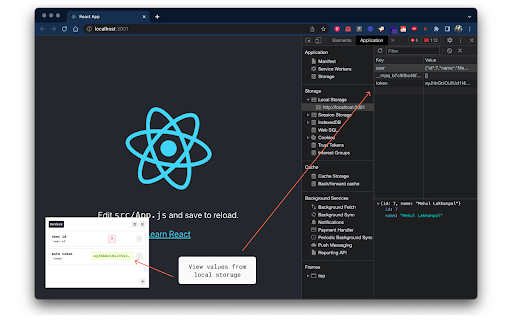

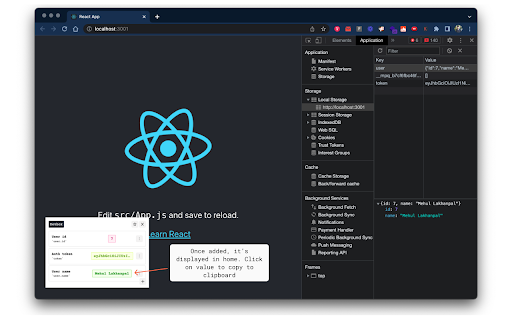
A UI for local storage A chrome extension which shows data from local storage for easy viewing & copy-paste. While development, there is a need to get fields from local storage (ex., userId, token, etc). This chrome extension helps create entries that read data from storage and show it in a small window at the bottom left corner of the development window. Features: - Create an entry by entering a local storage key name, path (if the key’s value is an object) & a label for reference. - Clicking value copies the content to the clipboard.

Colorway: Eyedropper & Color Picker Tool
Eyedropper, color picker, palette creator, and more! Colorway is a free, private, user-friendly color tool that allows you to easily sample colors from your screen while browsing the web. Colorway includes a variety of features to help you work with colors. What's inside: ✺ Eyedropper ✺ Color picker ✺ Style guide generator ✺ Palette builder ✺ HEX/RGB/HSL values on demand ✺ Random color palette generator ✺ Color history ✺ Tints and shades for any color ✺ Light and dark color theme options To use Colorway, simply open the extension and hover over the screen with the eyedropper tool to select the color you want to sample. The HEX value of that color will be automatically copied to your clipboard. You can also create a palette based on a range of colors from the page, and generate a unique URL for bookmarking or sharing the palette. Colorway was created with designers and developers in mind, but is easy enough for anyone to use. It requires no registration or setup, and is completely private. Simply click the extension button and start working with color. 🎨 Thanks for trying Colorway! \(^-^)/ Note about privacy: Our extension collects no user data. Unlike other eyedropper extensions that can see your pixel data, we utilize the browser's built in Eyedropper API (https://developer.mozilla.org/en-US/docs/Web/API/EyeDropper_API), which protects against user pixel data from being maliciously used. Rest assured, we care about your privacy, and don't find you all that interesting! Note about browser support: We've done our utmost to restrict the extension to supported browsers, which is primarily going to be recent versions of Chrome, Edge, and Brave. If you've managed to install the extension on an unsupported browser, it should be expected that the extension will not work as intended. Kindly rule out this possibility before submitting bug reports or reviews. Want to open Colorway with a keyboard shortcut? Go to chrome://extensions/shortcuts and set your own. By installing the extension, you agree to Colorway’s Privacy Policy (https://colorway.app/privacy) and Terms of Use (https://colorway.app/terms).

Jinno: code any React component with AI
Develop html or react components with AI and chat GPT4. We can modify the React, HTML and CSS code for you. Change your react website and with AI tool, we will export the code for you to you visual studio code. We have support for React, css, HTML code. We use AI platforms to modify your react component. Save all stylesheet/javaScript changes in one place. Jinno is a Javascript viewer tailored for developers. Get access to the useful styles with our Chrome extension. Our mission is to let developers to focus on code with AI, and spend as little time as possible digging in a css code of React. FEATURES ✓ Find any React open source component ✓ Build design system ✓ Build storybooks ✓ Export React code ✓ Export Html code ✓ Export Css code ✓ Color picker ✓ Best tool for designers ✓ Syntax highlighting ✓ Share you css design with developers ✓ Font family picker ✓ Design your page the same as Figma ✓ Page ruler from Sketch ✓ Hover css inspector ✓ Inspect element tool ✓ Detect your devtool position ✓ Save your css stylesheet changes from your Inspect element ✓ DevTools integration ✓ Copy to clipboard ✓ Data export ✓ React support ✓ CSS support ✓ Javascript support ✓ Design like sketch ✓ Design like Figma ✓ Design like Webflow

FavBox
FavBox is a local-first experimental browser extension that enhances and simplifies bookmark management without cloud storage or third-party services. It extends your browser's native bookmarking features. 🔄 Syncs with your browser profile 🔒 No third‑party data sharing, no ads, no tracking 🎨 Minimalist, clean interface 🏷️ Supports tags 🔍 Advanced search, sorting, and filtering by tags, domains, folders, and keywords 🌁 Multiple display modes 🌗 Light and dark themes 🗑️ Automatically detects broken and duplicate bookmarks ⌨️ Hotkeys for instant search access 🗒️ Supports local notes ❤️ Free and open source

Aspect
Sample React, HTML, and CSS code from any website. Save time building UI by sampling html element code from any website by just pointing and clicking. Paste code into the Aspect UI builder (https://aspect.app) to visually edit it, or directly into your React file.
