
dmhkalipldojecjggjindleobbfhbahj
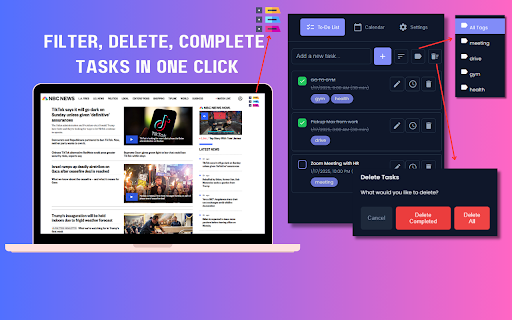


Designed to help you stay organized, focus on what matters, and sync tasks with Google Calendar. Simplify your life and take control of your tasks with Taskify, the ultimate task management Chrome extension designed for everyone. Whether you’re managing a hectic schedule, juggling work and personal commitments, or need a little help staying on track due to ADHD, Taskify is here to make your life easier and more productive. Effortless Task Management Create, schedule, edit, and delete tasks in just one click. Organize your day and never miss a deadline again. Sort and Filter Tasks Easily sort tasks by due date, name, or time, and filter tasks by tags to focus on what’s most important. Smart Scheduling Visualize your tasks and appointments in a seamless, color-coded interface for both, in calendar and in the To-Do list dashboard Stay On Track Set reminders and receive notifications so you can focus on what matters without worrying about forgetting important tasks. Google Calendar Integration Sync with your Google Calendar to manage tasks and events all in one place. Perfect for maintaining work-life balance. Dark Mode Reduce eye strain and work comfortably at any time with a sleek dark mode option. Flexible Time Formats Choose between 12-hour and 24-hour time formats to suit your preference. Add Tags to Tasks Categorize and label tasks with customizable tags for better organization. Clean and Intuitive Design Enjoy a modern, user-friendly interface that helps you stay focused and organized. Busy Professionals: Streamline your workflow and increase productivity. Students: Keep track of assignments, exams, and study schedules. Parents: Manage family tasks, activities, and appointments. People with ADHD: Stay focused, organized, and in control with intuitive tools designed to support neurodiverse needs. Keywords That Describe Taskify: Task manager, productivity tool, calendar integration, ADHD-friendly, time management, reminders, task notifications, focus tool, cross-device syncing, task organizer, modern design, Google Calendar extension. Make Your Life Simpler Today Taskify is your all-in-one solution for effective task management. Whether you need gentle reminders or a full-fledged productivity companion, it is designed to meet your needs and help you succeed. Install now and start living a more organized, stress-free life. We Value Your Feedback We’re committed to making Taskify the best it can be! If you have any constructive feedback or suggestions for improvement, feel free to reach out to us at zxtechx@gmail.com. We'd love to hear from you!

Sundial: Google Calendar Reimagined for Enterprise Schedulers
Schedule meetings faster with tools built for enterprise teams — directly inside Google Calendar. After installing and signing up, Sundial appears in the left column of Google Calendar. 1️⃣ Add Multiple Timezones to Google Calendar Search for a place or timezone and Sundial adds that timezone to Google Calendar. Add as many as you need. Rename them as you'd like. Reorder them whenever. 2️⃣ Share Times From Time Blocks Turn "Share times" on in the sidebar. Then drag time blocks on your calendar. Sundial turns them into copyable text, and can adjust it to any timezone. No more timezone mistakes. Here's an example of the text: Need to adjust to another timezone? Search for a place or timezone in the Sundial, and your copyable text updates instantly. Here’s how it looks: 3️⃣ Bulk Create Calendar Holds Turn "Share times" on in the sidebar. Then drag the time blocks on your calendar where you want the holds to be placed and click "Create holds". Add your event details as normal and once ready, click "Save holds". Sundial will save the calendar holds for each selected time all at once. 4️⃣ Bulk Delete Calendar Holds Click on any existing event with the word "Hold" in the title. Then click "Select holds to delete." Sundial displays all holds with the matching title, allowing you to quickly select and delete the ones you want. 5️⃣ Reusable Workspaces Save your commonly used calendar setups (calendars, timezones, and layout) as reusable workspaces. Open them with one click. Name them to stay organized. 6️⃣ Highlight Events with Issues Instantly highlight calendar events for missing video links, rooms, guests not attending, etc. 7️⃣ Export Events to Google Sheet (Calendar Audit) Export events to a Google Sheet in a single click – formatted for a calendar audit and instantly ready for your customization and review. 8️⃣ See Proposed Times Overlaid on Your Calendar Give Sundial dates and times mentioned in text and it visually displays them on your calendar. No more remembering proposed times or timezone conversions. Thank you for trying Sundial. I hope you find it helpful! ➡️ Terms and Conditions We collect your email address after you sign up. There is no other personal information that we collect. We never share or sell your information. We also track which features you use and how often you use them, solely to improve the extension and enhance your experience. By installing the extension, you agree to and acknowledge: www.trysundial.ai/terms-of-service www.trysundial.ai/privacy The use of raw or derived user data received from Workspace APIs will adhere to the Google User Data Policy, including the Limited Use requirements.

Button for Google Calendar
Check Google Calendar schedule and join meetings with one click. It fully integrates with Zoom, Google Meet, Microsoft Teams, etc. Experience seamless integration with Google Calendar using the Button for Google Calendar™ extension. Trusted by over 100,000 users, our extension provides the ultimate convenience for managing your schedule: • Instant Access: Open Google Calendar to view your schedule and join meetings directly from the toolbar. • Quick Event Creation: Navigate effortlessly to Google Calendar to create new events. • Real-Time Notifications: Get timely reminders for upcoming events and meetings. • Customizable Interface: Adjust settings to personalize your calendar experience and boost productivity. Join a growing community of users relying on Button for Google Calendar™ to simplify scheduling. Download now and enhance your calendar management! KEY FEATURES • Toolbar Button: Immediate access to Google Calendar from your browser. • Meeting Integration: Join Google Meet and other video calls with ease. • Event Creation: Quickly open Google Calendar to add new events. • Customization: Personalize notifications and calendar views to suit your needs. HELP • Authorization: Works correctly only in Google Chrome. • Multiple Accounts: Supports only one Google Calendar account. To receive notifications from multiple calendars, select the primary account and grant it access to the secondary calendar. • Time Format: Automatically synchronizes with your Calendar upon installation. • Corporate Accounts: If using a corporate Google Workspace account and facing authorization issues, contact your domain administrator to add our "Button" to the list of trusted extensions. • Support: For problems or bugs, contact us at support@browsecraft.com. ADS You may encounter ads when using Button for Google Calendar. These ads allow us to offer this extension for free. DISCLAIMER Button for Google Calendar is not made by Google™ or affiliated with Alphabet Inc. Supported with ❤️ by the BrowseCraft gang. Stand with Ukraine 💙💛.

boost. Task management made simple
Organize and manage tasks with drag and drop cards An extension for managing personal tasks, work, job applications, ideas, and whatever else you want! Currently, data is stored locally on your browser, so you will not be able to sync data across different devices. If you have any questions or concerns, feel free to contact me at josh.ho.dev@gmail.com

ActiveInbox: Organize Gmail™ tasks
Overwhelmed by too many to-dos in your inbox? Turn Gmail into an effortless task manager to never forget anything. Turn Gmail into a task manager, and take control of all your conversations. Our mission is simple really... we want to give all of us the tools to achieve meaningful happiness. Our business supports this by making elegant software, infused with proven psychology, to help us all absorb the shocks of life and become truly effective. DESIGNED FOR EXECS, MANAGERS & FOUNDERS ActiveInbox has a free trial to get a taster of being in control. It's "A 'must try' if you want to easily keep yourself on track in an undoubtedly busy world" - Richard Gaspar ActiveInbox works where you already do: in Gmail and on mobile. There's no need to adopt a new tool to accomplish... Stop emails sinking into the inbox swamp by turning them into tasks with due dates and adding them to projects. Don't 'send and pray' emails you spent precious time writing. Deliver at the time they'll be read and let ActiveInbox track them to completion. Achieve inbox zero, then glide through your day, by having just one place to focus on emails and tasks, and breaking your Today list into digestible chunks. Oh, and we're the original Gmail plugin - ActiveInbox has been supporting customers since 2006.
