
dkcgdknimgiffognmpiheegpfkkmcapk
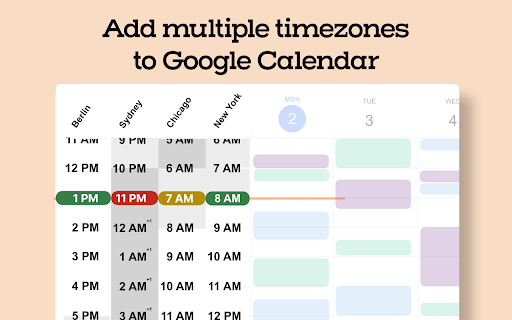


Schedule meetings faster with tools built for enterprise teams — directly inside Google Calendar. After installing and signing up, Sundial appears in the left column of Google Calendar. 1️⃣ Add Multiple Timezones to Google Calendar Search for a place or timezone and Sundial adds that timezone to Google Calendar. Add as many as you need. Rename them as you'd like. Reorder them whenever. 2️⃣ Share Times From Time Blocks Turn "Share times" on in the sidebar. Then drag time blocks on your calendar. Sundial turns them into copyable text, and can adjust it to any timezone. No more timezone mistakes. Here's an example of the text: Need to adjust to another timezone? Search for a place or timezone in the Sundial, and your copyable text updates instantly. Here’s how it looks: 3️⃣ Bulk Create Calendar Holds Turn "Share times" on in the sidebar. Then drag the time blocks on your calendar where you want the holds to be placed and click "Create holds". Add your event details as normal and once ready, click "Save holds". Sundial will save the calendar holds for each selected time all at once. 4️⃣ Bulk Delete Calendar Holds Click on any existing event with the word "Hold" in the title. Then click "Select holds to delete." Sundial displays all holds with the matching title, allowing you to quickly select and delete the ones you want. 5️⃣ Reusable Workspaces Save your commonly used calendar setups (calendars, timezones, and layout) as reusable workspaces. Open them with one click. Name them to stay organized. 6️⃣ Highlight Events with Issues Instantly highlight calendar events for missing video links, rooms, guests not attending, etc. 7️⃣ Export Events to Google Sheet (Calendar Audit) Export events to a Google Sheet in a single click – formatted for a calendar audit and instantly ready for your customization and review. 8️⃣ See Proposed Times Overlaid on Your Calendar Give Sundial dates and times mentioned in text and it visually displays them on your calendar. No more remembering proposed times or timezone conversions. Thank you for trying Sundial. I hope you find it helpful! ➡️ Terms and Conditions We collect your email address after you sign up. There is no other personal information that we collect. We never share or sell your information. We also track which features you use and how often you use them, solely to improve the extension and enhance your experience. By installing the extension, you agree to and acknowledge: www.trysundial.ai/terms-of-service www.trysundial.ai/privacy The use of raw or derived user data received from Workspace APIs will adhere to the Google User Data Policy, including the Limited Use requirements.

The Big Gift List
Easily add items to your 'The Big Gift List' lists Help friends and family take the guesswork out of buying you gifts with The Big Gift List. When it comes to a birthday, Christmas, wedding or any other special occasion, with your gift list you can show your friends and family what you really want, so they don't need to guess. Use the official browser extension to add items to your gift lists directly from any website.

Trello Bug Feature Colors
Colors Trello cards that have the label "Bug" or "Feature" a color based on the color of that label.

Extra Time Zones for Google Calendar
Break free from Google Calendar's 2 timezone limitation! This extension adds unlimited additional time zones to your Google Calendar interface. Perfect for: - Remote teams working across multiple timezones - International businesses scheduling global meetings - Travelers who need to track home and destination times - Anyone coordinating with colleagues around the world ✅ Add as many timezones as you need ✅ Clean integration with existing Google Calendar interface ✅ Easy feedback system to help us improve ✅ Privacy-focused design ✅ Lightweight and fast This extension is actively being improved based on user feedback. Some minor visual glitches may occur as we refine the experience. Use the built-in feedback button to report issues or suggest improvements! - No personal calendar data collection - Feedback is optional and anonymous - No tracking or analytics - Works entirely within your browser 1. Install the extension 2. Visit Google Calendar 3. Add timezones by clicking on the extension 4. Additional time zones will automatically appear 5. Click "Send Feedback" to help us improve Found a bug or have suggestions? Click the feedback button in the extension popup - your input directly shapes future updates and helps make this the best timezone tool for Google Calendar. Note: This extension requires access to calendar.google.com to function properly.

Pact for Google Calendar
Boost your productivity with Pact for Google Calendar Effortlessly track and manage your work commitments using Pact's Google Calendar extension. Now, visualize your daily pacts and interact with them directly from your calendar. Pact brings accountability to teams through smart reminders, analytics, and automated workflows. It integrates seamlessly into your calendar, email, or Slack for enhanced team collaboration. Pact empowers teams with: 15x more visibility into outcomes, 3x more accurate delivery dates, and a remarkable 91% task completion rate. With our Chrome extension, you can: - Instantly view your commitments (think of them as ‘pacts’) and due dates right in your calendar. - Easily create, view, edit, and update your commitments, all within Google Calendar. - Improve accountability, both with yourself and your team, right from your calendar.
