
jeoeplaeienbiolajhbpjojcjpjljode
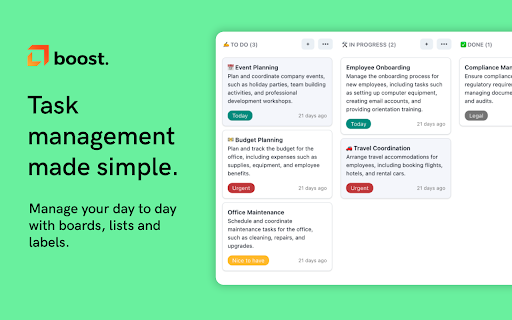
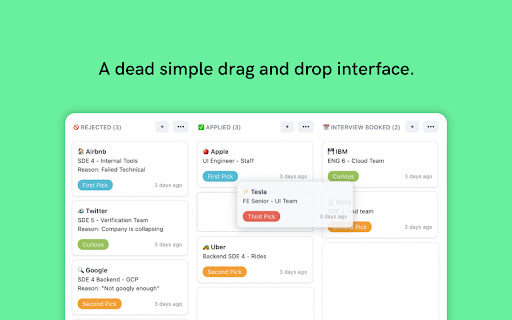

Organize and manage tasks with drag and drop cards An extension for managing personal tasks, work, job applications, ideas, and whatever else you want! Currently, data is stored locally on your browser, so you will not be able to sync data across different devices. If you have any questions or concerns, feel free to contact me at josh.ho.dev@gmail.com

Today's Task
A simple extension that opens a new tab with a daily task to complete. Reason? Our goal setting abilities are a lot enhanced than our goal completing environments. The conflict between this results in a tension between what we want to do and what we can do. Today's Task chrome extension solves the very particular problem of this conflict. Today's Task will allow you to conquer more projects by focussing on one task per day. ✅ Today's Task - This page will show you your Today's Task to complete - A task will be randomly picked for you - but you can also shuffle task ✅ Task Chain - Gamify your TODO tasks - Everyday you complete a task the task chain will change the color and increment the counter - This is to encourage you and keep you accountable ✅ Update Tasks - Use this page to add your list of tasks or delete any tasks - You can shuffle your Today's Task from this page too ✅ Progress Review - Track your productivity with weekly stats - See your current streak and monthly completions - Get motivational messages based on performance ✅ Shuffle Tasks: - If you don't like today's task you can use "Shuffle" task to update today's task - If you complete today's task and want to do more you can use this feature for it too ✅ Snooze Tasks - Snooze tasks for 1 week, 1 month, or 3 months - Auto-shuffles to next task after snoozing ✅ Motivational Nudges - Action-oriented subtle motivational quotes on the main page - Easy toggle on/off in settings - Designed to inspire without distracting ✅ Widgets (Right Sidebar) - Real-time date and time display - Current weather conditions (defaults to San Francisco, CA) - Set your own city in settings - Choose temperature unit: °F or °C - Beautiful glassmorphism design - Toggle widgets on/off in settings ✅ Left Sidebar Tools - **Pomodoro Timer**: Dedicated focus timer always accessible - Quick presets: 5m, 15m, 25m, 45m - Visual progress tracking with color coding - Browser notifications when complete - **Quick Notes**: Temporary scratchpad for quick thoughts - Jot down reminders or ideas - Auto-deletes after 24 hours - Shows time remaining - Both default ON, toggle individually in settings ✅ Theme - You can switch between light and dark theme ✅ Disable for 2 hours - Use this option if you want to see normal chrome new tab instead of this extension - This is especially handy when you don't want to show your tasks in meetings Update 1.4.0 release notes: 🌤️ **Date & Weather Widgets** - Real-time clock and weather on right sidebar (defaults to San Francisco, customizable) 📝 **Quick Notes** - Temporary scratchpad that auto-deletes in 24 hours (left sidebar, default ON) 🍅 **Pomodoro Timer** - Focus timer with quick presets: 5m, 15m, 25m, 45m (left sidebar, default ON) ⚙️ **Settings Page** - Customize your experience - toggle all widgets, set weather location, control Pomodoro 💡 **Motivational Nudges** - 50 subtle, rotating quotes to inspire action (toggle on/off in settings) 🎉 **Confetti Celebration** - Animated confetti burst when you complete tasks! 🎨 **Fun Emoji Icons** - 300+ colorful emojis replace boring icons! From 🚀 to 🎉, from 🍕 to 💻, every task gets a personality! Update 1.3.0 release notes: ✨ Weekly Progress Review - Track your productivity with stats, streaks, and motivational messages ⚡ Quick Add Shortcut - Press ⌘K / Ctrl+K from anywhere to instantly add tasks 🎨 Modern UI Redesign - Glassmorphism design, bigger layout, cleaner menu, everything fits on screen 🔧 Bug Fixes - Snooze auto-shuffles, fixed duration bug, improved responsiveness Update 1.2.0 release notes: - Complete UI/UX redesign - And a lot of bug fixes Update 1.1.6 release notes: - Had to remove sync on multiple devices support due to chrome storage limitations - More storage space now available with local storage (unique data per device) Update 1.1.4 release notes: - You can now conveniently shuffle tasks directly from the Today Task page. - In addition to marking today's tasks as done, you can now mark any task as completed and receive credit for your achievements. - Export all your tasks and task-chain for your reference - Various bug fixes

Kanban Board
Simplify task management with the Kanban board in your New Tab. Use Kanban software to manage projects and track workflows. Kanban board turns your browser into a visual productivity tool, keeping your projects in clear view. 🆕 All your tasks in one place: access your project board every time you open a new tab. 🔛 Drag and drop kanban cards: Easily move tasks across different stages of your project board with a simple drag-and-drop interface. ⏰ Timers to stay in focus: Use the integrated Pomodoro timer and focus timer to maintain your concentration and productivity. 📊 Progress Insights: Track your progress with our kanban project management insights. Understand where you stand and what needs attention with detailed reports and analytics. 💪 Powerful Productivity Tools Made Simple 1️⃣ Built-in focus timer. 2️⃣ Progress Tracking Insights. 3️⃣ Dark Mode Option. 4️⃣ Shortcuts for quick action. 5️⃣ Instant notifications and updates for productivity planner. 💡 Visual Workflow Management With the kanban board app, every new tab becomes a visual representation of your work, providing you with: ⏩ Clear and concise project overviews. ⏩ Organize tasks into columns like "To Do," "In Progress," and "Done". ⏩ Easy drag-and-drop functionality. ⏩ Custom columns and workflows. 🏃 Boost Your Productivity Stay on top of your game with features that streamline your workflow: 1. Prioritize your tasks with tags and deadlines. 2. Identify and eliminate bottlenecks. 3. Track progress in real-time. 4. Focus on your top priorities in your to do list with the pomodoro timer. 5. Achieve your goals efficiently. 🌐 Instant Access and Seamless Integration - integrates directly into your browser, making your project board accessible with every new tab. - This seamless integration ensures that your workflow is always in view, helping you stay organized and focused. 🐙 Drag and Drop Simplicity Transform your task management with a clear and intuitive kanban board approach: ◆ Easily move tasks between columns with intuitive drag-and-drop functionality. ◆ Customizable fields and tags. ◆ Flexible kanban methodology organization. ◆ Personal and project specific workflow. ◆ The simple, clean interface is designed for users of all skill levels, making it easy to get started right away. ⏳ Time Management Improve your time management with the kanban app: ➤ Break down tasks with kanban flow. ➤ Set deadlines with your project planner. ➤ Use a productivity timer for focused work. ⚙️ Implementing a Kanban Board productivity software Step 1: Set up your project board by customizing columns, settings and tags. Step 2: Add and assign tasks. Step 3: Monitor and adjust. 🎯 Use Cases ▶️ Project Management: Ideal for agile workflows and project planners. Track work through stages like 'Backlog,' 'In Progress,' and 'Completed.' ▶️ Personal Task Management: Perfect as a personal online planner. Organize your daily routine and personal goals. Columns might include 'To Do Today,' 'In Progress,' and 'Done.' ▶️ Sales Pipeline Management: Visualize and manage the sales process with the Kanban board online. Track leads through 'Lead,' 'Negotiation,' and 'Closed.' ▶️ Content Creation Workflow: Manage content creation from ideas to publishing. Use stages like 'Drafting,' 'Review,' and 'Published.' ▶️ Product Development: Track product development tasks. Organize tasks through 'Concept,' 'Development,' and 'Launch.' 🔍 FAQs: ❓ What is Kanban? 💬 It is a visual system for managing work as it moves through a process. It helps improve efficiency and workflow management. ❓ What is a kanban board software? 💬 This is a tool that visualizes tasks in columns representing different stages of a process, helping track progress from start to finish. ❓ Scrum vs Kanban? 💬 Scrum is structured with fixed-length sprints and defined roles, while Kanban is continuous and flexible, focusing on visualizing work and limiting work in progress 💎 Why give it a try? You get more than just a Google to do list app. You gain a comprehensive tool that transforms how you manage tasks: ✅ Intuitive kanban method integration. ✅ Reduced Multitasking: Encourages focus on one task at a time, reducing multitasking. ✅ Flexibility: adapts to various workflows and project types. ✅ Efficient Tracking: Simplifies tracking the progress with kanban tool. ✅ Enhanced productivity with Kanban system and Agile workflow. 📦 All-in-One Solution: 🔺 The functionality of several project management tools - a project planner, task tracker, and productivity tool - are combined into one easy-to-use extension. 🔺 This all-in-one approach streamlines your workflow, reducing the need for multiple tools and apps. ⤵️ Download the Kanban Board now and take control of your tasks and projects effortlessly!

Note Sidebar
Note Sidebar is a lightweight and useful add-in designed for taking notes from the sidebar of your web browser. With this browser extension, you can customize the note paper according to your preferences, whether it is your favorite background color, squared graph paper, or lined paper. It serves as a secure notepad extension for writing notes in a minimalist design. Everything you type is automatically saved securely in your web browser. The Note Sidebar can be used for various purposes, such as creating a to-do list for tasks you plan to work on later in the day, jotting down any thoughts, taking notes on YouTube videos in the simplest way possible, or even recording meeting notes. It is ideal for students, teachers, managers, IT experts, influencers, engineers, and business owners. Additionally, it is suitable for medical professionals who need to write therapy notes, urgent care doctor notes, and physical reports. You can retrieve your personal notes on all your synced web browsers and edit them at a later time without interrupting your work. What are you waiting for? Your thoughts deserve the best. Install the extension and start taking notes. Browser extension features: ◆ Automatically Saving: Instantly type your note and automatically save it on your local and synced settings. ◆ Infinity Text: Write as much as you want without worrying about character limits, just like your personal journal. ◆ Font Style: Customize the font color, font size, line height, and background paper. ◆ Text Format: Choose between Plain Text or Rich Text format, supporting Bold, Italic, Underline, Hyperlink, and custom text background. ◆ Text To Speech: Convert your text to speech and select your preferred voice for a personalized experience. ◆ Copy to Clipboard: Easily copy text the complete text area in your clipboard with a single click button. ◆ Print: Print your current note directly from the sidebar. ◆ Character Counter: Keep track of the number of characters in your typed text. ◆ Context Menu Note Addition: Quickly add notes using the right-click menu to copy text into your note sidebar. ◆ Toolbar Customization: Hide buttons in the bottom toolbar to streamline your workspace. ◆ Note Locking: Secure your note with your personal password ◆ Export Options: Export your notebook text to a TXT file, perfect for importing into Google Docs, Microsoft Word, or Apple Pages. ◆ Shortcut: Customizable shortcut key to open the Note Sidebar. ◆ Custom Toolbar Icon: Select your preferred toolbar icon in either light or dark mode, adapting to your visual preferences. ◆ Accessibility: Accessibility Ready with labels for the interactive elements. ◆ Support Dark Mode, which makes it comfortable for your eyes. Project Information: https://www.stefanvd.net/project/note-sidebar/browser-extension Required Permissions: ◆ "contextMenus": This is to add the "Copy text to sidebar" menu item in the web browser context menu. ◆ "sidepanel": Allow the note to be visible in the side panel. ◆ "storage": Save settings locally and sync with your web browser account. >> Unlock an option feature to protect your eyes at night and focus on the video player, such as YouTube™, by installing Turn Off the Lights browser extension for YouTube and Beyond. https://chromewebstore.google.com/detail/turn-off-the-lights/bfbmjmiodbnnpllbbbfblcplfjjepjdn

Neatly - Bullet Journal and Task Manager
A Bullet Journal as a Chrome extension for using anywhere Hey There! If you are looking for a digital bullet journal and want to manage your tasks easily, we recommend this extension to you. Unlike other websites, you can use this Chrome extension whenever you open a new tab. This means you don't need to open a specific webpage or application to achieve to this. - Task management per week and month - Categorize your tasks into 5 colors - Highlighting overdue tasks - Showing last week's overdue tasks on each week - Privacy mode to hide your task from others - Dark mode for dark theme lovers - etc... Language and Calendar Support - English language and Gregorian calendar - Persian language and Solar Hijri calendar - Your email is only used for account management and no promotional email will be sent to you. - Your input information, such as tasks and planning, is reserved for this extension and will not be given to third parties and will not be sold.
