
ghmmlbbhellogdiejchbppddlfmfdepj


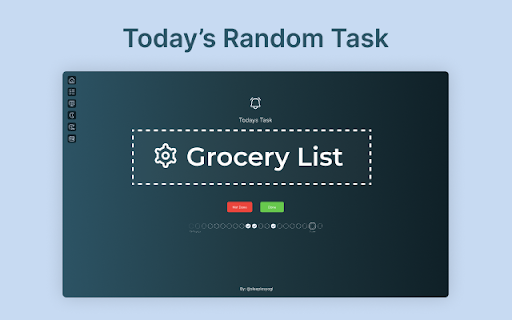


A simple extension that opens a new tab with a daily task to complete. Reason? Our goal setting abilities are a lot enhanced than our goal completing environments. The conflict between this results in a tension between what we want to do and what we can do. Today's Task chrome extension solves the very particular problem of this conflict. Today's Task will allow you to conquer more projects by focussing on one task per day. ✅ Today's Task - This page will show you your Today's Task to complete - A task will be randomly picked for you - but you can also shuffle task ✅ Task Chain - Gamify your TODO tasks - Everyday you complete a task the task chain will change the color and increment the counter - This is to encourage you and keep you accountable ✅ Update Tasks - Use this page to add your list of tasks or delete any tasks - You can shuffle your Today's Task from this page too ✅ Progress Review - Track your productivity with weekly stats - See your current streak and monthly completions - Get motivational messages based on performance ✅ Shuffle Tasks: - If you don't like today's task you can use "Shuffle" task to update today's task - If you complete today's task and want to do more you can use this feature for it too ✅ Snooze Tasks - Snooze tasks for 1 week, 1 month, or 3 months - Auto-shuffles to next task after snoozing ✅ Motivational Nudges - Action-oriented subtle motivational quotes on the main page - Easy toggle on/off in settings - Designed to inspire without distracting ✅ Widgets (Right Sidebar) - Real-time date and time display - Current weather conditions (defaults to San Francisco, CA) - Set your own city in settings - Choose temperature unit: °F or °C - Beautiful glassmorphism design - Toggle widgets on/off in settings ✅ Left Sidebar Tools - **Pomodoro Timer**: Dedicated focus timer always accessible - Quick presets: 5m, 15m, 25m, 45m - Visual progress tracking with color coding - Browser notifications when complete - **Quick Notes**: Temporary scratchpad for quick thoughts - Jot down reminders or ideas - Auto-deletes after 24 hours - Shows time remaining - Both default ON, toggle individually in settings ✅ Theme - You can switch between light and dark theme ✅ Disable for 2 hours - Use this option if you want to see normal chrome new tab instead of this extension - This is especially handy when you don't want to show your tasks in meetings Update 1.4.0 release notes: 🌤️ **Date & Weather Widgets** - Real-time clock and weather on right sidebar (defaults to San Francisco, customizable) 📝 **Quick Notes** - Temporary scratchpad that auto-deletes in 24 hours (left sidebar, default ON) 🍅 **Pomodoro Timer** - Focus timer with quick presets: 5m, 15m, 25m, 45m (left sidebar, default ON) ⚙️ **Settings Page** - Customize your experience - toggle all widgets, set weather location, control Pomodoro 💡 **Motivational Nudges** - 50 subtle, rotating quotes to inspire action (toggle on/off in settings) 🎉 **Confetti Celebration** - Animated confetti burst when you complete tasks! 🎨 **Fun Emoji Icons** - 300+ colorful emojis replace boring icons! From 🚀 to 🎉, from 🍕 to 💻, every task gets a personality! Update 1.3.0 release notes: ✨ Weekly Progress Review - Track your productivity with stats, streaks, and motivational messages ⚡ Quick Add Shortcut - Press ⌘K / Ctrl+K from anywhere to instantly add tasks 🎨 Modern UI Redesign - Glassmorphism design, bigger layout, cleaner menu, everything fits on screen 🔧 Bug Fixes - Snooze auto-shuffles, fixed duration bug, improved responsiveness Update 1.2.0 release notes: - Complete UI/UX redesign - And a lot of bug fixes Update 1.1.6 release notes: - Had to remove sync on multiple devices support due to chrome storage limitations - More storage space now available with local storage (unique data per device) Update 1.1.4 release notes: - You can now conveniently shuffle tasks directly from the Today Task page. - In addition to marking today's tasks as done, you can now mark any task as completed and receive credit for your achievements. - Export all your tasks and task-chain for your reference - Various bug fixes

Taskade - Task & Todo List
Taskade is a simple todo and task manager to make all things done in an organized way. Taskade - Task & Todo List is a FREE chrome extension to manage all your tasks and todo list in a simple and easy way. The extension lets you add tasks and once they are done, you can remove them from your task and todo list without following any complex steps. - The extension allows you to add tasks in your beautiful todo list just by hitting a single button click. - It is available worldwide. Therefore, you can use the extension no matter where you are, it works smoothly. - Taskade - Task & Todo List works with all the tabs you are working in the browser, so you don't need to click the extension icon to add a piece of work in your todo list instead you just need to press Alt+Z key on your keyboard and fill your mission in prompt box and then hit enter key. Done. Your piece of work will be added to your todo list. - Enjoy the beautiful layout of this mission manager extension while keeping your things done. -Once your mission is done, you just need to check the piece of work from the list in this task manager extension. Alt+z - To add a piece of work from your working tab. - Pin the extension to your toolbar after installing it. - Click the extension icon to open the popup window. -Type your task in the input field and hit Enter key or press Add button, the task will be added to your task list. -Press Alt+Z key on your keyboard in your working tab. It will open a prompt box, enter your task and submit it to add the task. - Once the piece of work is completed, just click on the task, it will be checked and get blurred. And next time when you open the extension, the assignment/job will not be there. Works offline - Taskade - Task & Todo List extension works perfectly offline. You don't need to be connected to the internet to manage your task. Light weight - The extension is of minimal size, so it will consume negligible disk of your system and will not affect system's performance. Simple layout - It is built based on simplicity so that you don't have to follow complex steps. Secure - Using this extension is completely safe. We don't store your data on our server. Your data is stored in your browser. So it is secure. Privacy: User's data is the most precious thing. While keeping this mind, we built the extension safe and secure for our users, so they can use it without any hesitation. We don't fetch users' data to our server. No one can check a user's data except the user. We don't use any tracking or analytics tools. Your privacy is private. Taskade - Task & Todo List is a safe and secure extension.

ToDo for Google Tasks
It is an application for convenient use of Google Tasks in 3 columns. Best app to use Google Tasks. Task display of "today", "tomorrow", "the day after tomorrow", "overdue", "all", global search, alphabetical or date sorting and dark mode support! ◆Sync with Google Tasks It also syncs quickly with Google Tasks and Google Calendar! ◆Narrow down tasks You can display tasks as "today", "tomorrow", "the day after tomorrow", "overdue", and "all"! ◆Sort tasks You can sort by "drag & drop", "date order", and "alphabetical order"! ◆Full search You can quickly search for the task you want to find from all tasks! ◆Security - We do not send your data to non-Google servers. - Data is exchanged directly with Google. Even developers can't see what's inside. - Do not ask for passwords or save them at all. ◆Support If you have any problems, we will help you as soon as possible. Please feel free to contact us at the email address below. info@thetodo.net

boost. Task management made simple
Organize and manage tasks with drag and drop cards An extension for managing personal tasks, work, job applications, ideas, and whatever else you want! Currently, data is stored locally on your browser, so you will not be able to sync data across different devices. If you have any questions or concerns, feel free to contact me at josh.ho.dev@gmail.com

Focus Window
ADHD-based extension helps you cut out distractions on the page so you can focus on what actually matters Enabling the Focus Window extension hides most of the page behind a slightly transparent background to reveal a smaller area to focus on. In today's web world, sites can be a tornado of distractions such as banners, videos, sidebars, popups and other elements with the hopes of grabbing (and holding!) your attention. Usually this is a good thing because it helps us navigate websites quickly, but sometimes it can get in the way of the content we are actually interested in. Great for long reads to prevent your eyes from jumping around the page and on websites that take your focus away from where you want it to be. The Focus Window will follow your cursor and still allows interaction with items on the web page. The Focus Window was made to help users with ADHD improve their focus and attention but is available to all productivity buffs, life-hackers, and efficiency nerds that want one more tool in their belt to make the most of their time on the web
