
mccbomeegfcjhinpfknaobocebffnoeg


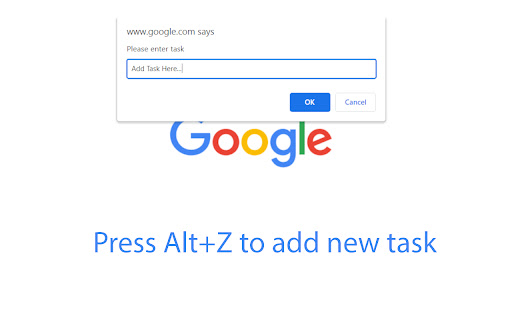
Taskade is a simple todo and task manager to make all things done in an organized way. Taskade - Task & Todo List is a FREE chrome extension to manage all your tasks and todo list in a simple and easy way. The extension lets you add tasks and once they are done, you can remove them from your task and todo list without following any complex steps. - The extension allows you to add tasks in your beautiful todo list just by hitting a single button click. - It is available worldwide. Therefore, you can use the extension no matter where you are, it works smoothly. - Taskade - Task & Todo List works with all the tabs you are working in the browser, so you don't need to click the extension icon to add a piece of work in your todo list instead you just need to press Alt+Z key on your keyboard and fill your mission in prompt box and then hit enter key. Done. Your piece of work will be added to your todo list. - Enjoy the beautiful layout of this mission manager extension while keeping your things done. -Once your mission is done, you just need to check the piece of work from the list in this task manager extension. Alt+z - To add a piece of work from your working tab. - Pin the extension to your toolbar after installing it. - Click the extension icon to open the popup window. -Type your task in the input field and hit Enter key or press Add button, the task will be added to your task list. -Press Alt+Z key on your keyboard in your working tab. It will open a prompt box, enter your task and submit it to add the task. - Once the piece of work is completed, just click on the task, it will be checked and get blurred. And next time when you open the extension, the assignment/job will not be there. Works offline - Taskade - Task & Todo List extension works perfectly offline. You don't need to be connected to the internet to manage your task. Light weight - The extension is of minimal size, so it will consume negligible disk of your system and will not affect system's performance. Simple layout - It is built based on simplicity so that you don't have to follow complex steps. Secure - Using this extension is completely safe. We don't store your data on our server. Your data is stored in your browser. So it is secure. Privacy: User's data is the most precious thing. While keeping this mind, we built the extension safe and secure for our users, so they can use it without any hesitation. We don't fetch users' data to our server. No one can check a user's data except the user. We don't use any tracking or analytics tools. Your privacy is private. Taskade - Task & Todo List is a safe and secure extension.

To do list - Keep it simple
A simple but powerful Chrome to-do list to organize tasks your way. Keep it simple is a to-do list extension designed to help you organize tasks quickly and stay productive without friction. This task manager extension lets you create tasks in seconds, organize them into custom categories, and reorder everything effortlessly with drag & drop. No unnecessary features, just a clean and intuitive to-do list that adapts to your workflow. With online synchronization, your tasks stay up to date across all your devices, whether you’re working at your desk or on the move. Focus on what matters, not on managing your task management tool. ✅ Clean & simple interface – Add, organize, and complete tasks with ease 🧩 Custom categories – Create and delete categories to fit your workflow 🖱️ Drag & drop tasks – Reorder your to-do list instantly 🔄 Sync across devices – Access your tasks anytime, anywhere 🚀 Boost productivity – A lightweight Chrome extension built to keep you focused

MyDodo | A simple todo list
Create a todo list in your Google Chrome browser What do you need to do today? :) Create a simple todo list with MyDodo! You don't need more papers or notepads! You can control, create and remove items in your Google Chrome browser.

Taskade - AI Agents, Chat Bots, & Task Automation
AI Agents, task lists, and workflow automation. Get work done faster and smarter with Taskade. ➜ TASKADE CHROME EXTENSION: ELEVATE YOUR PRODUCTIVITY WITH AI-POWERED AUTOMATION AND COLLABORATION Transform your browser into an all-in-one productivity powerhouse with the Taskade Chrome Extension. Capture ideas, automate workflows, and collaborate effortlessly using AI agents that think, learn, and act. Whether you’re brainstorming ideas, managing projects, or automating workflows, Taskade is the ultimate tool to supercharge your productivity. • Highlight text and right-click to "Add to Taskade" for instant organization. • Automate repetitive tasks with Taskade Automation's smart triggers and actions. • Train AI agents with knowledge from files, links, projects, and live data. • Manage tasks, projects, and workflows with powerful AI tools. • Collaborate in real-time with AI chat, mind maps, and team tools. • AI AGENTS: Build, train, and deploy custom AI agents to automate tasks, conduct research, and enhance workflows. • TASKADE AUTOMATION: Create workflows with "If this, then that" logic to handle repetitive tasks and boost efficiency. • TOOLS FOR AI AGENTS: Equip agents with advanced tools to execute commands, interact with external platforms, and streamline tasks. • KNOWLEDGE FOR AI AGENTS: Train agents with files, links, and live data for smarter, contextual, and adaptive responses. • TASKS AND PROJECTS: Organize tasks in lists, boards, calendars, and mind maps, enhanced with AI for creativity and structure. • AI COLLABORATION: Collaborate with teammates and AI agents using real-time chat, video conferencing, and automation tools. Taskade Automation enables you to streamline repetitive workflows and put your projects on autopilot. Using simple "If this, then that" logic, you can create automation flows tailored to your team’s needs. • Automate task creation and notifications. • Integrate with tools like Google Sheets, Slack, and WordPress. • Use AI agents in automation flows to execute commands and handle decisions. • Schedule automations to run at specific intervals, such as daily or weekly. • Share automation flows and templates with your team for consistent productivity. ➜ TOOLS FOR AI AGENTS Give your AI agents the ability to perform actions and interact with external platforms using powerful tools. Tools for AI Agents unlock new possibilities for dynamic workflows. • Create and manage tasks or projects within your workspace. • Send messages to team channels, email contacts, or publish blog posts directly from Taskade. • Integrate seamlessly with external platforms like Google Drive, Dropbox, or WordPress. • Enable specific tools for your agents to handle specialized tasks, like scheduling or generating reports. ➜ KNOWLEDGE FOR AI AGENTS Train your AI agents to provide smarter, more context-aware responses by equipping them with knowledge from a variety of sources. Combine static and dynamic knowledge to enhance agent performance. • Upload files like PDFs, DOCs, and spreadsheets to your agent's knowledge base. • Add live resources such as web links, YouTube videos, and blogs for real-time learning. • Integrate workspace projects as sources, including text, tasks, and embedded data. • Manage bulk knowledge uploads to keep agents updated with the latest information. • View knowledge backlinks in projects to track agent usage and sources. ➜ BUILD YOUR ULTIMATE AI-POWERED WORKSPACE • Capture ideas instantly by turning any webpage into actionable tasks with one click. • Automate workflows with Taskade Automation to save time and reduce effort. • Train AI agents with files, live data, and external resources for smarter assistance. • Collaborate smarter with AI-powered chat and real-time video conferencing. • Use tools for AI agents to interact with external platforms and handle complex tasks. ➜ HOW TASKADE BROWSER EXTENSION WORKS • Turn your new tab into a productivity dashboard where tasks, goals, and agents are one click away. • Use automation flows and tools to execute workflows, generate insights, and streamline decision-making. • Enable agents to handle dynamic knowledge for real-time, adaptable responses. ➜ PERFECT FOR INDIVIDUALS AND TEAMS Taskade adapts to your needs, whether managing personal projects or collaborating with a global team. • Unlimited workspaces to organize tasks and notes. • Customizable templates to create repeatable workflows. • Cross-device sync for seamless access on web, mobile, and desktop. ➜ GET STARTED FOR FREE Taskade is free to use, with optional upgrades to unlock additional features. Learn more at https://taskade.com/pricing. Join millions of users from companies like 3M, Netflix, Tesla, Adobe, and Airbnb who rely on Taskade to stay organized and productive. Read testimonials at https://taskade.com/reviews Reimagine how you work with Taskade and 10x your productivity. Download the Taskade Extension today and take your productivity to the next level.

New Tab Todo List: Checklist, Notes, Outliner
Beautiful and sharable checklists, notes, and to-do lists. Collaborate and outline in real-time. Turn your New Tab into a Todo List! ✏️ A lightning fast new tab productivity page and dashboard with stunning backgrounds, todo, tasks, lists, and more. Make your new tab / start page the way it should be: Fast, customizable, beautiful and productive! Make lists, outlines, todos, and more. With the New Tab Todo List extension for Chrome, just open a New Tab to capture your ideas, goals, and daily tasks. New Tab Todo List is a friendly space for your lists, outlines, and teams. Use it as your simple to-do list and task manager. You can instantly make a list and share it with your friends, family, and team. Simple, clean, and beautifully designed with relaxing themes and backgrounds. New Tab Todo List declutters your thoughts so you can focus on your tasks, ideas, and getting things done. Use New Tab Todo List to capture your ideas, goals, daily tasks and stay organized. A homepage you will fall in love with! Checklists, tasks, todos, quick notes, calendar and more. Replace your new tab with a personal productivity tool featuring to-do, task lists, team outliner, and inspirations. • New Tab into a beautiful task list • Collaborate with others, with real-time syncing • Share your task lists instantly using a share link • Easily invite friends and teammates to New Tab Todo List • Work together in a shared team space • Task lists with a natural editing interface • Edit to-do lists like a word doc and document • Mark any items as complete, whether bullet, number, or checkbox. • Infinitely nested lists with indent / outdent • Tag and filter tasks using #hashtag and @mentions • Works on phones and tablets, with live real-time syncing between devices • Automatic syncing between your phone, tablet and computer • Simply click to edit, like a text document • Easily expand and collapse outlines and lists • Inspirational wallpapers and photos • Beautiful and minimal interface • Simple, instant and FREE • Feel good, get motivated, seize the momentum and get things done! Yes, New Tab Todo List is completely free. Soon you will have the option to upgrade to New Tab Todo List Pro, which will have additional features like themes, sticker packs, and customizations. ➜ CAN I USE New Tab Todo List WITH MY TEAM? Yes. Create a space and invite your team instantly. It helps keep your lists and team organized. Members will have full access to lists in space. Use New Tab Todo List as your collaboration tool to help each other get stuff done. Meeting notes, task lists, collaborative documents and processes are now in one place in your shared New Tab Todo List space. Unleash your team’s potential ➜ CAN I COLLABORATE WITH OTHERS? Yes. New Tab Todo List allows you to edit lists dynamically with anyone through a share link in real-time. Your task lists are in sync across all devices live and in real-time. Collaboratively edit together in real-time with teams and groups. Simply select and share the edit link. Stay organized and make progress with your team projects using New Tab Todo List. Your team is on the same page!
