
cnhlfdfcgejlkkmdaoahfaohojcbmogf
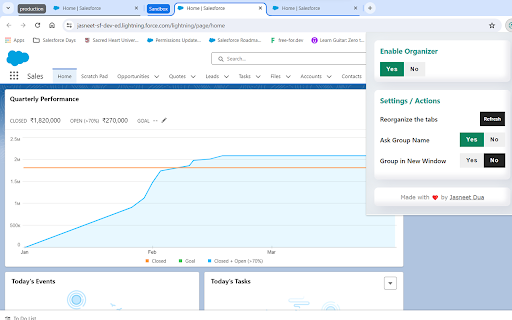
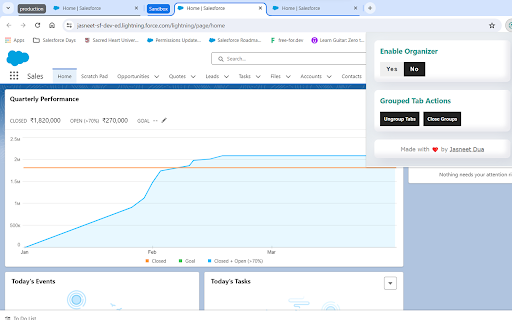
Effortlessly manage multiple Salesforce instances with Salesforce Tab Organizer. Salesforce Tab Organizer is your essential companion for organizing and optimizing your Salesforce experience. Seamlessly manage multiple Salesforce instances by intelligently grouping tabs associated with similar organizations. This extension intelligently groups tabs related to the same organization, streamlining your workspace and boosting productivity. Automatic grouping, intuitive organization, and smart automation ensure a clutter-free and efficient Salesforce experience. # Key Features: 1. Automatic Grouping: Effortlessly categorize tabs belonging to the same Salesforce organization into distinct groups. 2. Intuitive Organization: Easily identify and manage tabs associated with specific Salesforce instances for efficient navigation. 3. Smart Automation: Automatically adds new tabs to existing groups or creates new groups as needed. # Get Started: Install Salesforce Tab Organizer from the Chrome Web Store. Experience effortless tab management as tabs are intelligently grouped. Optimize your workspace and navigate Salesforce tasks with ease. Join users streamlining their Salesforce workflow with Salesforce Tab Organizer. Simplify tab management for a more efficient Salesforce experience!

Salesforce Show Api Name
Salesforce Show API Name The easiest way to view and copy API names in Salesforce 1. Shows API names for all fields and objects 2. Works in both Classic and Lightning 3. Copy single or multiple fields with one click On any Salesforce record page: 1. Click the extension icon to show/hide API names INSTALLATION Get it from the Chrome Web Store or install manually from: https://github.com/ChenZaichuang/salesforce_show_api_name

Maven Tools for Salesforce
Uniquely architectured for Salesforce technical consultants, Maven Tools transforms how Salesforce implementations are being delivered. It offers features like an intelligent query editor, REST console, event hub and many more, giving you the power to deliver changes more quickly and effectively. 📨 Support ▸ Go to our service desk to get technical support, or to report bugs and suggest improvements : https://mavenmule.atlassian.net/servicedesk/customer/portal/6

Salesforce DevTools
Salesforce DevTools is a powerful Salesforce developer chrome extension for doing the below things : ・Quickly generate Apex code / SOQL, exporting query results to Excel file. ・Quickly access to new record page, list page and object setting page of any object. ・Quickly search object fields and check its usage. ・Display fields API name on Salesforce object detail page. ・Exporting Objects Definition to Excel file. ・Exporting Objects Fields Definition to Excel file. ・Exporting Objects Page Layout Definition to Excel file. ・Exporting Objects List View Definition to Excel file. ・Exporting Flow Definition to Excel file. ・Salesforce data modal (ERDs) generator. ・All Check / Select on profile edit page and field permissions edit page. ・Mass edit, mass delete, mass clone custom fields (Only Classic). ++++++++++++++++++++++++++++ Release notes ++++++++++++++++++++++++++++ 2026/01/1 ・Added features of "Export Flow Definition". -------------------------------------- 2023/04/10 ・Added features of mass edit, mass delete, mass clone custom fields on Lightning. -------------------------------------- 2022/01/30 ・Added feature of searching object fields and show its usage. -------------------------------------- 2021/04/05 ・Added feature of exporting Object definition (FULL) and fixed bugs. -------------------------------------- 2020/09/07 ・Added feature of exporting List View definition and fixed bugs. -------------------------------------- 2020/06/07 ・Fixed Lighting active bug and Japanese language document exporting bug. -------------------------------------- 2020/04/12 ・Improved feature of Query Editor. -------------------------------------- 2020/01/06 ・Added feature of exporting object page layout. -------------------------------------- 2019/08/18 ・Added feature of Multi Check on field permission edit page. -------------------------------------- 2019/05/13 ・Added features of mass edit, mass delete, mass clone custom fields -------------------------------------- 2019/03/24 ・Fixed issues. -------------------------------------- 2018/12/17 ・Reactivated feature of Debug Log Viewer. ・Added feature of searching Debug Log. ・Fixed issues. -------------------------------------- 2018/11/12 ・Improved UX of feature exporting object API reference to Excel file. ・Added Query Editor feature to all Objects. ・Added feature of exporting query result to Excel file -------------------------------------- 2018/09/25 ・Added support for cloudforce orgs. -------------------------------------- 2018/09/03 Major Release ・ Added support for Lightning! ・ Improved UX of feature Object Reference Doc generating. ・ Improved UX of feature All Check. -------------------------------------- 2018/04/17 ・Improved ERDs UX, fixed bugs. -------------------------------------- 2017/10/11 ・Improved Debug Log Viewer UX. -------------------------------------- 2017/05/29 ・Added feature of query editor and csv data exporting. -------------------------------------- 2017/04/23 ・Added feature of ERDs generator. -------------------------------------- 2017/02/06 ・Fix bugs. -------------------------------------- 2017/01/30 ・Added features of SOQL generator and Apex debug log viewer. -------------------------------------- 2016/12/20 ・Fixed export excel bugs. -------------------------------------- 2016/12/06 ・Improved UI, fixed bugs. -------------------------------------- 2016/11/25 ・Added features that allows you to enable it on custom domain. -------------------------------------- 2016/08/21 Major Release ・Added features of exporting objects definition to excel file. -------------------------------------- 2016/05/18 ・ Added support for Visualforce Page. -------------------------------------- 2016/04/04 ・ Added the features of object searching and object quick access. -------------------------------------- 2016/03/31 ・ Added support for generating Apex Code include blank fields -------------------------------------- 2016/03/28 ・ Added support for RecordType ・ Added hint for Quick Access Menu Turned Off

Salesforce Change Set Helper
Enhances the Salesforce change set. Adds last changed date and allows sorting, searching, validation and comparison with other orgs. A Chrome extension to improve the usability of Salesforce change sets NEW! Release 3.1.4 Optimizations for large organization Release 3.1.3 - Fix Compare and allow multiple orgs to be connected. - Add the ability to validate and deploy changes directly to other orgs. - Ability to select components from different types and add them at once. - Added a new Change Set Cart where the user can see what are the items have been added without needing to leave the add screen. - Persistent cart panel with sync badge, search, virtualised list, filterable chips. - Export/Import package.xml from cart and both page toolbars. - Bulk Remove via Tooling API DELETE (no A4J reload dance). - Single-row Remove without page reload. - Hide native Import entry point. - Fix lighting page issue. Release 3.0.2 Supports Chrome extensions best practices and manifest v3 updated better loading of components for large orgs. Features include: - Includes the last modified date and user and api name for each item. - Automatically ordered by most recent modified first - Filter/Search/Order by any field. - Sets all pages to show the 1000 rows. If more than 1000 items in a page, asks if you want to continue to retrieve more. - View and Search on items in the change set. This allows you to see the whole change set and search to make removing much easier. - Compare to another org (uses OAuth2.0 -- no username or password information is seen or stored by this extension). - Shows the last modified date and user for the compared org as well. - Click the file name to see a diff of the metadata file between orgs. Note that there is a delay when loading large pages and you may need to disable other chrome extensions that alter the change set page. Release 3.0.0. Lightning compatible! Fixed issue with Validation. Added Quick Deploy. Updated compare files content to compare all files (for example, in a Aura Component). Fixed issue with constantly spinning wheel if there is an error. Added ability to change API Version. Removed extension from all pages except change sets. Release 2.2.0 Now includes Validation helper. Log into another org and validate the change set. Release 2.1.2 Fixed bug with Quick Links on VF page even when disabled Fixed bug with Sharing Criteria Rules Release 2.1.1 Fixed bugs with hanging when no content. Merged with "beta" extension -- new features such as download zip file of the change set. Release 2.02 Now can compare files between orgs. Log in to a sandbox or dev/prod org. Uses Oauth2.0 for authorization -- no user or password information is seen or stored locally. Shows the last modified date and user for the compared org. Click the name and see a diff comparison of the two. Release 1.4 Updated to add ability to keep getting 1000 more items on pages. (Salesforce will only retrieve 1000 a time.) Added in a "clear" function to clear the search filters. Clear is automatically called before items are added to change set -- this is because of a bug where the items will not be added unless they are visible. Release 1.3 Updated to support workflows, reports, email templates and many more.
