
kgookdjjmmekebgdecakmblghjgiaoem


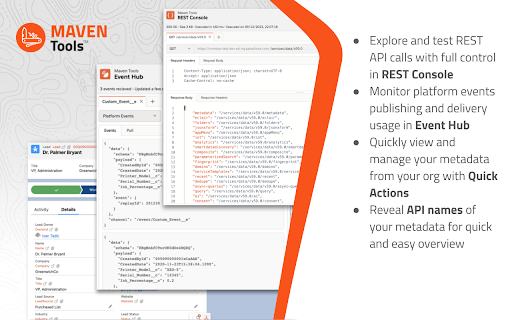

Uniquely architectured for Salesforce technical consultants, Maven Tools transforms how Salesforce implementations are being delivered. It offers features like an intelligent query editor, REST console, event hub and many more, giving you the power to deliver changes more quickly and effectively. 📨 Support ▸ Go to our service desk to get technical support, or to report bugs and suggest improvements : https://mavenmule.atlassian.net/servicedesk/customer/portal/6

Salesforce advanced Code searcher
By using the advanced quick find you can get your code few clicks shorter. Also, you can search any string your code Using this extension you can search your code components your salesforce instance: 1) apex Classes 2) Apex Triggers 3) visualforce Pages 4) Visualforce Components 5) Lighting Component In addition to the above you can use this extension to jump to classes / pages / triggers from the advanced quick find section on the left hand side. How to make it work in Lightning: 1) We embed the extension in the setup page. Please navigate to the setup home page where you can find the extension injected in the right. 2) You need to authorize (this is a one time activity) for the application to make the API calls. 3) On clicking the button, you will be navigated to the Salesforce to authorize. Once you have successfully completed the authorization, you will be redirected back to the home page. 4) Once this is done, all the functionalities will be enabled. Both the below section get added in the set-up pages, so this is only useful for developers and Admins, this tool will not make any sense for salesforce users. 1) Advanced Quick Find section:This part gets added in side navigation bar on all set-up pages. Select the code component that you want to go to, then start typing the name of the code,an autocomplete suggestion pops up, select the one that you want to go to. 2) Developer Utilities: 2.1) This component get added in force.com home page only. Let's say you want to know where you have hard-coded a profile name in your code, like if(profile.name =='sys Admin'){//you're doing something}. Right now to find this out you have to either go thru all the code individually or create a force.com project in eclipse and then search there. There's no way we can do this directly in salesforce. This string search will help you do that. You have to check the code components in which you want to search the code, enter a string in the input text field and hit enter. You will be presented with a list of code components where the string is used. 2.2 ) Code Coverage Extract: You can View and download the code coverage in your org. 2.3 ) This extension now allows you to lint the lightning code via the Lightning Linter tab. 2.4 ) You can now run PMD against your code 2.5 ) Added a new tab which will allow the users to view the record and its child information . update 1.22 Improved the static code analysis functionality update 1.15 Added the LWC Editor with Autocompleting for html & xml files. update 1.10 Added the ability to get the record Information by just giving the record Id. update 1.8, 1.9 Added support for the application to work on lightning update 1.4.2 Added support for Custom label Addes support for Apex PMD Update 1.1.1 Expanded the quick search scope to Email Templates, Validation Rule, Workflow Rule, Custom Object Added edition checks. Update 1.2 Update the UI to be more in sync with Lightning Update 1.3 Added Code coverage Extract section allowing user to view and download the code coverage. Update 1.3.3: UPdated the cookie issue. NOTE: 1) Salesforce's REST API is used to accomplish the above functionalities Update 1.3.5 1) Added support to delete all the Debug logs 2) Added a button on traceflag to renew the startDate / expiration date.

Salesforce Colored Favicons
Updates the standard favicon on Salesforce tabs with colored versions to help differentiate between different organizations. Supports both Classic and Lightning Experiences and includes separate icons for production, sandbox, and develop/scratch orgs. To use the extension, simply navigate to a Salesforce org and the extension will automatically select a random color for it then update the favicon with that color. Now every time you visit that org, the colored favicon will be displayed instead of the default Salesforce favicon. At this point you can also visit the options page to change the color for any org you've visited.

Salesforce Tool Suite
Enhance your Salesforce productivity with our comprehensive toolkit tailored for administrators, developers, architects, and consultants. This all-in-one solution enables you to compare profiles and permission sets, manage debug logs, and explore schemas seamlessly on your device. Your data remains secure, stored exclusively on your local machine. 1. Reports - Profile and Permission Set Comparison: Analyze and compare profiles and permission sets across different Salesforce organizations. - Metadata Export: Export critical components such as classes, triggers, process builders, flows, validation rules, Visualforce pages, and workflow rules to Excel for streamlined analysis. - Super User Report: Quickly identify potential security vulnerabilities in your Salesforce org by auditing privileged users. - Approval Process Details: Access and export approval process configurations effortlessly. 2. Debug Logs - Hierarchical Log Viewer: Delve into Salesforce's core with an organized log viewer. - Tail Logs: Monitor real-time logs without additional installations or configurations. - Trace Flags and Debug Levels Management: Efficiently manage trace flags and debug levels. - User-Specific Debugging: Instantly debug errors reported by specific Salesforce users. 3. Schema Explorer - Schema Navigation: Navigate Salesforce schemas without memorizing fields or relationships. - SOQL Query Builder: Construct complex SOQL queries with ease. - Data Management: Sort, filter, edit records in batches or inline, and export data to Excel. 4. Event Monitoring - Comprehensive Event Logs: Monitor and download logs for over 50 critical Salesforce events. - Exclusive API Access: Leverage features not available in standard Salesforce setup. 5. Salesforce Tools - Apex Testing: Execute test suites and obtain code coverage metrics. - Bulk Management: Efficiently manage validation rules, workflow rules, fields, and objects in bulk. - Object Limits Monitoring: Stay informed about Salesforce object limits. - Bulk Operations: Create or delete multiple fields or objects simultaneously. - Report and Dashboard Management: Clone, delete, and manage reports, dashboards, flows, and record types in bulk.

EasyCrud(Salesforce)
Assign your CRUD and FLS for Salesforce in Bulk from Single Screen This Extension allows Salesforce Admins/Developers to assign CRUD and FLS Permissions from Single Screen. There are also features that provides ability to export permissions in CSV and also generate dashboard for the permissions.
