
fiaakhiohminpblhmlihfcdhclmphjcd
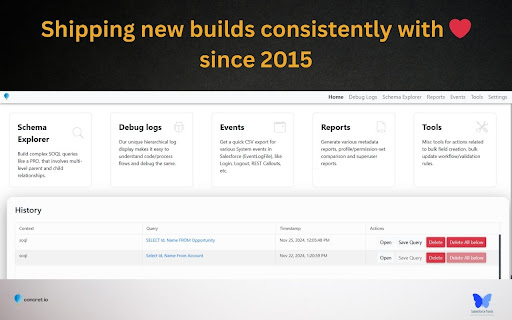


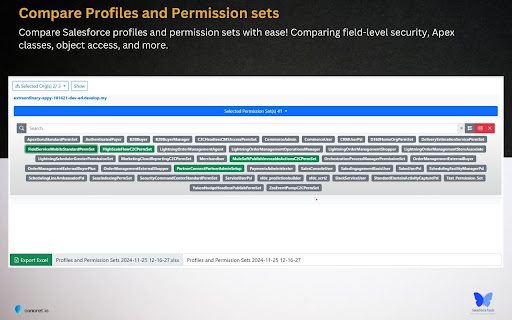

Enhance your Salesforce productivity with our comprehensive toolkit tailored for administrators, developers, architects, and consultants. This all-in-one solution enables you to compare profiles and permission sets, manage debug logs, and explore schemas seamlessly on your device. Your data remains secure, stored exclusively on your local machine. 1. Reports - Profile and Permission Set Comparison: Analyze and compare profiles and permission sets across different Salesforce organizations. - Metadata Export: Export critical components such as classes, triggers, process builders, flows, validation rules, Visualforce pages, and workflow rules to Excel for streamlined analysis. - Super User Report: Quickly identify potential security vulnerabilities in your Salesforce org by auditing privileged users. - Approval Process Details: Access and export approval process configurations effortlessly. 2. Debug Logs - Hierarchical Log Viewer: Delve into Salesforce's core with an organized log viewer. - Tail Logs: Monitor real-time logs without additional installations or configurations. - Trace Flags and Debug Levels Management: Efficiently manage trace flags and debug levels. - User-Specific Debugging: Instantly debug errors reported by specific Salesforce users. 3. Schema Explorer - Schema Navigation: Navigate Salesforce schemas without memorizing fields or relationships. - SOQL Query Builder: Construct complex SOQL queries with ease. - Data Management: Sort, filter, edit records in batches or inline, and export data to Excel. 4. Event Monitoring - Comprehensive Event Logs: Monitor and download logs for over 50 critical Salesforce events. - Exclusive API Access: Leverage features not available in standard Salesforce setup. 5. Salesforce Tools - Apex Testing: Execute test suites and obtain code coverage metrics. - Bulk Management: Efficiently manage validation rules, workflow rules, fields, and objects in bulk. - Object Limits Monitoring: Stay informed about Salesforce object limits. - Bulk Operations: Create or delete multiple fields or objects simultaneously. - Report and Dashboard Management: Clone, delete, and manage reports, dashboards, flows, and record types in bulk.

Salesforce Inspector Advanced
Productivity tools for Salesforce administrators and developers to inspect data and metadata directly from the Salesforce UI. Salesforce Inspector Advanced - The Ultimate Developer Toolkit for Salesforce Transform your Salesforce development workflow with this comprehensive browser extension designed for developers, admins, and architects. Salesforce Inspector Advanced provides powerful tools to inspect, analyze, and optimize your Salesforce org. 🔍 INSPECT & ANALYZE • Object & Field Inspector: Deep dive into object metadata, field usage analysis, and relationship mapping • Flow Analyzer: Comprehensive flow analysis detecting performance issues, security vulnerabilities, and best practice violations with actionable recommendations • Org Analyzer: Identify unused resources, code quality issues, security vulnerabilities, and migration opportunities across your entire org 💾 DATA MANAGEMENT • Advanced SOQL/SOSL Editor: Intelligent code editor with autocomplete, syntax highlighting, and inline suggestions for fields, objects, and relationships • Data Export: Query and export data with advanced filtering, sorting, column management, and support for GraphQL • Data Import: Bulk import with Bulk API support, hard delete capabilities, and smart field mapping • Inline Editing: Edit records directly in the data export view with bulk update capabilities ⚡ APEX DEVELOPMENT • Apex Runner: Execute anonymous Apex, batch jobs, and queueable classes with real-time log monitoring • Log Viewer: Advanced log analysis with flame charts, profiler, resource tracking (SOQL, DML, callouts), and unit test execution with code coverage • Code Editor: Full-featured editor with syntax highlighting, auto-indentation, and intelligent suggestions for Apex classes and methods 🔧 METADATA & DEPLOYMENT • Metadata Browser: Explore and download metadata with automatic package.xml generation • Metadata Import: Streamlined metadata deployment with relationship handling 🌐 API & INTEGRATION • API Explorer: Test Salesforce APIs with templates, history, and response formatting for REST, Bulk API, Chatter, Reports, and more • Platform Event Manager: Subscribe, monitor, and publish platform events, push topics, and change data capture events 🤖 AI-POWERED FEATURES • AI Flow Analysis: Leverage ChatGPT, Claude, Mistral, or Agentforce to analyze flows and generate SOQL queries • Intelligent Suggestions: Context-aware autocomplete for fields, picklist values, and relationships 🎨 USER EXPERIENCE • Customizable Interface: Custom favicon colors, editable shortcuts, and personalized settings • Quick Access Popup: Fast access to common tasks, user management, and org navigation • Modern UI: Clean, responsive interface with keyboard shortcuts and intuitive navigation 🔒 SECURITY • OAuth 2.0 with PKCE: Secure authentication with support for external connected apps • Security Analysis: Detect SOQL injection vulnerabilities, XSS risks, and access management issues Perfect for developers who need to: • Analyze and optimize Salesforce Flows • Query and manipulate data efficiently • Debug Apex code with advanced log analysis • Manage metadata and deployments • Test APIs and integrations • Identify org health issues and optimization opportunities Whether you're building new features, debugging issues, or maintaining your org, Salesforce Inspector Advanced provides the tools you need to work faster and smarter. https://github.com/dufoli/Salesforce-Inspector-Advanced This extension is based on the original Salesforce inspector extension made by Søren Krabbe and Salesforce inspector reloaded by Thomas Prouvot.

Salesforce Advanced Search & Record Details
Salesforce Advanced Search plugin works in both Classic and Lightning: i) Search any keyword, text or field api name used anywhere in below Salesforce Components, in the result section plugin shows the total number of files where keyword has been used in different components. Plugin also provides to choose which all components to search in for the keyword via checkbox selection: 1) Apex Classes 2) Apex Triggers 3) Visualforce Pages 4) Visualforce Components 5) Email Templates ii) Show Field API Names with Labels of an object in details page, you can toggle between Show and Hide Field API Names without refreshing the page iii) View All Fields and Values provides a way to view all the fields (Label and API Name) and values for a given record of an object, even those that are not in the Page Layout. The show cached checkbox gives the ability to view cached values without querying the SF database. iv) Delete Record allows the admin to delete a record. It's also available for Firefox: https://addons.mozilla.org/en-US/firefox/addon/salesforce-advanced-search/

Salesforce Log Inspector
This app helps you inspect, analyze, and optimize your Salesforce debug log. ──────────: 𝑭𝒆𝒂𝒕𝒖𝒓𝒆𝒔 :────────── 🗂️ 𝐋𝐨𝐠 𝐄𝐱𝐩𝐥𝐨𝐫𝐞𝐫 - Quickly browse log rows with search and highlighted code for easy identification of key details. 🌿𝐑𝐚𝐰 𝐓𝐫𝐞𝐞 - View displays your Apex logs in a structured tree format. Instead of scrolling through long, unformatted text, you can explore the log hierarchy with expandable and collapsible nodes. 🐞 𝐀𝐩𝐞𝐱 𝐃𝐞𝐛𝐮𝐠 - View only 𝚂𝚢𝚜𝚝𝚎𝚖.𝚍𝚎𝚋𝚞𝚐() outputs for simplified troubleshooting, excluding other log details. 📅 𝐄𝐱𝐞𝐜𝐮𝐭𝐢𝐨𝐧 𝐓𝐢𝐦𝐞𝐥𝐢𝐧𝐞 - Visualize code execution over time with a flame chart and detailed event tooltips. 🔗 𝐄𝐱𝐞𝐜𝐮𝐭𝐢𝐨𝐧 𝐓𝐫𝐞𝐞 - Explore the method call path with key metrics like DML, SOQL counts, and execution times. 🔎 𝐄𝐱𝐞𝐜𝐮𝐭𝐢𝐨𝐧 𝐀𝐧𝐚𝐥𝐲𝐬𝐢𝐬 - Identify time-consuming methods to pinpoint performance bottlenecks for optimization. 🛢️ 𝐒𝐎𝐐𝐋 𝐀𝐧𝐚𝐥𝐲𝐬𝐢𝐬 - Find the most executed and time-consuming SOQL queries and those with the most extensive result sets. 🧮 𝐃𝐌𝐋 𝐀𝐧𝐚𝐥𝐲𝐬𝐢𝐬 - Identify the most frequent and slowest DML operations to optimize data processing. 🤖 𝐅𝐥𝐨𝐰 𝐀𝐧𝐚𝐥𝐲𝐬𝐢𝐬 -Quickly identify which Flows ran and how often in this execution. ──────────────────────────────────────────────────── 🌐𝐃𝐨𝐜𝐮𝐦𝐞𝐧𝐭𝐚𝐭𝐢𝐨𝐧: https://nisar-99.github.io/salesforce-log-inspector ──────────────────────────────────────────────────── 🛡️𝐒𝐞𝐜𝐮𝐫𝐢𝐭𝐲 ★ 𝘓𝘰𝘤𝘢𝘭 𝘋𝘢𝘵𝘢 𝘖𝘯𝘭𝘺: 𝘈𝘭𝘭 𝘥𝘢𝘵𝘢 𝘴𝘵𝘢𝘺𝘴 𝘰𝘯 𝘺𝘰𝘶𝘳 𝘥𝘦𝘷𝘪𝘤𝘦; 𝘯𝘰𝘵𝘩𝘪𝘯𝘨 𝘪𝘴 𝘴𝘦𝘯𝘵 𝘵𝘰 𝘦𝘹𝘵𝘦𝘳𝘯𝘢𝘭 𝘴𝘦𝘳𝘷𝘦𝘳𝘴. ★ 𝘕𝘰 𝘛𝘩𝘪𝘳𝘥-𝘗𝘢𝘳𝘵𝘺 𝘚𝘩𝘢𝘳𝘪𝘯𝘨: 𝘞𝘦 𝘥𝘰𝘯’𝘵 𝘴𝘩𝘢𝘳𝘦 𝘥𝘢𝘵𝘢 𝘸𝘪𝘵𝘩 𝘢𝘯𝘺 𝘵𝘩𝘪𝘳𝘥-𝘱𝘢𝘳𝘵𝘺 𝘴𝘦𝘳𝘷𝘪𝘤𝘦𝘴. ★ 𝘕𝘰 𝘓𝘦𝘨𝘢𝘭 𝘋𝘪𝘴𝘤𝘭𝘰𝘴𝘶𝘳𝘦𝘴: 𝘕𝘰 𝘱𝘦𝘳𝘴𝘰𝘯𝘢𝘭 𝘥𝘢𝘵𝘢 𝘪𝘴 𝘴𝘩𝘢𝘳𝘦𝘥 𝘧𝘰𝘳 𝘭𝘦𝘨𝘢𝘭 𝘰𝘳 𝘰𝘵𝘩𝘦𝘳 𝘱𝘶𝘳𝘱𝘰𝘴𝘦𝘴. ★ 𝘕𝘰 𝘋𝘢𝘵𝘢 𝘊𝘰𝘭𝘭𝘦𝘤𝘵𝘪𝘰𝘯: 𝘞𝘦 𝘥𝘰𝘯’𝘵 𝘤𝘰𝘭𝘭𝘦𝘤𝘵, 𝘴𝘦𝘭𝘭, 𝘰𝘳 𝘶𝘴𝘦 𝘱𝘦𝘳𝘴𝘰𝘯𝘢𝘭 𝘪𝘯𝘧𝘰𝘳𝘮𝘢𝘵𝘪𝘰𝘯. ★ 𝘗𝘳𝘪𝘷𝘢𝘤𝘺 𝘣𝘺 𝘋𝘦𝘴𝘪𝘨𝘯: 𝘌𝘹𝘵𝘦𝘯𝘴𝘪𝘰𝘯 𝘧𝘶𝘯𝘤𝘵𝘪𝘰𝘯𝘴 𝘴𝘦𝘤𝘶𝘳𝘦𝘭𝘺 𝘸𝘪𝘵𝘩 𝘮𝘪𝘯𝘪𝘮𝘢𝘭 𝘥𝘢𝘵𝘢 𝘶𝘴𝘦. ──────────────────────────────────────────────────── ❤️𝐂𝐫𝐞𝐝𝐢𝐭: I would like to acknowledge and thank 𝗦𝗮𝗹𝗲𝘀𝗳𝗼𝗿𝗰𝗲 (𝖣𝖾𝗏𝖾𝗅𝗈𝗉𝖾𝗋 𝖢𝗈𝗇𝗌𝗈𝗅𝖾) and 𝗖𝗲𝗿𝘁𝗶𝗻𝗶𝗮 (𝖵𝖲 𝖢𝗈𝖽𝖾 𝖤𝗑𝗍𝖾𝗇𝗌𝗂𝗈𝗇) for the inspiration and creative influence that helped shape this work. ──────────────────────────────────────────────────── 💡𝐖𝐞 𝐕𝐚𝐥𝐮𝐞 𝐘𝐨𝐮𝐫 𝐅𝐞𝐞𝐝𝐛𝐚𝐜𝐤 Your suggestions help us improve! Feel free to share any feedback or ideas to make the app even better. ────────────────────────────────────────────────────

DeployForce – Salesforce Deployment Manager
DeployForce makes Salesforce metadata deployments fast, safe, and trackable — directly from your browser. 🚀 KEY FEATURES ✅ Multi-Org Management - Connect multiple Salesforce orgs instantly using OAuth — no consumer key setup required. ✅ Component Browser - Browse and select metadata components from your source org by type — Apex Classes, LWC, Flows, Layouts, and more. ✅ Smart Deployment - Deploy selected components to any target org with one click. Auto-resolve dependent components before deployment. ✅ Validation First - Run pre-deployment validation to catch errors before they hit production. ✅ Compare Orgs - Side-by-side diff view to compare components between source and target org before deploying. ✅ Deployment History - Every deployment is logged with timestamp, org details, components, and status. No server needed. ✅ Rollback - Instantly rollback any deployment to its previous state with one click. ✅ Analytics Dashboard - Track deployment success rates, frequency, and trends across all your orgs. 🎯 PERFECT FOR - Salesforce Developers - Salesforce Admins - Release Managers - DevOps Engineers working with Salesforce 🔒 PRIVACY All data is stored locally on your machine. No credentials or metadata are ever sent to external servers.
